Everyone hates taxes, but most people pay Microsoft a Tax every year. It’s called either a Laziness Tax or a Loyalty Tax. Here’s how to avoid paying extra for Microsoft 365.
Microsoft 365 annual tribute fee for the Home/Family plan is US$129.99 but you can pay less for renewals. The difference is Microsoft’s Laziness Tax or a tax on Loyal customers.
Microsoft’s tax is the extra you pay for buying direct from Microsoft for Microsoft 365 new and renewals without shopping around for a better price.
Renewals too
You do NOT have to renew direct with Microsoft.
Microsoft 365 Family or Personal plans can be renewed by buying elsewhere and adding to your existing account.
Some retailers sell the same Microsoft 365 subscription for less than Microsoft. In the US and Canada, Costco seems the most constant discount seller.
Sometimes 15 month Microsoft 365 plans are offered, these are usually good value. A quick calculation will confirm that.
Microsoft doesn’t like to mention this, because they make too much extra from their Laziness / Loyalty Tax. It’s definitely allowed according to Microsoft’s own Terms and Conditions for Microsoft 365.
Microsoft much prefers people to buy directly because customers pay full price (no discounts) and Microsoft doesn’t have to pay a share to a merchant.
Auto-Renewals
Ever wondered why Microsoft pushes the Auto-Renewal option so hard? If you haven’t turned Auto-Renewal on, you’ll see reminders all over the place, even on the Office software Account pane.
Auto-Renewal enforces the Laziness Tax. Microsoft gets to charge you full price for Microsoft 365 automatically.
Of course, Redmond doesn’t say that. Instead, Microsoft says Auto-Renewal is a ‘convenience’ for customers. Auto-Renewal might be convenient, but only really naïve people think that’s Microsoft’s main motivation.
See Automatic Renewals trap and how to take advantage to find out how to use Auto-Renewal to get an extra month of Microsoft 365 each year.
How to save on Microsoft 365
About 4-6 weeks before your Microsoft 365 comes due, start shopping around. Any reputable retailer will do.
- The same plan as you already have: Microsoft 365 Family or Personal
- There’s no special renewal product. Buy the same Microsoft 365 Family/Personal for both new and renewals.
- It doesn’t have to be the same store as you bought Microsoft 365 in the past but it does have to be in the same country.
- Sometimes it’s cheaper to have the product physically delivered than getting electronically. Another reason for suggesting the 4-6 week advance time.
Microsoft 365 Product Key
What you’re buying is an Microsoft 365 Product Key, a unique 25 character code. Get that in the Microsoft 365 card you buy in a store or download from an online store.
Either way, look for that Product Key. It’s what you need to renew Microsoft 365.
How to Renew
Once you have your Product Key, go to your Microsoft 365 account at Office.com to add it to your Microsoft 365 subscription.
Go to My Office Account | Manage Account | Subscriptions and look for ‘Redeem a code or prepaid card‘.
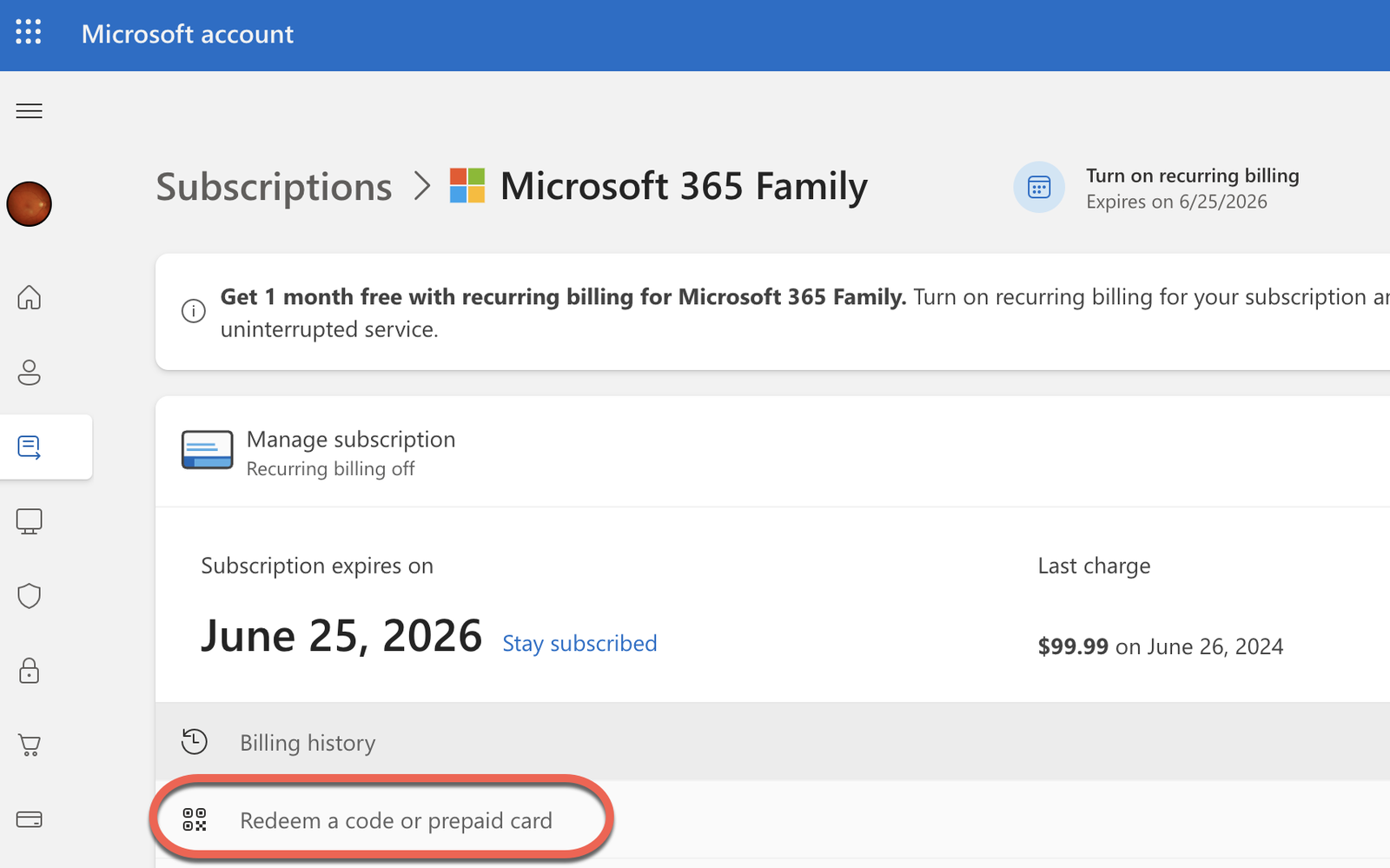
Or try this link https://account.microsoft.com/services/office/billing to the same page (but MS changes their web navigation so the link might not work anymore).
After confirming your Microsoft account, enter the product key to extend your Microsoft 365 expiry date.
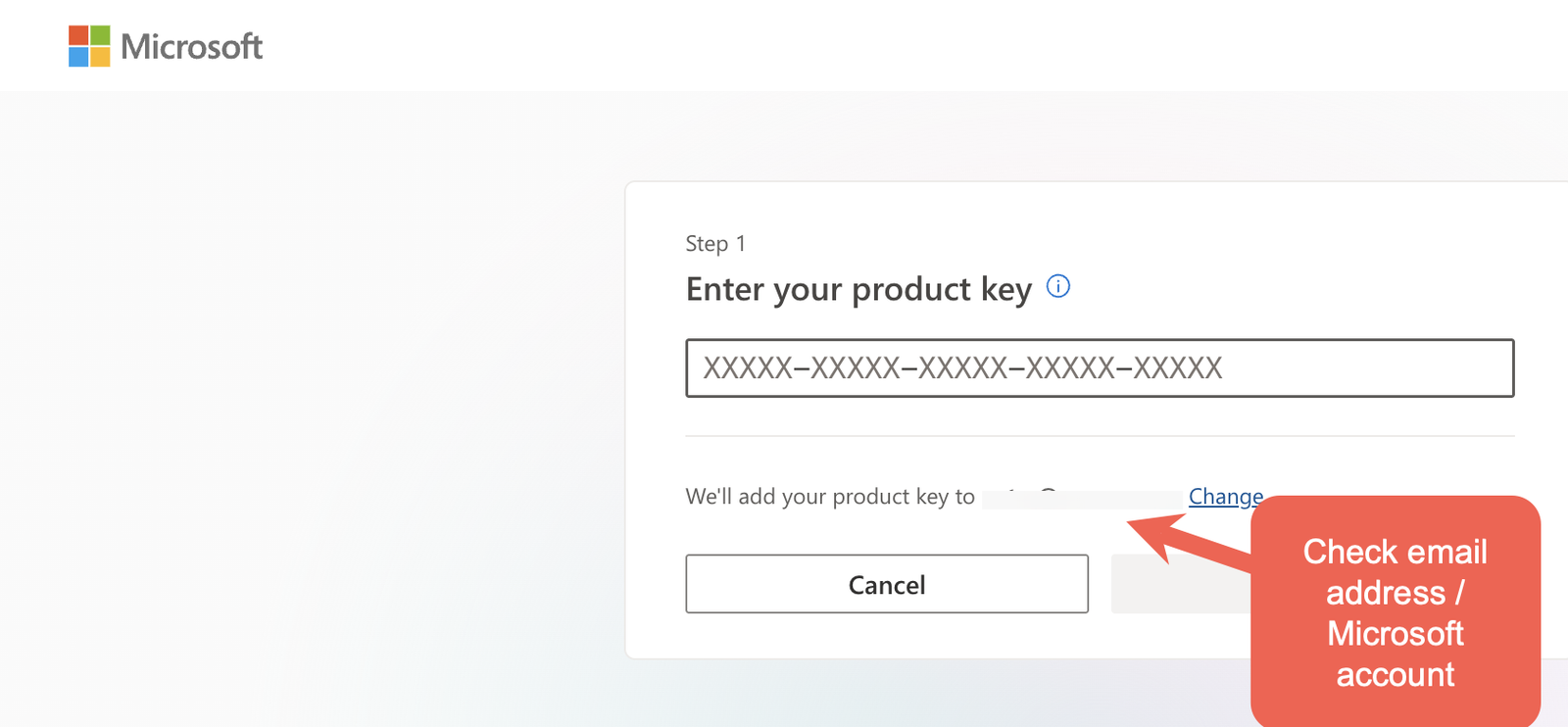
Double-check that you’re logged into the correct Microsoft account before adding the product key. Is the email address shown the same one that has your existing Microsoft 365 plan. Many people have multiple Microsoft accounts (e.g work and personal) and it’s easy to get them mixed up.
Microsoft 365 for Windows: Straight Talk has a ‘Buying Office’ chapter devoted to saving money getting Microsoft 365.
Buying Office for all the money saving tricks for Microsoft 365 and Microsoft Office.
15 month Microsoft 365 special, a good deal or gimmick?
6 Smart Ways to Save on Microsoft 365 Renewal or First Purchase
Automatic Renewals trap in Office 365 – and how to take advantage.
