Microsoft’s January 2026 Windows update introduced a series of major bugs that broke Outlook Classic and other essential apps, leaving users facing crashes, freezes, and unusable email profiles. After widespread disruption, particularly for POP and PST accounts, Microsoft finally issued emergency fixes to restore stability, but the fallout highlights deeper quality control challenges in its update process and what users need to know now.
The original January patch for Windows 11 (KB5074109) caused widespread instability on some systems, most noticeably affecting Outlook Classic users and apps that work with files stored in cloud-sync folders such as OneDrive and Dropbox.
The fix, KB5078127, restores stability for POP and PST Outlook profiles and resolves the unresponsive app behavior introduced earlier this month, making it a must-install for affected systems.
It took Microsoft 11 days to release a fix to a problem of their own making and which should have never happened in the first place. Proper pre-release testing should have detect these problems long before Microsoft’s paying customers were affected.
Only Windows 11 users are affected. People who have stayed with Windows 10 can feel a little smug having dodged this bullet 😎.
Outlook crashes and frozen apps.
The most problem hit Outlook Classic (in any version; Microsoft 365, Office 2024/2021 etc), particularly setups using POP email accounts and PST data files.
Many users found Outlook freezing, crashing, or repeatedly downloading mail. In some cases, sent items failed to appear properly or the app became completely unresponsive when opening PST files stored in synced folders.
Beyond Outlook, other applications also became sluggish or froze when saving or opening files in cloud-backed locations. For businesses relying on shared folders and synced storage, this quickly became a major problem.
What the emergency update fixes
KB5078127 specifically fixes the bugs introduced by the January update. It’s called an ‘update’ but should be called a “bug fix”.
Microsoft says it restores normal behavior for Outlook POP and PST profiles and resolves the broader unresponsiveness affecting apps that interact with cloud-synced files.
For most affected systems, installing the update should remove the need for workarounds such as uninstalling January’s patches or moving PST files back to local drives.
How the update is delivered
The emergency fix is being rolled out automatically through Windows Update for devices that already have the problematic January patches installed. For most people, the update has probably been installed already or it’ll be offered at Settings | Windows Update like this.
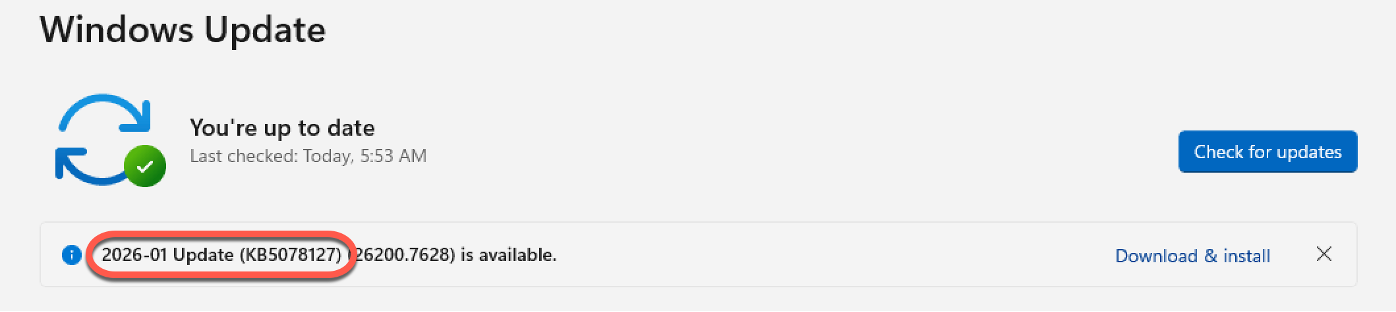
Or check Settings | Windows Update | Update History to see KB5078127 listed.
Administrators can also download and deploy KB5078127 manually via the Microsoft Update Catalog if faster or controlled rollout is needed. A restart is required once the update is applied.
Ongoing January update fallout
While this emergency patch deals with the Outlook and app freezing problems, Microsoft is still investigating other side effects reported after January’s updates, including boot issues on some systems.
As usual with rushed fixes, it’s wise to monitor systems closely after installation, but for anyone affected by Outlook crashes or frozen apps, this update is effectively essential.
The latest Windows 11 update has not been Microsoft’s proudest hour with many bugs appearing after the public release of the January 2026 updates. But don’t worry, Microsoft management has decades of experience in forgetting their mistakes so the company can repeat the error at a later time <sigh>.
Why so many problems?
Microsoft isn’t saying why the January 2026 update has been such a disaster. One popular theory is the over-reliance on AI (as a cost cutting measure) while cutting staff to test updates.
Another is that the responsible teams were still recovering from Christmas and New Year celebrations <g>.
