When Spam Messages Still Get Through, Even with Modern Email Protection
Sometimes even obvious spam and phishing messages reach inboxes despite Outlook’s advanced filters, AI detection, and stricter security rules. Here’s one 2026 example and how Copilot responds …. badly.
Our 2026 Inbox started with a ‘blast from the past’. An email ‘from Africa’ promising untold riches in exchange for bank details and ID. This arrived in our Microsoft enterprise hosted mailbox.
“Confirmation of Payment”
It was a surprise that Microsoft’s much hyped online security systems should completely miss such an obvious and clichéd target, letting it appear in an Inbox at all.
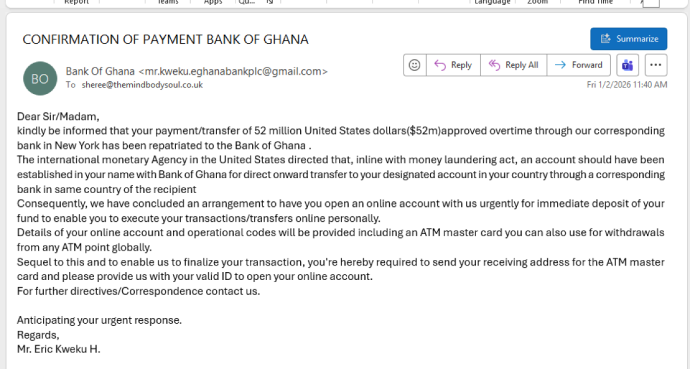
Obviously, there’s only two choices for such a message:
Report as Junk or Phishing
Right-click and choose Report | Report Phishing or Report Junk.

Delete
Or just hit the Delete button and forget about it.
What does Copilot think?
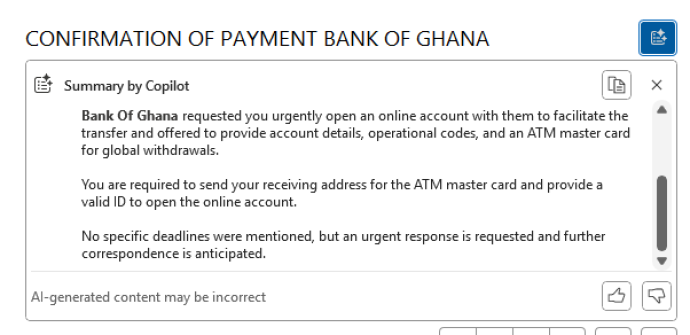
What Copilot’s “Summarise this email” make of such an obviously malicious message. Sadly Copilot’s summary was different depending (it seems) on the version of Outlook reading the same message.
It’s another sign of how much more work is needed on Copilot when such different responses are given to the same input. Such blatantly dangerous messages should start with warning to paying customers.
Outlook (classic) for Windows gave a straight summary of the email with no warning or suggestion that the offer was a trick.
The same message and Copilot access in Outlook for Mac gave a better answer in a Chat pane and asking for a summary. After a summary of the email came a proper warning and suggested actions.
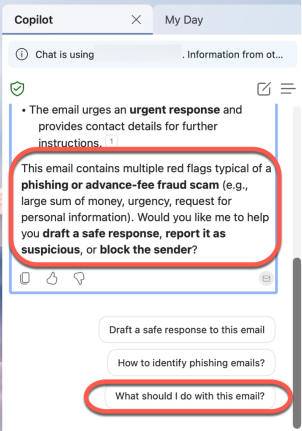
“Draft a safe response to this email” is NOT a good idea. Always ignore junk or phishing messages.
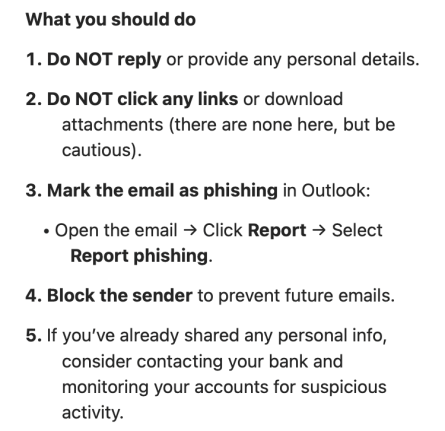
Choose “What should I do with this email” and Copilot responds properly starting with
“This email is almost certainly a scam. Here’s why and what you should do:”