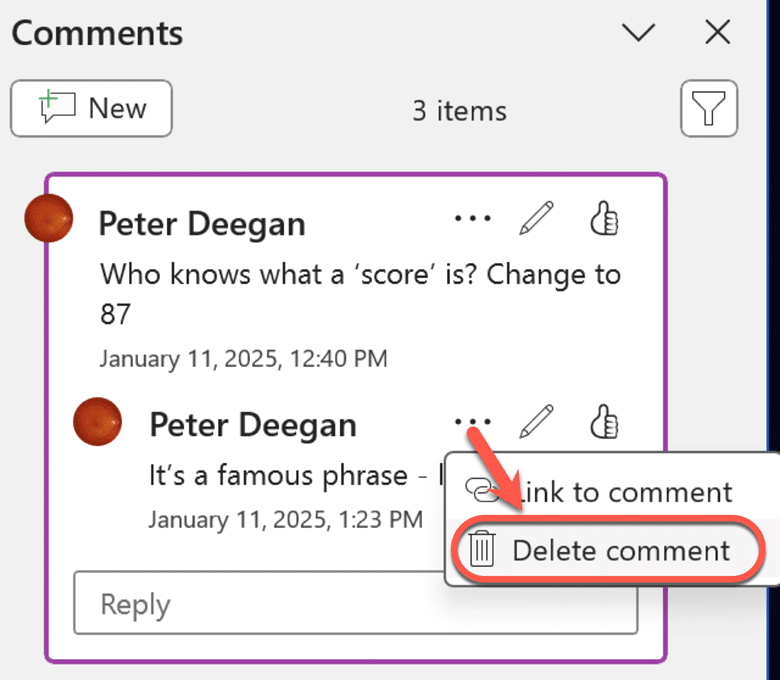
Microsoft has been changing the way comments work in Office 365 and now it’s the turn of Excel 365 to get the new-style conversational comments. If you’ve opened up Excel 365 recently you might have seen a notice like this: “ Comments can now be used for discussions. When you
How to insert the Double Vertical Bar ‖ into Microsoft Word, Excel, PowerPoint or Outlook. Both in Office for Windows and Office for Mac. Double Vertical Bar ‖ symbol is used to represent norms in mathematics, (for example ). It can also be used to signify parallel lines. It can
Type the Cross of Lorraine ☨ into Microsoft Word, Excel, PowerPoint or Outlook. Both in Office for Windows and Office for Mac. Cross of Lorraine ☨ symbol was originally a heraldic cross. In more recent times it was used in the global distribution systems, Sabre, Apollo, and Wordspan, as a delimiter
=Rand.old() is a Word trick which adds common sentences that use all, or most, of the letters in that language’s alphabet. Here’s what Word does in English, French, German, Danish, Polish and many other languages. It’s useful filler text for testing formatting or other Word features just like “Lorem Ipsum
Behind the simple Mark Index feature in Word are some useful but almost hidden options. These give you many choices for making and formatting your document index. Getting started with indexes in Word? Check out our starter, Simple Indexing in Microsoft Word. Indexes are as much art and judgment as
Yes, there are bunnies and other secular Easter graphics waiting for you in Microsoft 365 and Office 2019. Icons and Illustrations (both types of SVG) have some Easter or at least bunny related graphics. Stock Images also have some choices. Religious choices are missing but there are Christian or Latin
The BBC has a ‘long read’ about hidden information inside almost all photos. Office Watch has talked about this problem many times before including how the extra image data hides in Microsoft Office documents, despite the ‘Document Inspector’. It’s too easy just to think of an image as just what
A more efficient way to mark index entries in Microsoft Word is with a concordance or AutoMark file. It’s a separate document with a table of words to be found in the document coupled with their index entries. See Simple Indexing in Microsoft Word for an intro to Word’s indexing
We’re going to talk about creating indexes in Microsoft Word. ‘Real’ books often have an index at the back which Word can create for you. An index is a list of terms or topics that can be found within the document. Microsoft Word has the ‘fixings’ to make an index
Re-creating the “Don’t be a Spock” sign in Word wasn’t hard especially since the original sign seen at the laboratory was probably made in Microsoft Word. Here are some comments on the design. The standard Arial font was used throughout. The two images and captions are in a 2 x
You’ve received a document, but when you try to open it, the file stubbornly won’t appear! We explain how to fix it. Our editor-in-chief saw that problem in an Internet cafe‚ in Ketchikan, Alaska and was surprised when neither the manager of the store nor the cruise computer ‘expert’ knew the
How to insert the Black Right Pointing index ☛ into Microsoft Word, Excel, PowerPoint or Outlook. Both in Office for Windows and Office for Mac. Black Right Pointing index ☛ symbol can be used for pointing a direction on a sign or as a different bullet symbol. There’s also a
Another bad week for Microsoft’s customers who rely on the Microsoft 365 hosting and other cloud technologies. There were global outages for more than half a day in Teams, Azure, Xbox Live and many other Microsoft Cloud services. All should be restored by the time you read this but there
The Word, Excel and PowerPoint apps for iPad are getting right-click menus when there’s a external mouse or trackpad connected. It’s a good move with more iPads being used with separate keyboard & mouse as a mini-PC. Sadly the new menus aren’t all they could be. Right-click (Microsoft calls a
Type the Broken Vertical Bar ¦ in Microsoft Word, Excel, PowerPoint or Outlook. Both in Office for Windows and Office for Mac. Broken Vertical Bar ¦ symbol was sometimes used in computing. These days there’s no specific use for the broken vertical bar but it’s good to keep in mind
Microsoft has added new features and interface to Dictation in Word for Mac. Voice commands, auto punctuation and even a !@$#$ profanity filter. It’s almost the same as Dictation in Word 365 for Windows. A different shortcut key ‘tis all. Clicking the Dictation button on the Home tab or pressing
The March 2021 Windows patches have caused at least two major bugs (sorry ‘issues’) that can affect Office users or anyone trying to print. Here’s the fixes and workarounds. Printing bug This is a nasty bug caused by the Windows patch KB5000802 not being properly tested before release. An update
There are types of Office documents that you should NOT open, even if they come from someone you trust. Here’s the full list of file extensions for the older Office document formats which are much more likely to be ‘malicious’ docs from hackers and criminals. We’ve talked about the risks
Without notice, the main forum for Office customers to tell Microsoft what they want has disappeared. No explanation of what’s happened and what, if anything, will replace it. For many years, Microsoft has boasted about their UserVoice pages such as https://office365.uservoice.com/ but it’s gone dark. All the years of suggestions
No need to right-click to see spelling and grammar suggestions in Word and Outlook 365. It’s changing so only a single left click will show the suggestions, corrections and more. On the downside, fewer options are initially displayed. Useful features are now multiple clicks away and hidden from view. It’s part
Word online (in a web browser) can now embed live web content like videos from YouTube or a quiz from Forms Embedded content is fully interactive within the Word document. Play the video, fill in the form/quiz. No special command or ribbon button necessary. Just paste in the web link,
Word online (web browser) is getting a way to convert a Word document into a PowerPoint presentation. For the moment it’s available as a preview feature in Word online. See if you have it at File | Transform. Transform document to presentation Start from File | Transform | Transform to
Type the Not Equal ≠ sign into Microsoft Word, Excel, PowerPoint or Outlook. Both in Office for Windows and Office for Mac. Not Equal ≠ symbol is used in equations, obviously but it’s also handy shorthand in a heading or slide. The official Unicode name is ‘Not Equal To’. How Not Equal ≠ looks in different fonts. Here’s some
Maybe it’s just us, but the news that Microsoft Word is soon getting a text prediction option does NOT qualify as good news. It’s a right PITA. Text prediction is a new cloud service from Microsoft. It’s currently in Outlook online for Microsoft 365 hosted mailboxes and some Microsoft 365