How to Turn On Frontier in Microsoft 365: Free Copilot Previews for Home Users
Microsoft 365 home (consumer) subscribers can try upcoming Copilot features for free through the Frontier option. But you have to turn it on yourself, one app at a time. Here’s how to enable it, what you get and how to switch it off if a preview feature misbehaves.
If you pay for Microsoft 365 yourself, there’s no admin involved: you switch Frontier on yourself. The catch is that you have to do it separately in each web app. Turning it on in Word on the web does nothing for Excel or PowerPoint.
Frontier is Microsoft’s preview program for Copilot. Frontier features haven’t reached general availability (GA, Microsoft’s term for “finished and fully supported”). They can change, and Microsoft admits some may never be released to everyone. Frontier is expanding late in 2026 to include early access to changes in new Outlook for Windows, OneDrive, SharePoint and Microsoft Teams.
It’s different from Microsoft 365 Insiders which is the early access option for the core apps (Word, Excel, PowerPoint etc.).
When Frontier opened to home users in September 2025, the announcement said people could opt in from the web apps but gave no instructions. Microsoft’s Frontier site now spells it out.
Frontier sits within a fast-changing landscape of Copilot plans and features. For background, see our guides to Microsoft 365 Pro vs Premium: Is $1,200 a Year Worth It?, Microsoft 365 Family Copilot Sharing: What’s Changing and What to Watch Out For, Microsoft’s Copilot Super App: What’s New, What It Costs and What to Do Now and Microsoft Word Agent Deep Dive — which you can try today through Frontier.
Who can choose Frontier access
Among the consumer plans, anyone with an active Microsoft 365 Pro, Premium, Personal or Family subscription that includes some Copilot access. There’s no extra fee. Microsoft 365 Basic isn’t on the list.
For work or school plans, Frontier access is controlled by admins.
Is Frontier worth turning on?
If you like trying out the latest from Microsoft, by all means. It costs nothing, you choose app by app, and you can switch it off again. Just don’t rely on a Frontier feature for anything due tomorrow: these are previews, and Microsoft can change or pull them without warning.
Turn Frontier on in Word, Excel or PowerPoint on the web:
- Go to microsoft365.com and sign in with the personal Microsoft account that holds your subscription, not a work or school account.
- Open Word, Excel or PowerPoint. Any document will do, including a new blank one.
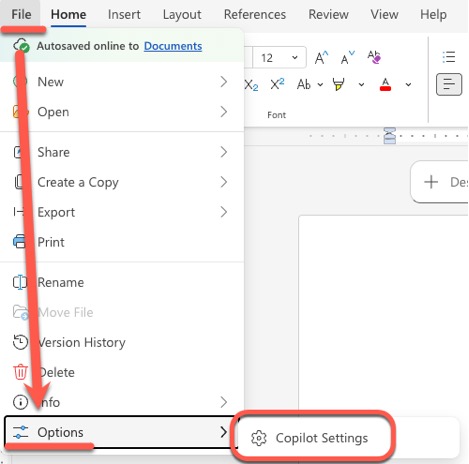
- Click File, then Options, then Copilot settings.
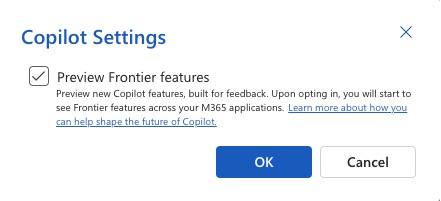
- Read the preview terms and turn on Preview Frontier Features.
- Repeat in the other two apps if you want Frontier there as well.
Frontier features are labeled (Frontier) so you can tell them apart from finished ones.
The Copilot app works differently
In the Microsoft 365 Copilot app, eligible subscribers see Frontier features automatically, with nothing to switch on. In other words, if you use the Copilot app, you’re already in Frontier whether you meant to be or not.
Turning Frontier off
Go back to File | Options | Copilot settings in each web app and turn the switch off. Microsoft’s instructions don’t mention any way to opt out in the Copilot app.
What you get with Frontier
For now, home users get Frontier features in Word, Excel and PowerPoint on the web and in the Copilot app.
The current headline feature is Copilot Actions, which creates Word documents and PowerPoint presentations from a chat prompt.
In coming months, Frontier is expanding into new Outlook for Windows, OneDrive, SharePoint and Microsoft Teams.
If you can’t find the Frontier switch
- Check which account you’re using. A work or school account follows your organization’s Frontier enrollment, which only your IT admin can change.
- Check your subscription is active, one of the four eligible plans and has Copilot within the Microsoft 365 apps.
- Check your language and region. At launch, Office Agent was limited to US subscribers working in English. Microsoft’s current page doesn’t list restrictions, but if you’re outside the US or work in another language, some features may still not show up.
Microsoft 365 Pro vs Premium: Is $1,200 a Year Worth It?
Microsoft 365 Family Copilot Sharing: What’s Changing and What to Watch Out For
Microsoft’s Copilot Super App: What’s New, What It Costs and What to Do Now
Microsoft Word Agent Deep Dive