Microsoft’s Copilot Super App: What’s New, What It Costs and What to Do Now
Microsoft has merged Copilot’s scattered tools into a single “super app” with three headline features: Home, Code and Autopilot. But the bigger story is what it costs, Microsoft is introducing pay-per-use billing alongside the existing flat-rate subscription, meaning your Copilot bill could rise Here’s what’s changing, what stays the same and what you should do before any of it reaches you.
For most people, nothing changes today. Home and Code will be rolled out gradually to the Microsoft Frontier program over the coming weeks, and Autopilot will expand to Private Preview at the end of the month. Frontier is Microsoft’s early access program, so unless your organization has signed up, you’ll be waiting.
What’s new in Copilot
Home: chat and delegation in one place
Home is the new landing screen. It brings Chat and Cowork together in one central location. While Chat supports day-to-day work, Cowork enables users to delegate entire tasks.
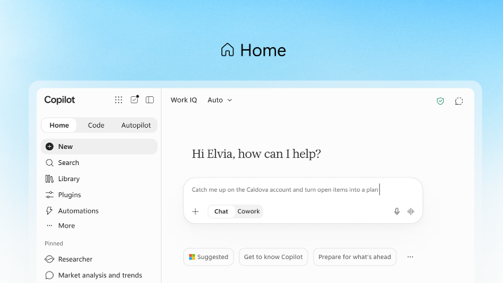
The more useful addition is Today, which highlights missed emails, meetings, and tasks, and helps you catch up quickly. Don’t expect it soon: Today enters private preview in October, and Microsoft plans to expand it across Outlook and Teams later this year.
Office inside Copilot
This flips the usual arrangement. Copilot has long run inside Word, Excel and PowerPoint. Now the full apps also run inside Copilot. Files in Word, Excel, and PowerPoint formats can be created and edited directly in Copilot, and content remains synchronized between Copilot and the Office applications.
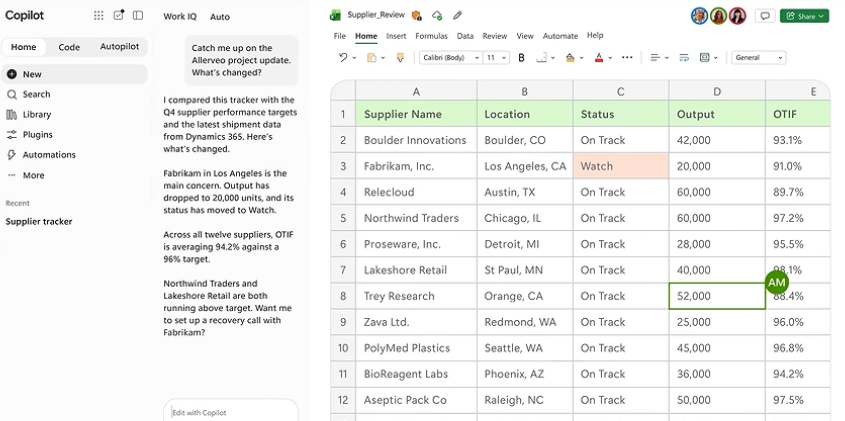
This one reaches home users too: Office in Copilot will roll out to consumers and Frontier customers in the coming weeks.
Code: build a small app by describing it
Code allows users, including those without a development background, to build small custom applications, trackers, dashboards, automations or workflows simply by describing what they need in natural language. Think “make me a tracker for overdue invoices that pulls from our Excel sheet” rather than writing formulas or VBA. It is based on the same technology as GitHub Copilot.
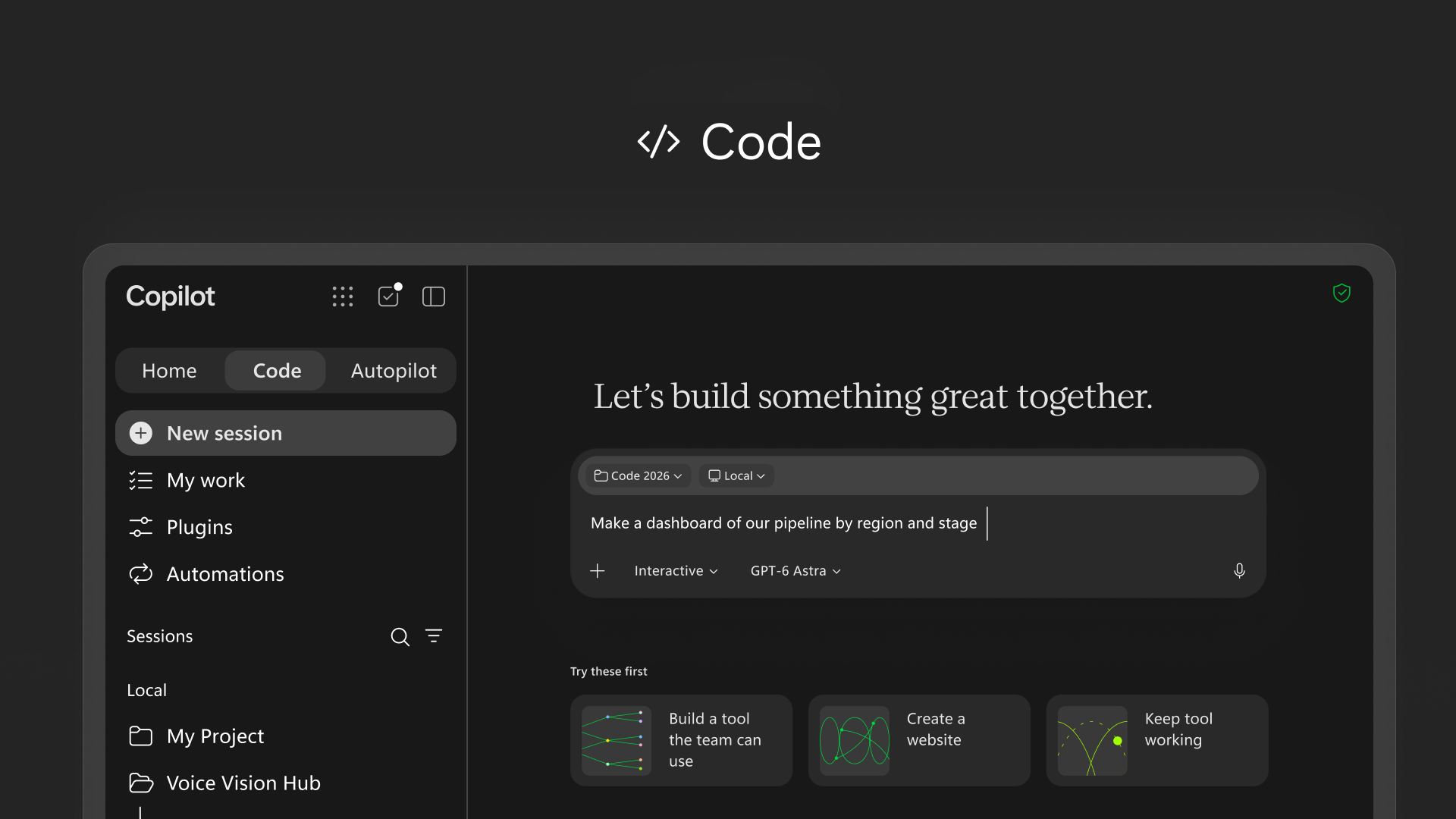
Microsoft’s pitch is that making an app should feel like making a Word document. That’s appealing, but it also means your office could soon be full of homemade apps nobody maintains. One analyst suggests every published app should need a named owner and a review date, which is sensible advice.
Autopilot: an AI worker that doesn’t clock off
Autopilot is the big one, and the one to be careful with. Microsoft is rebranding Scout, the AI personal assistant, as Autopilot. Users can trigger it via an @mention in Teams, Outlook, or documents, and it keeps running in the cloud even when they’re offline.
It isn’t just a chatbot with a long memory. Microsoft gives Autopilot an objective and role, along with its own identity, memory, computing environment, and workspace. That means an AI with its own account inside your company, scheduling meetings and chasing follow ups. Powerful, yes. But it’s also a new “person” in your organization that can send email on your behalf.
What it will cost
This is the part Microsoft buried under the feature names. There are now two ways to pay.
The per user license gives you Copilot in Chat and across Word, Excel, PowerPoint, Outlook and Teams; model selection; and new capabilities and models. Everything else is metered: Cowork, Code, and Autopilot, new long running agentic capabilities, and frontier models like Astra and Fable all run on Usage-Based Billing or UBB.
For businesses, the usage charges come on top of, rather than instead of, the existing $30/month Copilot seat. Worse, Microsoft has not published a price list showing how many credits a typical Code build or a day of Autopilot activity consumes.
Let’s call it what it is: Microsoft is ending the era of “all you can eat” AI for a flat fee. See Microsoft Copilot’s New Pay-Per-Use Pricing: What USL, UBB and FinOps Mean for You
What this means for you
If you have Microsoft 365 Personal, Family or Premium
You’ll likely see Office inside the Copilot app first. The agent features follow later, with a meter attached. Consumer Microsoft 365 subscriptions will also add usage based billing later this year for Cowork, Code and other new features. Code is expected to become available later this year for Microsoft 365 Premium and Pro subscribers.
Before you let any agent run a long task, find out how usage is charged on your account and whether you can set a spending limit. Don’t assume your subscription covers it.
If you use Copilot at work
You don’t have to switch to the new app. Microsoft will continue to allow customers to use Copilot Chat and Copilot in Office directly, as they do now, without using the app. If your company joins Frontier, you may see Home and Code in the next few weeks. Autopilot is further off.
Expect more detail, and hopefully actual prices, at Microsoft Ignite.
Copilot Pricing, Models and the Features That Actually Matter
The cost changes outlined above are only the summary. For a full breakdown of USL, UBB and FinOps — including what’s defaulted off and how to set spending limits, see Microsoft Copilot’s New Pay-Per-Use Pricing: What USL, UBB and FinOps Mean for You.
Microsoft isn’t the only company offering models inside Copilot now. If you’re wondering whether to stick with the default or try something different, Grok AI in Microsoft 365: What Copilot Users Need to Know Before Turning It On walks through the risks and trade-offs before you flip the switch.
Copilot Notebooks have quietly become one of the more useful parts of the platform, and most people haven’t tried them yet. Copilot Notebooks Explained: What They Are and Who Gets Them Now covers what they do and who has access.
Microsoft has renamed its roadmap and keeps shifting how it communicates what’s coming. AI at Work Roadmap: Microsoft Renames the Microsoft 365 Roadmap explains where to look now, and Microsoft 365 Insiders: The Risks Microsoft Does Not Mention is worth reading before you join any early-access programme.
Before you build anything in Code, it’s worth knowing that Microsoft has pulled features before with little notice. Microsoft Drops Excel COPILOT(): Convert Your Formulas Before They Break is a cautionary tale about relying on Copilot features that might not last.