Microsoft Copilot September 2026 updates
Microsoft’s September 2026 Copilot update puts AI deeper into the apps you already use — and some changes will hit your screen without warning. Word now cites its sources, PowerPoint gets reusable “Skills” that save you from retyping prompts, Teams and Outlook have a redesigned Copilot panel, and Copilot Search is replacing the familiar search box in SharePoint and OneDrive. Here’s what changed, what to watch for, and what to try first.
The “September 2026 edition of What’s New in Microsoft Copilot” is light on important details. Just because it’s called “September 2026” doesn’t mean the features are available in that month. If your workplace pays for Microsoft 365 Copilot, several of these features might already be on your screen. A few are still limited to Frontier or beta testers, Microsoft’s early access program for organizations that opt in to test features before general release. Some are just for work or school customers and some won’t arrive until October. As we said, Microsoft isn’t clear on important details.
We’ve already gone into detail about the two new Copilot features in Word 365. The Citations feature has yet to appear while Copilot image positioning is terribly slow compared to clicking a button.
PowerPoint gets Skills: saved recipes for common jobs
A Skill is a saved, repeatable set of steps that Copilot follows, so you don’t have to type the same long prompt every time. Instead of rebuilding a process one prompt at a time, you call a Skill and Copilot works through each step.
Microsoft has included some prebuilt ones. The two it highlights:
- Explain this presentation: reviews the overall story, how well it fits the audience, and the flow.
- Sharpen slide titles: rewrites titles so each one better sums up its slide.
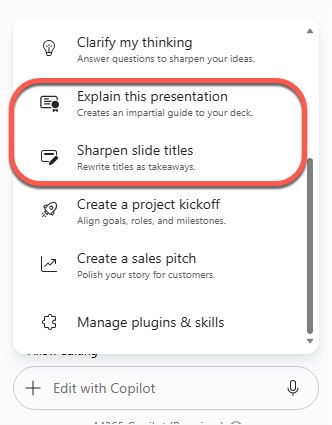
Try Sharpen slide titles on your next deck. Weak slide titles (“Q3 Update”, “Next Steps”) are one of the most common presentation problems and this is a quick fix.
Other PowerPoint changes:
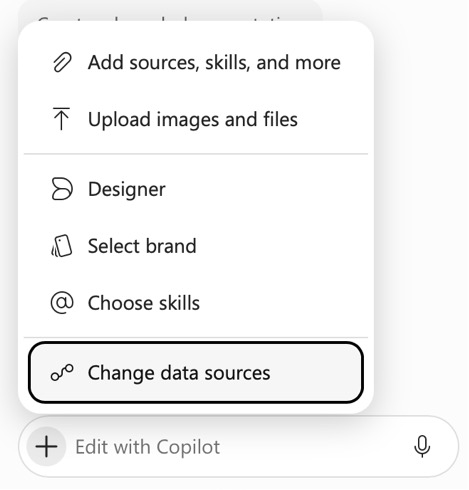
- Connectors: pull in information from other apps and sources you already use while building slides.
- Company Skills: IT admins can now push approved Skills to specific people, groups, or the whole organization, so you may find new Skills appearing that you didn’t add yourself.
- Coming in October: Copilot will keep working on lengthy PowerPoint jobs after you close the app, switch devices, or go offline, then notify you when it’s done or needs input.
- Brand Kit is also getting Skills in October.
Copilot in Teams and Outlook looks different
Copilot inside Teams and Outlook has been redesigned to match the main Copilot app, both in the full screen view and the side pane.
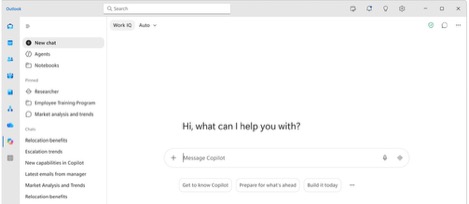
Source: Microsoft
If Copilot looks unfamiliar this week, that’s why. Nothing has been taken away; things have moved.
Two new keyboard shortcuts in Copilot Chat
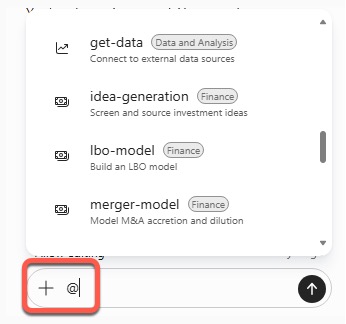
You can now pull agents and skills straight into a prompt: type a
slash (/) for agents
@ sign for skills
Take note of which is which. Many people will expect @ to bring up agents, as it does for people in Teams. Slash in Microsoft 365 Copilot brings up recent documents.
@ in Microsoft 365 Copilot brings up a list of skills, like this in Excel 365.
Better search inside scanned PDFs
Copilot Chat is now better at finding matches inside scanned PDFs. “Scanned PDFs” is Microsoft’s term for a PDF that has only images without a searchable text layer, which is common for older PDFs made from scanners or photos.
If your organization has years of scanned contracts, invoices, or signed forms, this is a quiet but genuinely useful improvement. Getting text from a scanned PDF will take more time as the AI has to open and OCR (Optical Character Read) the image. Don’t assume the OCR text is perfect; scan quality and fonts still matter.
Copilot editing on Android phones
Copilot editing in Word, PowerPoint, and Excel came to iPhone this year and reached Android in September.
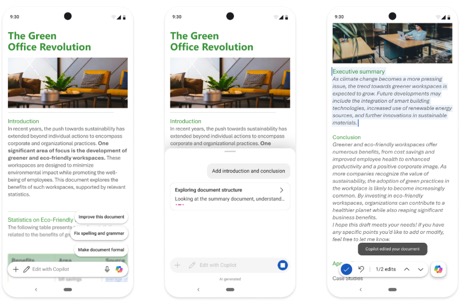
Fine for small fixes. Nobody should be rewriting a 40 page report on a phone.
Record: Copilot can now listen to face-to-face conversations
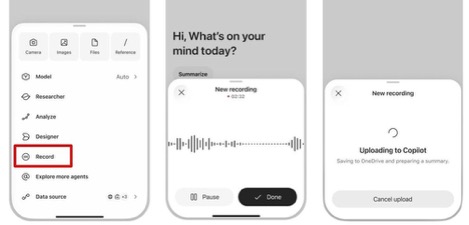
The Record feature in the Copilot mobile app captures in-person conversations and voice notes, then gives you a transcript and summary in Copilot Chat that you can question further, such as pulling out action items. Microsoft suggests using it for hallway chats and customer visits.
SharePoint and OneDrive: Copilot is now standard
Copilot in SharePoint is now generally available, with features including image generation and editing, site analytics reports, and automatic filling of document metadata (the labels and tags attached to files). Copilot in OneDrive has been rebuilt on the same foundation and uses the same licensing.
The bigger change for everyday users: Copilot Search is becoming the default search in SharePoint and OneDrive, letting you ask questions in plain English and get answers drawn from content you have permission to see. That part is rolling out to Frontier first.
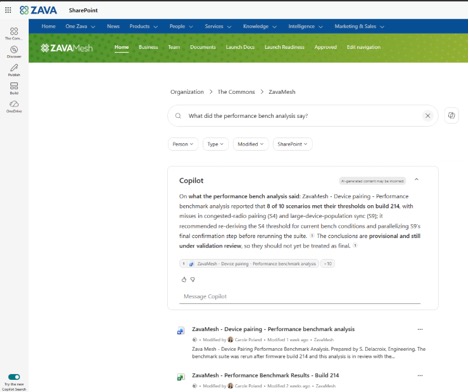
The search box you’re used to will start behaving more like a chatbot. You’ll get an answer rather than a list of files. That’s faster when it works, but an AI answer can miss the one document you actually needed. If you know a file exists and Copilot doesn’t mention it, search by file name.
Teams Phone Agent: an AI receptionist
An AI that answers your company’s phone. Teams Phone Agent picks up incoming calls, handles common questions, books and reschedules appointments, claimed to be possible in more than 60 languages, and passes callers to the right person along with a summary of the call.
Microsoft pitches it at places like bank branches and IT help desks.
Or it could be a new level of call center hell for customers.
For callers, the promise is not having to navigate a phone menu or repeat yourself. Whether it delivers depends entirely on how well your organization sets it up.
What Else Is Changing in Microsoft 365
We’ve covered the Word changes from this update in more detail, including how citations actually work and where Copilot’s image editing falls short, in Copilot in Word Now Cites Its Sources, Here’s How to Use It. If the Copilot panel in Outlook looks unfamiliar, Copilot in Outlook Is Changing This Month: Here’s What Moves walks through what went where.
Microsoft is also rethinking how Copilot is packaged and priced. Microsoft’s Copilot Super App: What’s New, What It Costs and What to Do Now explains the merged app, and Microsoft Copilot’s New Pay-Per-Use Pricing: What USL, UBB and FinOps Mean for You breaks down whether usage-based billing could change your costs.
Copilot now lets you choose which AI model runs behind the scenes. GPT 6.1 Sol and Claude Sonnet 5.5 in Copilot: What to Pick and When compares the options, and Grok AI in Microsoft 365: What Copilot Users Need to Know Before Turning It On covers the newest — and most controversial — addition.
If you had two confusing Copilot icons on your taskbar, Two Copilot Apps Become One: What Changes on Your PC and Phone explains why one of them is disappearing. And for the bigger picture of what else is changing across Office this autumn, October 2026 Office Changes: Publisher Dies, Office 2021 Support Ends has the full list.