Microsoft 365 Family Copilot Sharing: What’s Changing and What to Watch Out For
Microsoft is opening up Copilot to everyone on a Microsoft 365 Family or Premium plan, not just the account owner. But the whole household will share one AI allowance — and Microsoft hasn’t said how big it is. Here’s what’s changing, what the catch is, and what you should do before the rollout begins.
That’s the key message from an email Microsoft is now sending to consumer subscribers. Aside from the two paragraphs in that email, the company hasn’t said a word about the changes for paying customers.
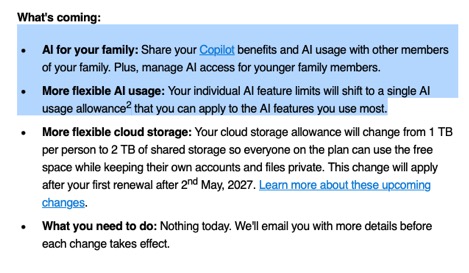
Announcing via an email to customers is usually at the end of Microsoft’s process, not the first public step. It’s possible the email was an accident, sent before the company intended to make a public and properly detailed announcement.
This change sits alongside a string of recent shifts to Microsoft 365 plans. The OneDrive storage cut is already reducing Family and Premium cloud space from 6 TB to 2 TB. We’ve also explained what Copilot access each plan actually gets today and how the Premium plan fits into the picture.
Until now, only the plan owner got Copilot in Word, Excel, PowerPoint and Outlook. The email promises to fix that, and adds controls so the owner can manage AI access for children on the plan.
The catch: the whole household will draw from one shared AI allowance, and Microsoft hasn’t said how big it is.
There’s no date for the AI changes yet, and nothing changes today. Microsoft’s own support pages still describe the old “Copilot for plan owner only” rules, so don’t be surprised if they contradict the email for a while.
What’s Changing With Microsoft 365 Family Copilot Sharing
The email lists two AI changes and one storage change. The AI part is good news on paper. The storage part is a straight cut, and it’s the only part with firm dates.
| Today | After the change | |
| Who gets Copilot | Plan owner only | Everyone on the plan, up to 6 people |
| AI limits | Separate limits for each feature, including 60 AI credits a month (Family plan) for Copilot in Office apps | One AI usage allowance for the plan, spent on whatever features you use most |
| Buying more AI | Not offered | Premium and Pro subscribers can buy extra Copilot access. |
| Controls for children | None | Owner can manage AI access for younger members |
| When | AI: no date yet. Storage: existing plans switch at the first renewal on or after May 2, 2027 |
The catch: one Copilot pot, unknown size
“AI for your family” sounds generous. The detail behind it is less so. Family and Premium members will all draw from the same shared allowance. That’s one pot for the whole household, not a separate allowance for each person.
Microsoft hasn’t said how big that pot is, how much each Copilot feature uses up, or what extra usage will cost. Without those three numbers, nobody can tell whether this is an upgrade or a cut.
Here’s why that matters. A Family owner gets 60 AI credits a month today. If the new shared allowance is anywhere near that size, six people splitting 60 credits works out to 10 each, or roughly 10 Copilot requests per person per month.
We hope Microsoft makes the pot much bigger. Until it publishes a number, treat “AI for your family” as a promise, not a benefit, possibly even a threat.
The timing is also lopsided:
- The OneDrive storage cut has firm dates. It’s already live for new plans and hits existing plans at renewal from May 2, 2027.
- The AI sharing has no date at all. Microsoft says only that changes roll out over the coming months.
Meanwhile, Microsoft’s official pages still say the opposite of the email. The family sharing support page and the Microsoft 365 Premium page both say AI features are for the subscription owner only and cannot be shared. Don’t buy or renew based on the email alone.
How Copilot limits work today
The single allowance replaces a patchwork of separate limits. On Microsoft 365 Personal, and for the owner of a Family plan, Copilot in the Office apps gets 60 AI credits a month. Other features have their own caps, such as 15 Deep Research uses a month in the Copilot app.
Premium owners get what Microsoft vaguely calls “extensive” usage.
AI credits refill at the start of each calendar month, and unused credits don’t carry over. To check your balance, go to your Microsoft account page online. It does not appear in File | Account inside Word or Excel, which is where most people look.
Everyone else on a Family or Premium plan gets the Office apps and storage, but no Copilot at all. That’s the gap the email promises to close.
What this means for Microsoft 365 customers
Nothing changes today. The email is genuine, but the AI sharing hasn’t started and Microsoft will email again before each change takes effect. What you do now depends on where you sit.
If you own a Family or Premium plan
- Plan who gets AI. Once sharing arrives, every person on the plan drains the same pot. Use the controls for younger members, or a teenager doing homework could use up your Copilot for the month.
- Family plans may not be able to top up. Reports so far say only Premium subscribers can buy extra AI usage.
If you’re a member of someone else’s plan
You still can’t use Copilot in Word, Excel or PowerPoint. If you need it now, Microsoft’s official route is to leave the family plan and buy your own Microsoft 365 Personal ($99.99 a year in the US) or Premium. Waiting is cheaper, but there’s no date.
More on Microsoft 365 plan changes
The shared Copilot allowance runs on AI credits, and knowing how they work matters before your family starts burning through them. Microsoft 365 Copilot Personal & Family Limits breaks down the current 60-credit cap, while How Many Copilot AI Credits Do I Have? shows you where to check your balance and when credits reset.
Copilot itself is changing fast alongside these plan shifts. Microsoft’s Copilot Super App: What’s New, What It Costs and What to Do Now explains the merger of Microsoft’s scattered AI tools into one app, and Microsoft’s Copilot Merge Eats Your OneDrive Space and Cuts Features reveals the hidden storage and feature costs buried in that change.
If you’re weighing whether to upgrade or switch plans, Microsoft 365 Pro vs Premium: Is $1,200 a Year Worth It? compares the two top-tier options side by side, and Microsoft 365 Premium: Copilot AI, new Features & Pricing Explained covers what Premium actually delivers today.
The storage cut landing alongside these AI changes makes things worse. Microsoft 365 OneDrive Storage Cut: What to Do Before You Lose 4 TB walks through exactly what’s shrinking, when it hits, and how to prepare before your renewal date.
For the full picture of what every plan costs and includes right now, Microsoft 365 Plans in 2026: Complete Overview of Pricing, Features, and Changes lays it all out, and 6 Smart Ways to Save on Microsoft 365 Renewal or First Purchase can help you pay less whatever plan you choose.