Microsoft To Do is shutting down: what to do before June 30, 2027
Microsoft calls it a retirement, but Microsoft To Do is being killed off. On June 30, 2027 the To Do apps for Windows, Mac, iPhone, Android and the web stop working, and your tasks and lists won’t move anywhere by themselves. Work and school users are being pushed to Planner, which has no Windows or Mac app and no offline mode. Home users, even those paying for Microsoft 365 Personal or Family, get no replacement at all. Here’s what changes, the key dates and what to do now.
Microsoft’s advice to personal users boils down to “go and find another app.” Existing tasks and lists will not move across automatically. Even work and school users moving to Planner have to recreate their tasks themselves.
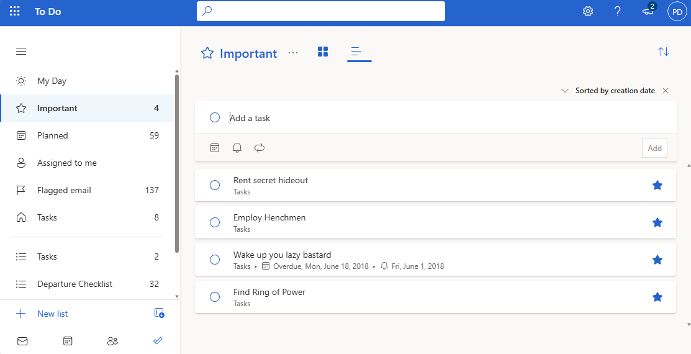
Microsoft promises an export option before the deadline, but hasn’t said when it arrives, what it includes or how it works. It made similar promises about Publisher and did nothing, so don’t hold your breath.
The term ‘retiring’ is being used but that’s just Microsoft’s standard euphemism, their version of “moved to a farm in the country”. To Do is being killed, ended, ceasing to be, going to join the choir invisible … it will be an ex-app.
Seven months before the end of To Do
There’s a little over seven months to sort this out. No need to panic and there’s good reason to wait before choosing a replacement. But don’t leave it until June next year either.
Personal users should start thinking about an alternative now but not make any changes.
Work and school users should wait for Planner’s new “My tasks” page in December 2026 and check what’s missing before they rely on it.
Microsoft To Do retirement: key dates
- November 18, 2026: Microsoft announces the change in a Planner team blog post about “unified plans.”
- December 2026: A redesigned My tasks page starts rolling out in Planner for work and school accounts.
- Sometime before June 30, 2027: Microsoft promises a way to export To Do data. No date or details yet.
- June 30, 2027: The To Do apps retire on Windows, Mac, iOS, Android and the web. It’s also the last day work and school users can see their old To Do tasks inside Planner.
- No dates given: The behind the scenes To Do service, its APIs (the connections other apps use to read and write your tasks) and sync support retire on separate timelines, to be announced.
The last point matters if you use a third party app or a Power Automate flow that talks to To Do. It may keep working for a while after the apps go dark, but Microsoft warns it may need changes.
Personal accounts: you’re on your own
This is the part that stings. If you use To Do with a personal Microsoft account (an Outlook.com, Hotmail or Live address, or the account behind a Microsoft 365 Personal or Family subscription), Planner isn’t available to you and Microsoft isn’t offering anything else. Its transition guide simply tells personal users to pick another task app that suits them.
That’s a remarkable message for a company to send to people who pay it every year for Microsoft 365. It’s also the same company that bought Wunderlist, shut it down and told everyone to move to To Do.
Work and school users at least get some help. Personal accounts get nothing.
Three things personal users should check now:
- Shared lists. If the family shopping list or a household chores list lives in To Do, everyone sharing it needs to move to the same new app.
- Tasks inside Outlook. To Do also powers the task features in Outlook.com and the new Outlook. Microsoft says these “entry points” will be updated and details will follow. In plain English, nobody outside Microsoft knows yet what happens to them.
- Recurring tasks and reminders. These are the details most likely to get mangled in any move, so note the important ones before you switch.
Wait for new To Do alternatives
We suggest patience. Other companies will move to fill the gap that Microsoft is leaving. AI development tools mean that it’s a lot easier and cheaper for companies to develop replacements or enhance existing apps.
Several tools, of mixed quality, have appeared to handle Publisher .pub files so you can expect developments to replace To Do.
Work and school accounts: Planner, with gaps
For business and education users, Planner becomes the one place for both your own tasks and work assigned to you. From December 2026, new private tasks you create in Planner will be stored in a private Planner plan rather than in To Do.
The redesigned My tasks page arriving from December 2026 is Microsoft’s answer to To Do. It has a simple list layout for your own tasks, a separate Assigned to me view, and starring to flag what matters. Today’s My tasks page offers only Grid and Board views; a List view arrives with the refresh.
That sounds fine until you read Microsoft’s own list of what Planner doesn’t do:
- No desktop apps. On a computer, Planner runs only in a web browser or inside Teams. Microsoft has no plans for Windows or Mac Planner apps, and there’s no proper offline mode. If you tick off tasks on a plane or with patchy internet, that’s a real loss.
- Reminders work differently. Planner sends notifications based on due dates. You can’t set a reminder for a particular time on each task the way To Do lets you.
- No attachments on private tasks, at least for now.
- No list groups. If you’ve organized To Do lists into folders, Planner has nothing like it.
- No printing or emailing a list, and Microsoft says it isn’t planning to add either.
- Planner labels don’t sync with Outlook categories.
- Shared lists don’t carry over. Collaboration in Planner works through plans and task assignments instead.
There’s also a licensing wrinkle. Whether you get everything depends on your subscription and your admin’s settings, and Microsoft says some premium features need extra licenses.
Your tasks won’t move by themselves
Whatever account you use, nothing is migrated automatically. Here’s what Microsoft has said about your existing data:
- Export, yes. Import, no. An export option is promised before the apps retire, with instructions, supported data and limits to be published later. Microsoft is clear that an export preserves your data but does not put it into Planner or any other app. Getting it into something new is your job.
- Shared lists fall apart. List memberships, assignments and permissions don’t transfer anywhere.
- Nothing is deleted on June 30, 2027, Retiring the apps doesn’t, by itself, delete anything, says Microsoft. That date is about the apps and Planner access, and retention is handled separately. Small comfort: data you can’t open isn’t much use, and work users lose sight of old To Do tasks in Planner on that date.
- Classic Outlook’s Tasks feature survives. The old Tasks folder in classic Outlook is separate from To Do and keeps working and syncing with Exchange. So yes, a piece of classic Outlook will outlive To Do.
How to prepare for the Microsoft To Do retirement
Personal Microsoft accounts
Start preparing for To Do’s end by noting how and where you use the app. But there’s no need to migrate yet; let’s see what happens in 2027.
- Make a note of what you actually use: your lists, recurring tasks, reminders, My Day and any lists shared with family or friends.
- Who do you share lists with? You’ll have to agree on a new app.
- Check out Microsoft’s export anyway once it appears, as a backup copy of your history.
Work or school accounts
- List the To Do features you depend on and check them against Planner’s gaps above. No offline access and no desktop app are the usual deal breakers.
- Check with IT that you have Planner, and follow your organization’s transition plan if it has one.
- Try the new My tasks page when it arrives in December, or explore Planner on the web now at planner.cloud.microsoft.
- Recreate the tasks that matter in your private plan, by hand or with Copilot, if available. Old To Do tasks disappear from Planner after June 30, 2027.
IT admins
- Confirm affected users have Planner and the right licenses. Microsoft adds no new admin controls, but if Planner is turned off for some users, turn it on.
- Hunt down anything that relies on To Do: shared lists, third party apps and Power Automate flows that use the To Do APIs. Those APIs retire on a separate, later timeline.
- Review retention and compliance needs for existing To Do data and for new Planner tasks.
- Brief users on the differences between today’s Planner and the upcoming My tasks page, and watch the Message Center for rollout dates. Government cloud tenants should follow their own separate announcements.
Wunderlist all over again, minus the lifeboat
Longtime users have seen this movie before. In June 2015 Microsoft bought 6Wunderkinder, the Berlin startup behind the popular Wunderlist app, for a reported $100 million to $200 million. The Wunderlist team then built To Do, which Microsoft launched in April 2017 as Wunderlist’s replacement. Wunderlist closed on May 6, 2020.
The big difference: last time, Microsoft gave everyone a direct import from Wunderlist into To Do. This time, personal users get a promised export file and a suggestion to look elsewhere.
It’s a shame, because To Do was one of Microsoft’s genuinely likable apps: simple, free and on every device. It even moved into Outlook for Windows in 2022. Folding it into Planner tells you where Microsoft’s attention is now: business tools sold alongside Teams and Copilot.
To Do isn’t Microsoft’s first kill
Before you choose a replacement, Discover inside Microsoft To Do walks through what To Do does beyond the old Outlook Tasks, which makes a handy checklist for judging any new app.
The To Do news came out during Microsoft’s Ignite week, and Microsoft Ignite 2026: only 76 of 215 new features are ready today shows which of the announcements you can actually use now and which are still promises.
Publisher users went through the same thing this year. Microsoft Publisher Ends October 2026: How to Keep It Working explains why your options depend on how you bought it, Publisher 365 Kill Switch: What Microsoft’s New Email Gets Wrong shows how badly Microsoft’s own warning undersold the problem, and How to Open .pub Files After Microsoft Publisher’s End covers the tools that can still open your old files.