Office versions available for Office 365 subscribers – Windows or Mac
Office 365 customers have various choices for installing Office for Windows or Mac.
The default is Office for Windows 32-bit. The Office 365 web site gives you Windows or Mac options plus language variant depending on the computer you’re using (i.e. it picks up the operating system and language from the information sent by your browser).
But if you dig down there are some useful alternatives available. There are more for Windows users but a few for Mac customers. We’ve mentioned these before but they’ve changed over time so it’s time to review your choices.
Login to your Office 365 account and go to the Office 365 Install web page. It shows you the Office software it will install automatically. In this case ‘Office for Windows’ in English. The web page doesn’t say so, but it will be the 32-bit edition.
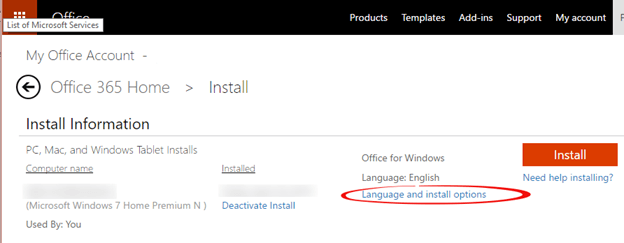
For more choices click on ‘Language and install options’. The next page has the language options to install Office with the ribbon, menus and default language tools in the language of your choice.
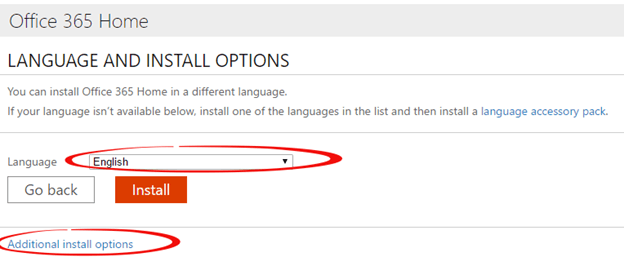
Click on ‘Additional install options’ to see some choices that will interest Office power users.
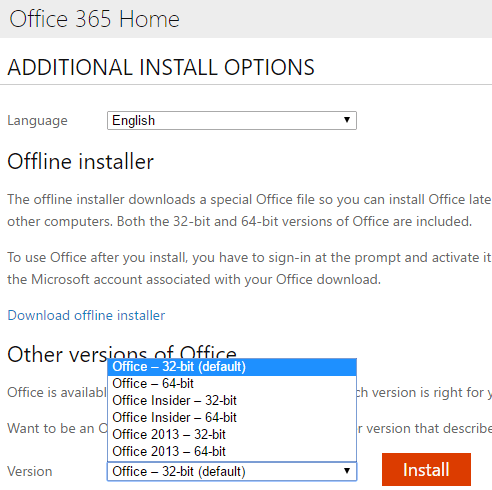
Offline installer is useful for installing Office on multiple computers because you only have to download once. Microsoft’s preferred ‘Click to Run’ install will download the entire Office software to each computer.
Other versions of Office are also interesting, here’s the current selection from a Windows computer. They are all streaming ‘Click to Run’ installs.
Office – 32-bit, the same version as you get from the Install button on the first install page.
Office – 64-bit, 64-bit is good for more powerful computers with large documents or worksheets. We prefer 64-bit Office but don’t need to worry about compatibility with 3rd party addons or old VBA code.
Office Insider 32-bit or 64-bit – Office Insiders get ‘advance’ releases of new / changed features that will eventually be released to the public. These beta releases may have bugs or strange behaviors, so choose these options with care.
Office 2013 32bit or 64bit – yes, you can get Office 2013! Good for compatibility purposes.
Macintosh users
Macintosh users go to the same Install web page on an Office 365 account but see different options (the web site picks up that you’re on a Mac and displays available options).
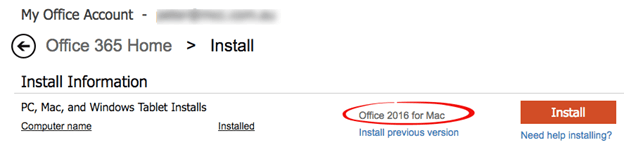
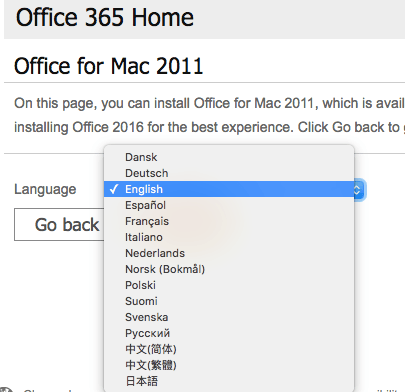
The link ‘Install previous versions’ will take you to the Office 2011 download – but only until 22 September 2016.
Unlike Office for Windows, Mac users choose the Insiders options (Fast or Slow ring) from the Microsoft Autoupdater. From any Office for Mac app choose Help | Check for Updates.
Languages: Office for Mac installs come with all languages for menus, ribbon etc. Office displays the language set in the Apple Preferences | Language and Region | set a primary language.