A ‘new’ Office 365 feature is ‘Save As Picture’ to save Office objects like shapes, icons, images and charts as a picture. It also comes with a mystery because this ‘new’ feature isn’t new at all in Office 365 and Office 2019. It’s a useful little trick, right-click on any
There are many ways to edit a logo or graphic in Microsoft Office; recolor, outline, shadow, reflection plus Shape options. All demonstrated here using the Star Trek logo ready for Word, PowerPoint or Excel. We’ve found the iconic logo in the best form to use in Office. Even if you’re
Microsoft Office, especially PowerPoint and Word, have simple and easy ways to ‘jazz up’ a simple image, flag or logo with one of the many framing options. Instead of just copying a graphic into a document or slide, try one of these variations. They retain the original image but give
One of the sillier online debates is an argument about the usefulness of algebra and other maths skills in a world where Excel is available on almost any screen. To us this is silly because it’s not a simple either/or choice. It’s about balance, a concept that’s not fashionable these
Microsoft has updated their Online Services Terms to clarify some privacy issues but concerns remain. They’ve also added yet another document to the confusing mix of legalese customers are expected to understand. Back in August 2019 the Dutch Ministry of Justice released a report that recommended against using Office online
The US National Security Agency (NSA) discovered a serious security bug in Windows and, for the first time, told Microsoft so the company could fix it. That bug could also affect Microsoft Office or other programs. It’s important to update your Windows 10 asap, that’s not our opinion, it’s the
Here are two options to stop Microsoft Office for Windows from automatically updating itself and why you might want to do that. Office for Windows All versions of Office that have current support (currently Office 2010 and later) get: updates to fix bugs in the software patches to stop security
He’s done it again, David Peel has quickly made up a new version of his Excel Year Planner that starts the year from any month you choose. Great for academic years (start in August) or financial years (e.g. Aussie start in July). The year selector is top left of the
PivotTables and PivotCharts from scratch in a new edition strips away the techobabble so you can make your own PivotTables and make sense of any list of numbers or information. We do that with plenty of step-by-step instructions and, crucially, Excel worksheets you can open and try for yourself. Understand PivotTables by looking at expert examples,
Nested IF statements can be hard to understand and manage but there are alternatives which can be easier to handle, fix and change. We’ll start with the relatively simple example we used for demonstrating IF and nested IF. =IF(C2>89,"HIGH DISTINCTION",IF(C2>79,"DISTINCTION",IF(C2>69,"CREDIT",IF(C2>49,"PASS","FAIL")))) This example has only five levels of nesting, we’ve seen
Microsoft has added Dynamic Array functions to Excel for iOS (iPhone and iPad) and done it in an uncharacteristically low-key way. Dynamic Arrays are now available across all Office 365 platforms; Excel 365 for Windows and Mac, Excel for Android, Excel Online (web) and now Excel for Apple devices. That’s
The Office apps on Windows 10 Mobile devices have now ended main support and will end security updates, hotfixes and support in 2021. It’s an unsurprising announcement and another death notice for the failed Windows 10 Mobile platform and phones. Source: Microsoft, from happier days when Win10 phones were ready
In a recent blog post Microsoft explained some of their thinking behind the redesigned Office mobile apps like the new ‘all in one’ Office app. The company has done a lot of research into the way people use their mobile devices, including the many people who only use a smartphone
Pantone has announced its Color of the Year for 2020 here’s how to get it in Microsoft Office – Word, Excel, PowerPoint, Outlook etc. The color of 2020 is … Classic Blue Source: Pantone As usual what’s more amazing than the color is the description from the ‘Pantone Institute’. Classic
The Office apps for Android are getting some interesting new features. Excel for Android has better sort and filtering. Galaxy Watch can now link to the Outlook app. At first for preview ‘Insiders’ and later to the publicly available Word, Excel, PowerPoint and Outlook apps. Here’s Microsoft announcement of the
Just one of the many tricks to get people to giveaway their password is a bogus ‘system delay’ email, supposedly from your network administrators. The fake login page is given extra credibility being hosted on a Microsoft server! It starts with a fake message from the ‘Excel Team’ saying you
Excel is getting a clever new way to quickly analyse your worksheets and pull out useful ideas or insights to quickly make PivotTables, PivotCharts and Charts. It’s now available in Excel 365 for Windows and Mac, Insiders and will eventually make it to public releases. It’s now called ‘Ideas’, previously
Microsoft is touting Application Guard as a defence against Office 365 macro viruses. What is it and will it truly prevent viruses in Word, Excel or PowerPoint documents? Application Guard is already in the Edge browser and Microsoft has announced that it will be extended into Office 365 sometime in
Here’s how to block .IQY web queries in Excel that are being used to infect machines with Buran ransomware. Yet again, a mostly forgotten part of Office is being used by hackers to get inside computers and networks. Suspicious Link (great name) found this nasty in an email. It pretends
A security vulnerability has been discovered in Excel for Mac. It’s been there for many years and affects Office 365, Office 2019, Office 2016 and Office 2011 for Mac. We have details and suggest a protection you can do yourself. It’s another problem with legacy support for an older Microsoft
The Microsoft Bluetooth Keyboard is one of two new models with dedicated Office key and Emoji key. What’s this new keyboard like … aside from those innovations? We bought a Microsoft Bluetooth Keyboard with our own money and gave it a long hard look. Source: Microsoft Note: this is the
Make your worksheets look more compact and focused by hiding unwanted columns or rows. Hidden rows/columns still work in calculations, they can be referenced in formulas etc. It’s pretty straightforward. Select the columns or rows, right-click and choose Hide. Keyboard shortcuts Type Control + 9 to hide a row. Control
Two new Microsoft keyboards have a dedicated Office key. Office-Watch.com has tested one of these keyboards to see how the new Office key really works. We have a full list of Office key shortcuts plus how it works inside Word, Excel and PowerPoint and geeky hardware info. Hard information about
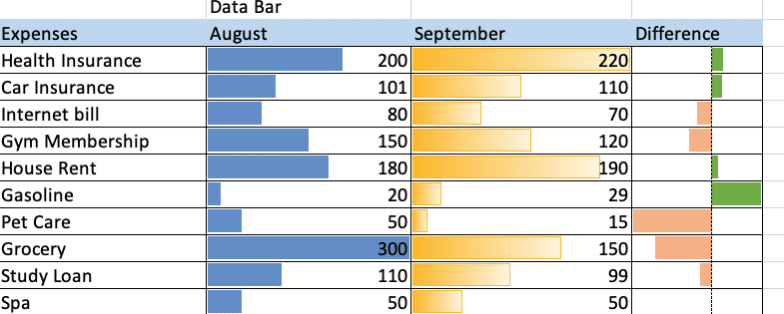
3D Formulas in Excel allow you to make calculations using data from many different worksheets, including ones that don’t exist yet. This can be incredibly useful, when you have similar figures for different periods across worksheets and want to use data from all of those periods. For our example, we have a file with expenses for a number of