An update for Excel users on the upcoming new Imperial Era in Japan and how to type the Reiwa era name in Office documents The Japanese government has now announced the new Era name that will coincide with new Emperor. From 1 May 2019 we’ll be in the 令和or Reiwa
In Japan there are two amazing uses of Excel. Excel used for displaying train timetables and to make beautiful works of art. The Michelangelo of Excel Tatsuo Horiuchi has become the Michelangelo of Excel. On retirement he wanted to turn to art but didn’t want the expense of paint, brushes
Thanks to everyone who tried out Microsoft Forms by filling out our example survey. Here are the results. Our form was mainly an example of what’s possible in Microsoft Forms as part of Microsoft Forms – a quick look and sample We took the opportunity to get a better idea
Continuing our look at Excel tab/worksheet listing here’s a fully automated alternative with more control and filtering. See Make Excel tabs list in a worksheet Automatic worksheet/tabs list in Excel Fit more tabs across an Excel workbook There are many VBA code samples on the Internet, we’ve taken one we like
Does Excel have enough significant digits for Pi in the inbuilt Pi() function? Modern computing can calculate Pi to 3.14 trillion digits which is a good trick but even extreme situations only needs Pi to 15 significant digits. What’s extreme? How about interplanetary travel? JPL/NASA calculate the paths of probes
Excel for Android has a new trick, converting photos of tables or other documents into worksheets. As usual, some conditions and limitations apply to Insert Data from Picture that are overlooked in the usual hype. The idea is simple, take a photo of a table or grid in a document
Updated Microsoft Office 365 icons have started appearing in the preview ‘fast track’ Office 365 for Windows and we could not be more excited. No … not really. When it comes to changed Office icons; if we were more apathetic, we’d be in a coma. Office 365 icons for Word,
Make your own clickable list of workbook tabs in an Excel worksheet to workaround the small number of tabs that can fit in a single line. See Fit more tabs across an Excel workbook for some suggestions to squeezing more across the single line available. Those suggestions work to make
Microsoft Forms is the latest cloud service to join the Office 365 stable. It’s still a Preview service, not full formed, but it’s working and interesting. We decided to take a look and give you a sample Form to try. Forms is a way to make online questionnaires, quizzes or
Wanna jump in and see a Microsoft Forms in action? We’ve made a sample Microsoft Form one for all our Office Watch readers to try. Below is the embeded version (using an <iFrame) or click here to see it on a separate page. Our simple form serves three purposes. The
Color fonts are coming to Microsoft Office and Windows but progress is slow and patchy. Here’s a quick summary of color fonts and the occasional, erratic support in Outlook, Word and other Office programs. What are color fonts Since the beginning of Mac and Windows we’ve had single color fonts.
The Microsoft Office Home Use Program (HUP) is a great way to save on Office 365 or Office 2019 for employees of many companies, organizations, governments and even some military personnel. Here’s details on the savings possible with the recent changes to the HUP. What’s changed? The Home Use Program
Here’s who can qualify for cheaper Office 365 Home or Personal under the revised Home Use Program and how to get the lower prices. Employer qualification Your employer must have a Microsoft Office Volume Licence agreement with Software Assurance Maintenance (SAM). If Office is widespread in your organization it’s likely
The current Home Use Program with Office 2019 sold for a mere $15 is about to end. If you want the perpetual licence Office 2019 for Windows or Mac, you’d better hurry. The full impact of the changed Office Home Use Program (HUP) is becoming clear. We’ve already noted that
The latest Microsoft Office promotion is a rare example of an ad which shows how a product was deliberately crippled with less features. The ‘Twins Challenge’ is a series of very selective videos that are supposed to highlight differences between Office 2019 (single purchase, less profitable for Microsoft) and Office
Office 365 is getting yet another way to save a document and it’s not as bad as the advance publicity suggested. We’ve now had a chance to use the new Save dialog ourselves and it’s not another attempt to force customers to OneDrive. The change is now available for Office
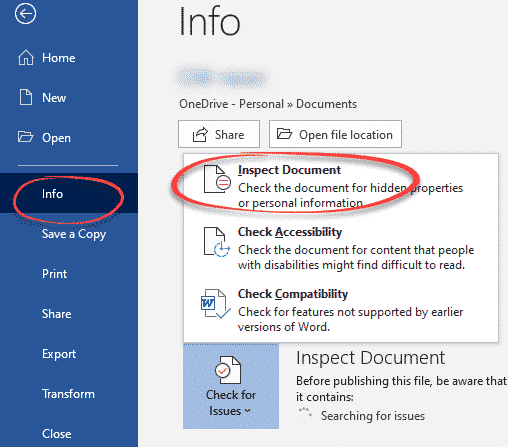
Here’s a quick and easy way to totally erase file, folders or free disk space so there’s no trace of the original data. Also erasing an entire drive before handing over or selling. As you may know, deleting a file doesn’t really remove it from your computer. Even after deleting
It’s the Chinese Year of the Pig and there are some symbols in Word, Excel and PowerPoint to mark the occasion in Office for Windows or Mac. The Unicode standard has three Pig related emoji, Pig, Pig Face and Pig Nose. Once you know the names or hex value, they
If the Translation options in Microsoft Office don’t do it for you, try the Google Translate full document translation option instead. For a long time, Google has a word and text translation between languages. The app is a godsend to travelers around the world, and the locals dealing with them!
Finding the right stock or index among the tens of thousands available in Excel’s Stock data type isn’t always easy. Here’s some stock search tips that might help with some advice about a changing situation. Stock data type is available in Excel 365 for Windows and coming to Excel 365
Great news for Mac Office 365 users, the Stock and Geography data types in Excel 365 for Windows have started rolling out to Excel 365 for Mac. At the moment it’s only Excel 365 for Mac, Fast Insiders v16.22 build 190112 or later. It means it’s coming to Slow Insiders
An astonishingly simple security breach in Microsoft Office has finally been patched two months after Microsoft confirmed the problem. The unanswered question, why did it take so long to discover it? Mimecast.com discovered the ActiveX memory leak back in November 2018 and told Microsoft. Two months later Microsoft fixed the
Excel can display dates in many different formats including Japanese Imperial Era. You don’t need the Japanese version of Excel. Office-Watch.com shows how to display an Era date and how Excel knows which Era to use. You don’t ‘convert’ a date from western format to Japanese Era. Like any date
Feature updates for Microsoft Office 2010 have been withdrawn but Redmond won’t tell customers why, beyond the usual vague platitudes. The KB4032217, KB4461627, KB4032225, and KB4461616 updates for Office 2010 released 2 January 2019 were withdrawn after a few days after complaints. Microsoft won’t admit what the problem is beyond saying customers “may experience