Thumbs Down or Dislike 👎 can be typed into Microsoft Word, Excel, PowerPoint or Outlook. Both in Office for Windows and Office for Mac. Thumbs Down symbol 👎 or emoji is used to suggest disapproval or dislike. Partnered against Thumbs Up / Like 👍 symbol. How Thumbs Down Sign 👎
The serious Windows and Office security bug is now used to target organizations in Europe and USA. Despite plenty of warnings, Microsoft still doesn’t have a fix, just ‘mitigations’. Last week Office-Watch.com told you about “Follina, or CVE-2022–30190” a relatively simple hack that exploits a security bug in Microsoft’s own Microsoft
Word in a web browser has a Designer feature, like Designer in PowerPoint, to quickly make great looking documents. Designer uses Microsoft’s templates collection to suggest formatting and design change for the document. One problem with Designer, like similar Office features, is that they can be overused and too many
Suggested Images and Add Visual Emphasis options have appeared in our Microsoft Word … looks like a new but not yet announced feature. We’ve been editing Word documents with Word in a browser, when a small blue diamond icon appears in the left margin: ◇ Clicking on it added a
Our annual Microsoft Word vs the Spelling Bee Champions contest is on again for 2022. Word has done better than in the past but was still beaten by another extraordinary 14 year-old. 2022’s Spelling Bee Champ is Harini Logan, 14, from San Antonio TX who narrowly beat Vikram Raju a
A large security risk has appeared in Microsoft Word, a zero-day security problem which can infect even fully updated Word. Microsoft has taken at least 14 months and still hasn’t fixed the security hole. We’ll explain the problem and what you can do. It’s a relatively simple hack which takes
The Dictation controls in Word 365 for Windows are moving to another place and getting a lot smaller. The new Dictation toolbar appears on top-right of the document, often just below the Dictate button. That’s the same location as the Read Aloud toolbar. Dictate – when dictation is ‘listening’ the
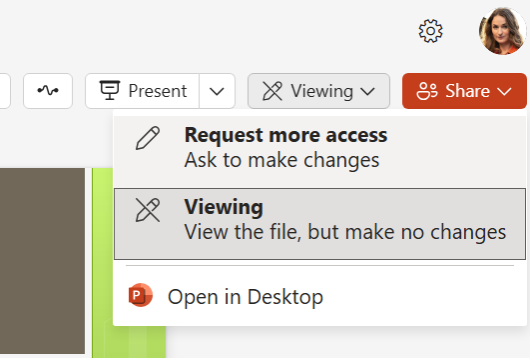
Microsoft Word has many different ways to view a document and now three primary options are available on a single menu; Editing, Reviewing plus Viewing which is a simple ‘read only’ mode to stop accidental changes while reading. The new menu appears on the top-right between the existing Comments and
The Elizabeth Line (aka Crossrail) is now open in London, a major new tube line crossing the city. Here’s the roundel and color scheme for the new line in a format ready for Word, PowerPoint and Office. The same design elements can be used for any other London Tube line
Type the fun Otter 🦦 emoji into Microsoft Word, Excel, PowerPoint or Outlook. Both in Office for Windows and Office for Mac. Otter 🦦 emoji represents a light-brown otter (a member of the weasel family) on its back with its paws held together. But the emoji can just be used
Add the Duck 🦆 emoji into Word, Excel, PowerPoint or Outlook. Both in Office for Windows and Office for Mac. Duck 🦆 emoji represents the quacky bird with webbed feet. The emoji is usually depicted as a Mallard. Sometimes used as a substitute for the f-word, because of iPhone’s tendency
What are the real words for really big numbers, waaay over a trillion? Does Microsoft Word’s dictionary recognize them? (Answer: most but not all and there’s even a spelling mistake in Word!). How many is a billion anyway? We’ve looked at the informal words for vague large numbers such as
Does Microsoft Word recognize the nicknames for ‘big numbers’ like zillion, jillion etc? There are many informal words to describe a non-specific but really large numbers. Word’s dictionary (at least in English) recognizes them as correct spellings. If you want to be more specific see Real words for really big
A small but important change is coming to Word mobile app for iPhone, iPad or Android. You’re able to continue listening to a ‘Read Aloud’ document from the lock screen. At the moment, Word will stop reading a document to you if the lock screen is enabled (usually because there’s
Does Office 2021 or Office 2019 insist on a Microsoft account Sign-In (login) to use the software and edit documents? We’ve done some tests to check and we’ll explain the details too. It’s a good question. Microsoft 365 software does require a Microsoft account login but what about the ‘perpetual
Office apps in a browser have caught up with an important feature in Office 365 for Windows – quick account switching is now available. Almost three years ago, Microsoft added quick account switching to Office 365 for Windows. You can save logins to several Microsoft 365 accounts; work, school, home
Like Word, PowerPoint and Excel also have options to add borders to pictures to add that extra oomph to your work. Users can choose between fairly simple borders or add some further complex, fancy styles to their images. If all this seems very familiar, it’s because the same picture tools
Type the Grinning Cat with Smiling Eyes 😸 emoji into Microsoft Word, Excel, PowerPoint or Outlook. Both in Office for Windows and Office for Mac. Grinning Cat with Smiling Eyes 😸 emoji is a variant of the grinning face emoji or the cat face emoji, which is yellow on most
The Windows Emoji Panel has its problems which are amply demonstrated by a common symbol that’s hiding in the long symbol lists – the Pi symbol 𝜋 . We’ll explain where it’s hiding and generally grumble about this part of Windows 11 and 10. The Emoji Panel is in Windows
There’s a small but important point about Microsoft Word with Footnotes and Endnotes. It’s so important we’ve made this separate little article about copying or moving. The footnote or endnote is stored in that little superscript character in the document text. Copy, move or delete that superscript character and the
If Microsoft 365 (Word, Excel, PowerPoint, Outlook) is misbehaving, try the Repair option. If that’s also causing trouble, there’s a hidden command prompt option. For any ‘Click to Run’ installations of Office for Windows (mostly Microsoft 365, Office 2019) there are Repair options available to fix common problems. Among these
In Microsoft Word, circling around text can place emphasis or enhance the text appearance. There are a few methods you can choose in Word documents and you’re not limited to circles. We’ll show how to add a simple circle like this, plus a lot more. Add shape to document Go
How to insert the Rainbow 🌈 into Microsoft Word, Excel, PowerPoint, or Outlook. Both in Office for Windows and Office for Mac. Rainbow 🌈 emoji depicts a colorful arc of a rainbow, usually used to express positivity, hope, good fortune. The rainbow flag was designed and has been adopted by
Not only has Microsoft just added 25 more languages to the Dictation feature of Microsoft Office 365, they’ve also promoted six languages from ‘Preview’ to full dictation status. Microsoft has been unusually quiet about all the improvements in Dictation, focusing on the new languages while not even mentioning that six