The long-standing Ursnif trojan is back in a new form to infect computers and steal personal information, all via a Microsoft Word document. To begin, we’ll repeat a warning we’ve been making for years … No .doc files DO NOT open .doc files from any source (not .xls or .ppt
A recent Windows update is causing VBA code to fail in Excel, Access and other VBA parts of Office. The culprit isn’t Office, but the version of Windows that it’s running on. After the 2019-08 Cumulative Update KB4511553 is applied, some VBA code will stop working. The patch bug is
The desperately needed feature is coming to Microsoft Office … the ability to search for Icons. Microsoft added Icons to Office 365 and even more a few months ago … 300 more icons in Office, but which ones and where? The problem has always been finding the right icons from
Office now has sensitivity options to label Word, Excel, PowerPoint docs plus emails. Not ‘touch-feely’ sensitivity like ‘loving’ or ‘compassionate’ but instead corporate, privacy labels. It’s a new feature for Office 365 corporate hosted E3 or E5 accounts and the admins have enabled Sensitivity options. Sensitivity appears on the Home
Microsoft and Samsung have a long announcement about Windows, Office and the new Samsung Note10 but there’s little really new. Under the bland title “Microsoft and Samsung partner to empower you to achieve more” is a carefully worded press release which mostly goes over existing Microsoft products which are available
A report commissioned by the Dutch Ministry of Justice and Security warns government departments NOT to use Microsoft Office Online or the apps for Apple or Android. The Privacy Company report was made public with the Ministry’s permission via two blog posts short and long. Many governments and organizations have
Office-Watch.com reader Jeffrey J. offers this look at Emailmerge.cc an add-on that fixes some limitations in the Word/Excel/Outlook mail merge system. “ Outlook email merge function does not allow multiple To line addressees, nor allows creating any cc or bcc addressees. And you cannot customize the Subject line. Manually adding/modifying
Word allows you to insert other files with data and functionality from another document or program directly into your Word document. Microsoft calls these additions ‘Objects’ which makes it sound overly technical and difficult but it’s not. Don’t get fazed by all the nerd talk about ‘objects’, that’s programmer speak
A new option in Office 365 for Windows is the ability to choose how hyperlinked Office files are opened. Inside Word, Excel or PowerPoint or in the default browser. The new option is at File | Options | Advanced | Link Handling Open supported hyperlinks to Office files in Office
A newly promoted UK politician has his own special style guide for staff, here’s some Word features that can help ensure your documents are approved by the boss. The Right Honourable Jacob William Rees-Mogg (to give his new full title) proudly affects an old-fashioned demeanor and has been described as
Word is getting reminders for accessibility before making a PDF. When Word makes a PDF version of a document, it includes accessibility tags. These tags help screen readers (spoken for blind and the visually impaired) and also adjusting the PDF for small and large displays. When saving a PDF (File
Yea, gods. Clippy is a persistent little beggar. Over 20 years since it infested our screens and it’s now being used as a dating meme by people not born when Office 97 annoyed us. The infamous Office paperclip, Clippy, continues to pop up just like it did in Office 97.
Microsoft says we should stop calling the browser-based version of their apps ‘Office Online’. It’s now just ‘Office’. ‘Word Online’ is now just ‘Word’. ‘Excel Online’ is ‘Excel’, ‘PowerPoint Online’ is merely ‘PowerPoint’. Make sense? No, we don’t understand either. Microsoft’s explanation of the name change doesn’t help. According to
Microsoft Word for Android has reached a billion installs. That’s a real Billion not a Microsoft hype billion. It’s even more impressive than it seems. The billion number is counted by Google on Google Play. Microsoft loves quoting high numbers especially ‘Billion’ even when it makes little sense. But this
Microsoft Word has several ways to quickly insert placeholder text into documents. Sometimes you want to add some random text to a document as filler, but don’t want to think of something to write yourself. While there are websites that will generate placeholder text for you, it is also possible
Sketchy Shapes, the new line option in Office 365 now has a little video to go with it. Sketchy line option in Office for Windows and Mac Sketchy or wriggly lines in Icons and SVG graphics Source: Microsoft
An upcoming feature in Word 365 for Windows (commercial editions) will be able to detect and define acronyms. When Word ‘sees’ an acronym it will try to show a definition based on it’s context in the document and how other people use the same acronym in the organization. Source: Microsoft
Back in the 16th Century, italic fonts were invented and that trick can still be used today in Microsoft Word. Italics let you fit more text into the same space. An innovative Venetian publisher, Manutius, needed to make small and affordable books. Paper was expensive so anything that put more
Here’s another case of someone trying to backdate fake documents and being caught by hidden details in the file. The font is the giveaway but not in the usual way. It’s the ongoing saga of Craig Wright, once a big name in the cyber-currency game. He’s now involved in a
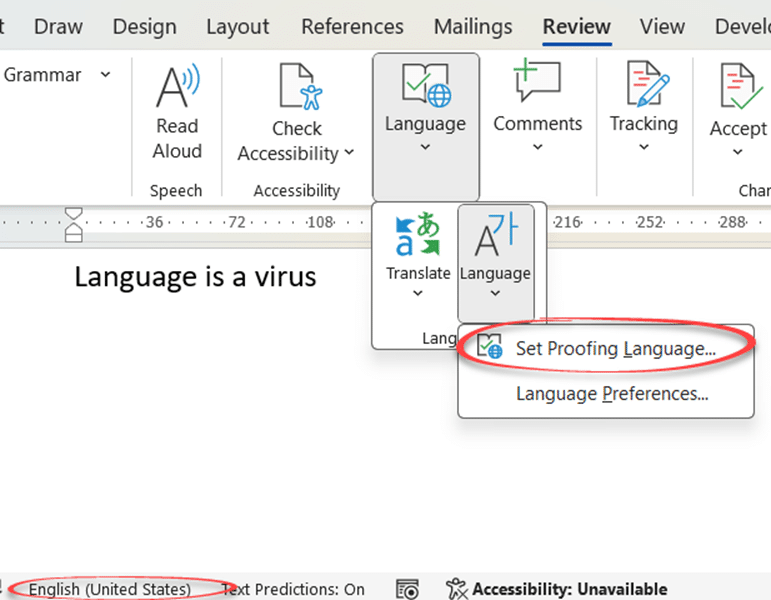
Word lets you translate an entire document in one go, either right click anywhere in the document, right click and select Translate, or go to Review | Translate | Translate Document. As with translating a selection, the Translator will open in a sidebar, where you can select the languages to
Word has a feature to translate text from one language to another. Whilst the translation may not be perfect, it does give you a starting point to understanding what the text says. You can either translate a selected piece of text, or the whole document. Translate works slightly differently depending
If you’re the sort of person who’s easily distracted, or just want to focus on the content of your document without worrying about formatting, there are a number of ways you can clear the distractions from Microsoft Word, so you can focus on the text you’re writing. Minimize the Ribbon
Here’s a summary of the July non-security updates for Office 2016, Office 2013 and Office 2010. These updates should be automatically installed via Microsoft Update or you can apply them manually. Install them now if there’s a listed bug you need fixing, otherwise play it safe. Leave some time for
Microsoft is hyping the addition of 300 more icons to Office 365 perhaps hoping to distract customers from the many problems finding and using the Insert | Icons feature in Office 365. We like the addition of SVG graphics (Icons) into Office because it opens up a much wider range