How to Buy an Older Version of Microsoft Office: What Actually Works
If you need an older version of Microsoft Office, like Office 2016, 2019 or 2021, your options have narrowed but they have not disappeared. Microsoft doesn’t sell perpetual licenses for past releases, but you may already own a transferable license, qualify for downgrade rights through a volume agreement, or find a legitimate retail copy still in circulation. Here is a practical walkthrough of every legal way to install an older Microsoft Office on a new PC or Mac in 2026, plus the traps to avoid when shopping on eBay or Amazon.
There are various good reasons for wanting a past release of Microsoft Office.
Some people prefer an older, known, version of Microsoft Office instead of the latest release. Maybe it’s an old computer with an older version of Windows (8.1 or 7) that’s not compatible with modern Office. For compatibility or code testing, some people might have many versions of Office installed in separate virtual machines.
Microsoft Publisher users might be hunting for software that will keep working after Publisher 365 stops working in October 2026.
Microsoft Publisher Ends in October 2026 – Key Dates, Alternatives & How to Keep .pub Files
As usual, when it comes to Microsoft Office licensing, there’s no simple answer. Here are a few things to try …
Install old Microsoft Office on new PC
An Office license you already have might be enough. It depends on how you bought your original Office either retail or with a new computer (aka OEM).
OEM purchases of Office (single payment, not annual subscription) are always for that PC only and non-transferable. See Which Microsoft Office did you buy? OEM or retail FPP?
Most people don’t know or remember if their Office was an OEM or retail purchase (the Help | About screen might say).
Retail Office 2013 is transferable (after Microsoft bowed to pressure). Unlike previous retail versions of Office, the retail license for Office 2013 and later perpetual license Office is for just one computer, not two.
Install the Office you have
Try installing the Office version you have on the new computer using your existing product key. There’s no risk in trying.
You’ll need the Office product key. Retail purchases have a sticker with the 25 character code. Office 2013 and later don’t save the product key in the registry so it’s not possible to recover the key from there.
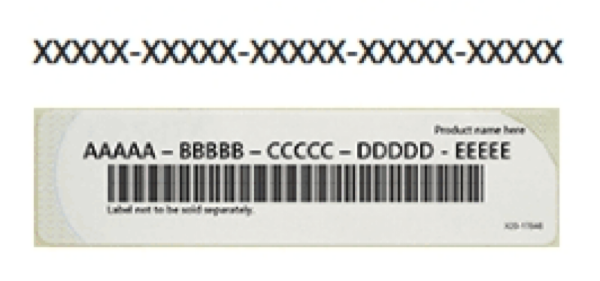
Hopefully, you’ll have your original Office DVD or a copy to install from. Otherwise there are online downloads you can try but make sure the source is reliable, safe AND it’s exactly the same Office release (i.e. Home and Student, Home and Business, Standard, Professional).
If the install and activation is permitted by Microsoft’s online licensing system, you’re good to go. Remember to update the software to the most recent version with security and bug fixes.
There’s no harm done if the product activation does not work. The Microsoft police aren’t going to come knocking at your door.
Modern Office (2019 and later) saves the license to a Microsoft account. Login to your account to see if any Office purchases are recorded there.
Buy older Office versions
Microsoft doesn’t sell old versions of Office retail but some retailers might have some old copies still available for sale.
eBay and, to a lesser extent, Amazon might host merchants selling older Microsoft Office licenses.
It’s hard to tell whether these offers are legal licenses or not. Many readers seem to feel that the low priced offers are worth a try. See Ultra-cheap Microsoft Office deals, are they legal and work?
Protect yourself buying Microsoft Office from Amazon or Ebay
More Office 2019 buying scams on Amazon and Ebay
Ask around friends and family, maybe one of them has an old Office retail pack gathering dust?
If buying online make sure it includes the vital Product License Key, not just a CD or DVD.
Microsoft Office downgrade rights
If an organization buys Office through Microsoft volume licensing programs, it can often install an older Office release instead of the licensed version. Microsoft calls this a Downgrade right.
Some volume license users get the right to install older versions of the software purchased. For example, a license for Office 2024 includes the right to install Office 2021, Office 2019, Office 2016 and even earlier versions.
Microsoft treats the customer as licensed for the newer product while permitting use of the earlier release.
Check what your license is entitled to because Microsoft licensing rules are complicated and do seem to change quite often.
Downgrade rights do NOT apply to retail or single-purchase products (what Microsoft calls Full Package Product or FPP).
If all else fails …
If you can’t get a copy of an older Office, then you might have to buy either a Microsoft 365 ‘subscription’ or the latest Office ‘perpetual license’ release.
There’s not a lot of difference between versions of Office. Certainly no document compatibility issues to worry about.
Which Microsoft Office did you buy? OEM or retail FPP?
Ultra cheap Microsoft Office deals, are they legal and work?
Protect yourself buying Microsoft Office from Amazon or Ebay
More Office 2019 buying scams on Amazon and Ebay
Office 2024 all you need to know
Microsoft Office support end dates checklist
Is “Lifetime” Microsoft Office Real? The Truth Buyers Need to Know
Microsoft 365 Classic Explained: A Lower Cost, No AI Subscription Option