Microsoft 365 Insiders: The Risks Microsoft Does Not Mention
Microsoft keeps nudging you to become a Microsoft 365 Insider, with little prompts inside Word, Excel and Outlook offering early access to new features. Before you click yes, understand what you are agreeing to: unfinished software, more data sent to Microsoft, add-ins and macros that may stop working, and no real support if something breaks. Office Watch explains why it’s best to stay on the regular public release. If there is one specific new feature you cannot wait for, choose the Preview channel rather than Beta, and keep a stable copy of Office available as a fallback.
Insiders is the testing program for new Microsoft 365 / Office features. It’s what used to be called ‘beta testing’ or ‘previews’. It involves using software with new or changed features that might not be working properly or have annoyances that need fixing.
In January 2023, the name changed from Office Insiders to Microsoft 365 Insiders. Nothing important changed, it’s just a relabeling.
For Copilot AI, there’s a similar beta testing program called Frontier.
Microsoft 365 for Windows customers can join Microsoft 365 Insiders from the File | Account pane. On Microsoft 365 for Mac, go to Help | Check for Updates | Advanced:
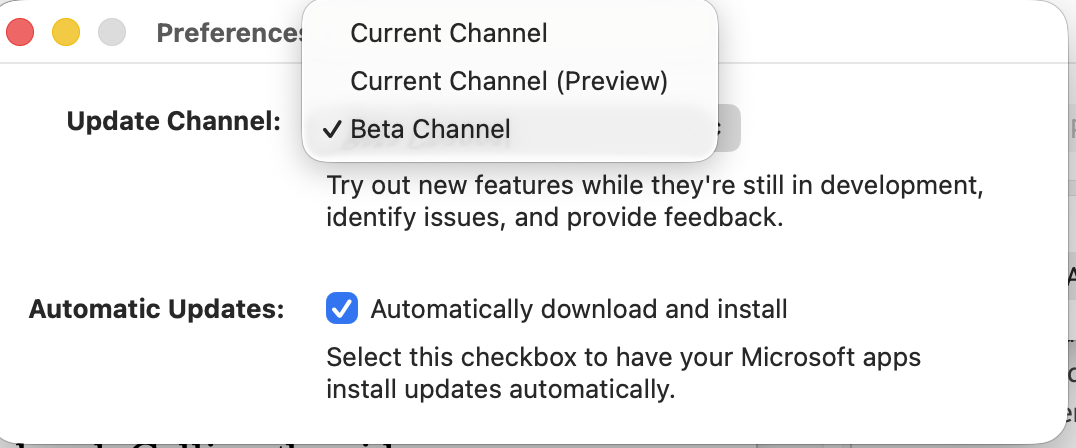
How Office testing works
There are roughly four stages to the release of a new/changed Office feature:
Internal – there’s a lot of in-house testing at Microsoft both automated and human (the latter reduced in recent years). It can include some non-Microsoft people under secrecy agreements.
Beta aka Insider or Fast – the first public testing level. This software has the newest features and has a greater risk of problems. Usually updated each week.
Current Channel (Preview), formerly Monthly Channel (Targeted) or Slow – after Fast testing the software is refined and released to more testers. Slow releases should be closer to what the public will see and be a lot more stable. Updated monthly.
Monthly Channel / Public – what Microsoft 365 customers get automatically with their regular updates. ‘Monthly’ level is what most subscribers get.
Some organizations choose ‘Semi-Annual Channel’ to limit updates to twice a year, though Microsoft is working hard to drop the semi-annual option. While it lasts, this channel has its own preview level, “Semi-Annual Enterprise Channel (Preview)“.
The ‘beta’ ‘Insider’ and ‘Monthly Channel (Targeted)’ names have been used in the past as ‘simplified’ Insider naming. Many people in and out of Microsoft keep using the ‘Fast’ and ‘Slow’ labels.
Gradual Rollout
Not everyone with the same software version will get the same Beta or Preview features at the same time.
Microsoft often gradually rolls out a server-based feature to users on the same channel. When the Microsoft 365 app starts, it checks with Microsoft’s servers to see what features are available. Availability depends on location (usually USA first), time and, seemingly, a roll of the dice.
Insider/Beta customers just have to be patient. Restarting a Microsoft 365 app will force the app to recheck with Microsoft.
Why does Microsoft push Insiders?
Microsoft has lots of little encouragements, almost advertising, for people to join the Insiders group. Even the name ‘Insiders’ was chosen to make people feel special and part of some select group.
Microsoft pushes the Insiders for its own selfish reasons. Insiders uses paying customers as a large block of unpaid software testers. It’s cheaper than all the paid testers that were ‘downsized’ off the Microsoft payroll some years ago.
The problem, as Microsoft has slowly discovered, is that having all these unpaid testers isn’t much use if the company doesn’t have enough staff to read and manage the bug reports from Insiders.
Insiders upsides
The main benefit of Office Insiders is getting new features faster than the public. Some like to check out anything new while others target a specific innovation.
We know many people who joined the slow Insiders track because they were eager to use the Stock data type which adds near real time financial information into Excel. Now that feature has been publicly released, those folks dropped the Insiders track and returned to regular public releases.
Risks of being an Insider
There are various downsides or risks to consider before becoming an Insider. Some are mentioned by Microsoft, others are not.
Instability – test software might not work correctly. At worst, the program might ‘crash’ and documents could be lost. When there’s a problem it’s hard to know if it’s a beta software bug or a wider problem.
Privacy – becoming an Insider means giving up some of your privacy to Microsoft. ‘Diagnostic data’ is mostly anonymous but could include content and other identifying information.

Document Compatibility – documents, worksheets and presentations made on Insiders software should work on non-Insiders Office. The exception is when the Insider-made files include features not yet in public Office releases. For example, a new Excel function will cause an error when opened on a non-Insider Excel.
Software Compatibility – any Office add-ons or VBA code might not work or work properly on an Insiders build.
Lack of Support – Other programs or add-ins will often decline to support you when you’re using Microsoft 365 or Windows Insiders builds. That’s understandable because the beta software is an uncertain base for other programs to work with.
FUD – general Fear, Uncertainty and Doubt. If there’s a problem, it’s hard to know if it’s a general bug or something specific to the Insiders build.
Send Reports to Microsoft
If you are an Insider, send smiles or frowns to Microsoft from the little face icon at top right.

If reporting a problem to Microsoft, keep in mind two things:
Be Specific – explain exactly what the problem is with details and include details about what was happening just before the problem occured.
Be polite – Microsoft is a large, soulless organization which often shows thinly veiled contempt for it’s paying customers. Don’t take that out on their staff. New and beta tested feature feedback is usually read by real humans who can be genuinely hurt reading abuse about software they are working hard to make good.
Don’t forget the less-used ‘Smile’ option to tell Microsoft about something you like.
Be an Insider or not?
Stay away from Insiders for Microsoft 365 or the similar program for Windows. For most people the disadvantages outweigh the few advantages. Insiders is only for people confident using their computer with good backups and willing to accept the risk of delays and problems.
By all means, switch to Microsoft 365 Insiders Beta or Preview channels if there’s something new that you just can’t wait to try.
If you’re worried about stability, definitely stay away from ‘Beta’ or ‘Fast’. The Preview track is usually stable.
Here at Office Watch we use Insiders software because it’s our job to keep up with what’s new and coming in Microsoft Office. If we had a ‘normal’ job we’d stay away from Insiders.
Have a stable Office on standby
Don’t rely entirely on Microsoft 365 Insiders software for your work. Have a fall-back copy of public Office 365 that you can use if the Insiders build is causing trouble.
A virtual machine (Hyper-V or VMware Workstation) can run either Microsoft 365 Insiders or public version. Or have stable Office on a second computer.
What Else You Should Know About Office Updates
Choosing the right update channel
If Insiders is too risky but you still want to understand your options, All the options for Microsoft Office 365 update channels lists every channel name Microsoft currently uses along with the exact command line values needed to switch. Organizations that want fewer surprises can go the other way entirely and force Office 365 to half-yearly feature updates, though that option is disappearing, as we explain in Microsoft Is Killing the Semi-Annual Update Channel.
The AI version of Insiders
Copilot has its own preview program with its own set of trade-offs. How to Join Microsoft Frontier: Early Access to AI in Microsoft 365 covers what you need, what you get, and the limits that Microsoft does not advertise. Business admins should also read Microsoft Rewrites How Microsoft 365 Updates Are Delivered, because the new Frontier, Standard and Deferred tracks change when features reach your users.
Taking control of updates yourself
Waiting for a feature to appear is one of the most frustrating parts of being an Insider. Simple ‘one click’ force an update to Microsoft Office shows a command that also lets you roll back to an earlier, known-good build when a beta goes wrong. If features never arrive at all, Why Microsoft Keeps Paying Customers Guessing explains why, and Windows 10 Users: Microsoft 365 Just Stopped Getting New Features may be the real reason your copy looks frozen.
Keeping a safety net
The advice to keep a stable copy of Office alongside your test build is easier to follow than it sounds. The new Office 365 install rule is fantastic news for virtual machines explains how the licensing change lets you run test installs in as many virtual machines as you like.
The privacy cost
Joining Insiders means sending more data to Microsoft, but the flow of diagnostic data never really stops even on the public release. Use a Hidden Registry Hack to Improve Your Privacy with Microsoft Office covers the undocumented setting that cuts down what Office reports back about you.