Free Microsoft Office Clones: WordCraft, GridCraft and DeckCraft Are Here, Should You Try Them?
Three free, open-source apps now look and work almost exactly like Word, Excel and PowerPoint — and they open your real Office files. WordCraft, GridCraft and DeckCraft all hit version 0.5.0 in October 2026 with one-click installers for Windows, Mac and Linux. They’re not ready to replace Microsoft 365 yet, but they’ve reached the point where they’re worth a test drive. Here’s what works, what doesn’t and what you should know before trying them.
WordCraft, GridCraft and DeckCraft are free, open source rebuilds of Word, Excel and PowerPoint from the ArtCraft team. They copy the Microsoft look and workflow closely (the ribbon, the shortcuts, the dialogs) and open and save real .docx, .xlsx and .pptx files. None of them is ready to replace Microsoft 365 today, and the developers say so themselves. All three reached version 0.5.0 on October 10 and 11, 2026, and all three now come with easy installers for Windows, Mac and Linux, so trying them takes a minute and no programming tools.
What are WordCraft, GridCraft and DeckCraft?
All three apps are written from scratch in a programming language called Rust, rather than borrowing code from Microsoft or LibreOffice. “Clean room” means the developers built them from public file format specifications and by watching how Office behaves, not from Microsoft’s code.
That matters legally: it is how you build a compatible product without getting sued. Or at least hopefully not sued. You can be sure that Microsoft’s legal department is looking at every move by ArtCraft.
The apps run on Windows, Mac, Linux, FreeBSD and in a web browser. The license (AGPL-3.0) means they are free to use, including at work, with no subscription.
GridCraft specifically promises no license server and no telemetry, meaning it doesn’t phone home with usage data.
They are part of a larger family called the “Crafting Apps,” which also includes Photoshop, Illustrator, Premiere and Acrobat style tools. ArtCraft’s main business is an AI image and video studio.
Our take
Now that installing is easy and quick, GridCraft and WordCraft are worth a test drive on copies of your files. DeckCraft is worth a look too, though it’s in an earlier development stage.
We’ve tried the Windows versions of all three apps using our own files (made in Microsoft 365 apps). With the exception of some Excel functions, all the .docx, .xlsx and .pptx files opened and edited without any trouble.
The interface is spookily familiar for anyone used to Microsoft Office.
The noise you hear in the background is the angry mutterings from Microsoft HQ 😎.
GridCraft (Excel)
Covers 89% of Excel’s ribbon commands and claims to emulate 501 of Excel’s 523 worksheet functions, including XLOOKUP, LET, LAMBDA and dynamic arrays.
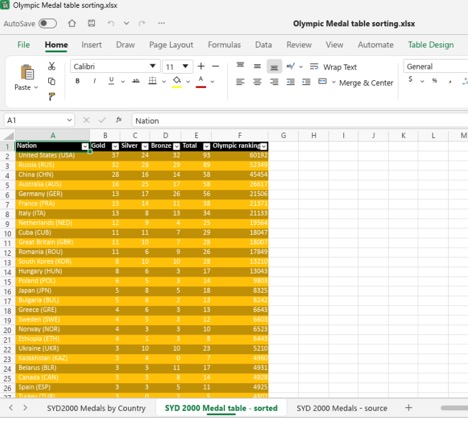
The developers estimate it is only about 50% ready for real work once features are weighted by what people actually use. Their stated weak spots are fidelity with real-world .xlsx files and very large workbooks.
PivotTables, 17 chart types, conditional formatting, sparklines, data validation, Flash Fill and PDF export are all there.
Version 0.5.0 adds import of worksheet data from .xlsb and .ods files, more interface languages and dozens of Excel compatibility fixes.
WordCraft (Word)
The developers now rate it about 60% ready for real work, measured against “Word 16.113.4”.
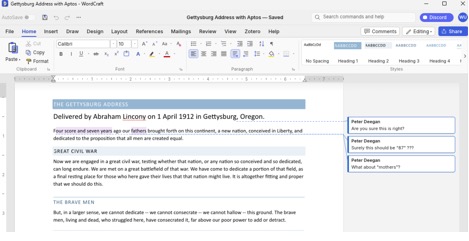
Version 0.5.0 fills most of the gaps that held it back: an equation editor, the Draw tab (pen, pencil and highlighter), charts and SmartArt that now display and survive a save instead of being dropped, and printing through your system’s PDF viewer.
It also opens old Word 97 to 2003 .doc files and password-protected Word documents, and adds Zotero citations and Read Aloud.
The core feature list stays deep: styles, track changes, comments, tables of contents, footnotes, mail merge from CSV and compare documents.
DeckCraft (PowerPoint)
Covers roughly 79% of PowerPoint features by breadth and 93% of the core ones.
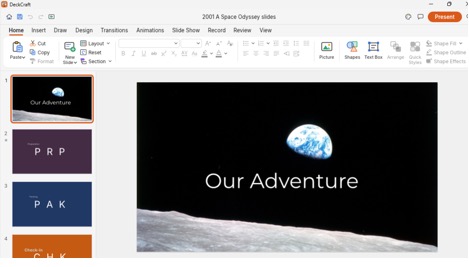
Includes Morph transitions, animations, presenter view, slide masters and video. Version 0.5.0 adds playing animated GIFs, an Animation Painter and fixes to slide show transitions.
How to download and install
All three use the same download layout on GitHub. Open the app’s release page, scroll down to Assets and pick the one file that matches your computer. Each release lists 26 files; you only need one.
The examples below use GridCraft; swap in wordcraft or deckcraft for the other two.
| Your computer | File to pick | Notes |
| Most Windows PCs | gridcraft-0.5.0-windows-x64.msi | Code signed installer |
| Windows on ARM (Snapdragon laptops and Mac hosted VMs) | gridcraft-0.5.0-windows-arm64.msi | Code signed installer |
| Older 32 bit Windows | gridcraft-0.5.0-windows-x86.msi | Code signed installer |
| Windows, no install rights | gridcraft-0.5.0-windows-x64-portable.zip | Unzip and run, nothing installed |
| Any modern Mac (Apple silicon or Intel) | gridcraft-0.5.0-macos-universal.dmg | Signed and notarized by Apple |
| Linux | .AppImage, .flatpak, .deb or .rpm | Intel/AMD and ARM64 builds, plus new RISC V builds |
| Web server | gridcraft-web-0.5.0.zip | For hosting on a server. |
Code signed means the installer carries a verified publisher signature, so Windows and macOS can confirm it hasn’t been tampered with. For extra peace of mind, each release also includes a SHA256SUMS.txt file listing a checksum (a digital fingerprint) for every download.
The portable version is handy on a work PC where you can’t install software or you don’t want any installed footprint on the computer.
For curious nerds
These apps are largely a curiosity at the moment. While progressing remarkably quickly, they aren’t ready for most people.
Don’t switch. If your job depends on Word, Excel or PowerPoint, these apps are not a substitute … not yet.
The biggest risk isn’t missing features, it’s file fidelity: open a complex client spreadsheet or a heavily formatted contract, save it, and something subtle may break when a colleague opens it in real Office. The developers list exactly this as their top remaining problem.
If you want to try the ArtCraft Office apps, here are some tips and precautions:
Install on a secondary machine or virtual machine. The ArtCraft apps should not conflict with Microsoft Office/365 or similar suites but at their early development stage it’s wise to keep them separate. Only open copies of your files, never the originals. Try the built-in samples first. GridCraft has a sales dashboard, household budget and gradebook; WordCraft has a sample handbook; DeckCraft has a sample deck. If GridCraft won’t open on Windows, the developers note certain AMD graphics drivers can crash it; their README has a workaround.
Don’t expect VBA macros to run. Nothing in the documentation says Visual Basic macros run in any of the three. WordCraft 0.5.0 does now keep the macros inside a macro-enabled .docm file when you save it, so it won’t strip them out, but keeping them is not the same as running them.
If you just want a free Office alternative now, LibreOffice and ONLYOFFICE remain the mature choices. They’re less pretty, but they’ve had years to iron out file compatibility.
The bigger story: built for AI agents
The most interesting thing here isn’t the Office look. Every button, menu and keystroke in these apps is also a command that an AI assistant can run through MCP (Model Context Protocol, the standard that lets AI tools like Claude operate other software).
In plain terms: you could ask an AI to “build a quarterly budget with a chart” and it would drive GridCraft directly, then check its own work.
Microsoft is chasing the same idea with Copilot, but here it’s open and free. The repositories also include instruction files written for AI coding assistants, which strongly suggests much of the code itself was written with AI help. That would explain how a small team produced three Office-sized apps so quickly, and it’s also a reason to be cautious about stability until these projects have more real-world testing behind them.
More about Office alternatives
If you’re weighing up free alternatives because Microsoft is pushing you toward pricier plans, The Real Choices for Office 2016 and Office 2019 Customers walks through every realistic option, from doing nothing to switching away entirely. Mac users face an even harder deadline: Microsoft Kills Office 2019 for Mac: Apps Stop Working July 13, 2026 explains how to check whether your copy is affected and the cheapest ways out.
Europe is taking a different approach to the Microsoft alternative question. Office.eu: Europe’s New Privacy-First Alternative to Microsoft 365 covers a cloud suite designed to keep your data under EU law and off American servers.
The article mentions that these clones open real .docx, .xlsx and .pptx files — but what’s actually inside those files? What’s Really Inside a Word, Excel, or PowerPoint File (And How to See It) shows you how to crack one open in four steps. And if you share Excel workbooks across countries, Why Excel Formulas Always Work When You Share Files Across Languages reveals the hidden translation system that keeps formulas working — something any Excel alternative has to replicate.