Switch Microsoft Accounts in Word, Excel and PowerPoint Without Signing Out
Juggling a work login, a personal Microsoft account and maybe a volunteer role? You don’t need to sign out and back in to Word, Excel or PowerPoint. Microsoft 365, Office 2024, Office 2021 and earlier for Windows lets you switch Microsoft accounts in Office with two clicks from the account menu at the top right of the Office app, and each program can even run under a different account at the same time.
Many people wear different ‘hats’ while using Office. There’s a Work ‘hat’ or ‘hats’ with more than one job. Plus your personal or home role. Sometimes even more hats/roles like a volunteer task running a local group.
Each of those roles can have a different Microsoft account login.
In the past, Office could not easily cope with different Microsoft account logins. You had to sign out and sign in to the other account – a time-consuming annoyance.
Quick Account Switching
Microsoft Office 365, Office 2024/2021/2019 for Windows have quick or instant account switching. Click your name or initials at the top right of the window to see your login options.
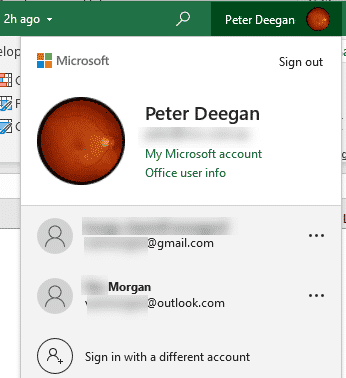
‘Sign in with a different account’ sets up another Microsoft account login.
If you’ve already signed into other accounts, they’ll show up in the list. Just click on another account to switch the Office program over to it.
How many different accounts? We’ve set up five logins with no trouble.
Different accounts for each program
The surprising and less well-known part of quick account switching is that it applies on a per-program basis.
Word, Excel, PowerPoint and other Microsoft 365 programs can be running at the same time with different Microsoft account logins.

Word, Excel and PowerPoint open with different logins
You can’t mix logins within a simgle program. For example, it’s not possible to have two open Word documents, each using a different Microsoft account login. To do that, open one of the documents in Word online which can have a separate login from the desktop app.
More Ways to Juggle Work and Personal Microsoft Accounts
The same quick switch works outside the desktop apps too. Fast account switching now in Office on the web shows how to hop between logins in your browser, and Add more accounts to your Teams includes a clever profile photo trick for telling your Teams logins apart.
Your files need the same treatment. Our guide on How to add many OneDrive accounts to a single device covers work and school accounts, while Four ways to sync multiple personal OneDrive accounts gets around Microsoft’s limit of one personal account.
Not sure which login holds your subscription? Microsoft 365 which email address am I using? shows where to look, and How Microsoft 365 counts your sign-ins, not installs explains the five device limit so it doesn’t catch you out.
Outlook handles multiple identities differently, and Outlook Profiles, important, useful but little known is the way to keep work and home mailboxes completely separate on one computer.
More logins means more to protect. Read Secure Your Microsoft Account Login: Important Change to Know before signing in on a shared PC.