2020 will be remembered for many things (big sigh) but from a design viewpoint, it could be the Year of the Icon. Many of those graphics are available either in Office directly or imported from elsewhere – we’ll show you both. Everywhere you go there are signs reminding us of
Despite fair warnings, Microsoft has allowed an old Excel format .SLK to get past their email security and infect Excel for Windows computers. As reported by Avanan, criminals have found a way to bypass the email security for Office 365 hosted mailboxes (possibly Outlook.com as well), allowing an infected email
How to quickly fix display problems in Microsoft Office. When Word, Excel, PowerPoint or Outlook don’t show up on the screen correctly. It doesn’t happen often but occasionally Word, Excel, PowerPoint or Outlook open but as all grey. Clicking around the screen displays just a ribbon or menu but not
Excel for iPhone and Android smartphones have a useful extension of Excel Tables called Cards. It’s a better way to view tables on a smaller screen with larger text and easier editing. Instead of scrolling right/left on the small screen, all the info for a single table row can be
Microsoft’s Money in Excel is worth looking at even if you don’t want to use it. There are some useful features and formula tricks you can use in your own workbooks. Group Columns Grouping columns or rows is normally for bringing together lists rows or columns. Grouping days into a
Animated GIF support is coming (finally!) to Microsoft Word, Excel and PowerPoint. We discovered the new feature in a new Insiders build, Microsoft hasn’t announced anything. Here’s an animated GIF playing in Word 365. Paste or Insert an animated GIF now has play/pause buttons included (bottom left corner). The animation
Money in Excel shows up on the Home tab once you’ve opened the Microsoft template. Here’s how to remove its button from the ribbon or completely remove the add-in from Excel. As soon as you open and use Money in Excel, it adds itself to the Home tab on the
Microsoft has gone public with their Money Excel template to import and manage financial transactions from bank accounts. There are some undocumented tricks available and an important security recommendation that Microsoft overlooks. Money in Excel can import transaction details (US bank accounts only) and show current balances. And convert that
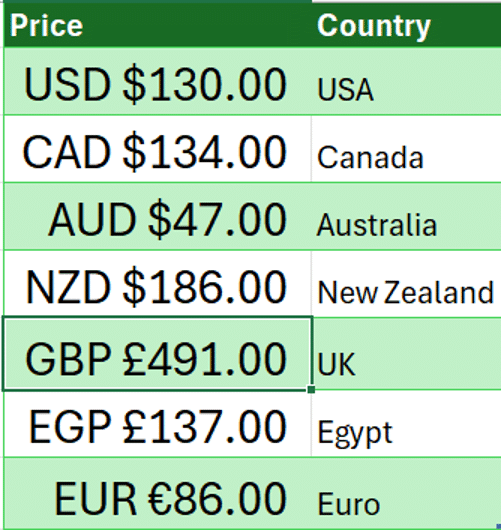
The latest global exchange rates can go directly into Excel 365 for Windows and Mac. No plugins or extras are necessary because it’s in Excel 365 though it’s hiding away. Foreign exchange rates are part of the Stock data type. They weren’t part of the original Stocks data feed but
Some useful new features have now been rolled out to the public versions of Microsoft 365 (Office 365) for May 2020. Word, Excel, PowerPoint and Outlook all have improvements. Two we’ve already told you about, the other is new. Stock Images, Cutout People and Stickers Or what Microsoft calls “New
If you’ve lost or accidently deleted a Word for Mac document (or Excel or PowerPoint) there are various places to look for it some might not occur to you. This article is also helpful if you’re trying to find and delete any files or documents that must be removed for
‘Tell me’ help box is now in Microsoft/Office 365 for Mac as a way to find features on the ribbon. However it continues to have the same limitations that are in the Windows version. Look for the lightbulb and ‘Tell me’ box beside the ribbon tabs. Type in a phrase
Microsoft Excel is the perfect tool to analyze and rank your fantasy football ranking. This article explains how to import players, other rankings and add your own opinion. How to Build Your Own Fantasy Football Rankings “There is no reason to re-invent the wheel by typing out all of the
Word, Excel and PowerPoint 365 for Windows are getting better control over what appears on the new-style Save dialog. Folders can be ‘pinned’ to always be show up in the list and a quick way to share a document. But a major annoyance remains unchanged. On the ‘Save this file’
A friend of Office Watch has enhanced our latest COVID-19 global statistics workbook and offered to share it with all our readers Phil Y from Sydney is interested in the number of active Coronavirus cases and how many new cases. That data was in the external connection so he made
The Drawing Tools in Word 365 is now larger with separate tools like Lasso and Eraser now in a single combined gallery. There are other changes and new limitations on the Drawing Tools gallery, some of them undocumented. Compare that to the old Draw tab where the Lasso, Eraser and
Microsoft is testing a new feature or template, Money in Excel. You can apply to be one of the first to try it. Money in Excel is a separate Excel ‘premium’ template that will connect with bank accounts, import transaction information and display as charts and lists. Transactions Bank accounts
Elon Musk and partner have named their child X Æ A-12 (no kidding) how do you type Æ in Microsoft Word and Office generally. The child’s name doesn’t trigger any spelling or grammar errors in Word. No squiggly lines. What is Æ ? Æ or æ is a a-e ligature
A long last, Excel is getting a quick summary of the workbook statistics including the bounds of the sheet, tables, formulas and external connections. Look on Review | Proofing | Workbook Statistics in Excel 365 for Windows or Mac. There are details for the currently selected sheet and the whole
We’ve updated our workbook that imports the latest COVID-19 statistics and combines with population data through Excel 365’s Stock Data Type. No technical changes in the workbook but we’ve added a few more ‘interesting’ or outlier countries. Plus some repeat help tips. Download COVID-19 Global Statistics workbook there’s also a
Adding a moving average line to an Excel Chart is very easy, just a few clicks, with many options. Any chart with a series of values over time will benefit from a trendline like a moving average. What is a moving average? An average / mean is a single value
Nirsoft’s SearchMyFiles has received a major boost. It can now search inside Office documents and PDF’s. SearchMyFiles is the Windows search tool that should be included with Windows. It’s interface might be old-fashioned but all the options are visible, including some not available in Windows. Some of the highlights in
Format Painter in Office will work to copy formatting between shapes which is very useful for complex Gradients. But they don’t always format copy in the way you’d expect. We’re obliged to Office-Watch.com reader, Lorelei, for pointing out that Format Painter can copy gradient fills in most but not all
We’ve made a few changes to our COVID-19 tracking workbook for Excel 365. The kind comments from readers are much appreciated. For those of you who asked, it was made by our Editor-in-Chief, Peter Deegan, who is safely locked-down in London. Peter refreshed the COVID-19 statistics (which any Excel 365