The April 2020 security fixes for Microsoft Office come with a warning that some VBA code will stop working. There are workarounds to let some references through. The KB4557055 security fix blocks VBA references that link to Internet or intranet sources or have been downloaded from the Internet. That will
We’ve made a new version of our COVID-19 statistics workbook that’s compatible with Excel 365 for Mac. Keep track of COVID-19 statistics using this Excel spreadsheet that shows the latest cases and deaths for countries you choose and populations also added for you. Excel 365 for Windows has a separate
Some of the features and tricks in our COVID-19 worksheet for Excel 365. We’ve made this workbook as a practical and timely example of some important recent Excel features and how they can be used. Open up the workbook in Excel 365 for Windows and add some countries to see
Keep track of COVID-19 statistics using this automatically updating Excel spreadsheet that shows the latest cases and deaths for selected countries with populations also added for you. We’ve been a little annoyed at media coverage that deals with raw numbers without adjusting for population. We opened up Excel 365 and
It is possible to send and receive faxes without a fax machine. At least you can send a fax from your computer without a fax machine because there are online services to do that for you. We’ve noticed some press reports were overwhelmed offices have reverted to faxes because their
Find and add the Indian flag into Office documents, Word, Excel or PowerPoint, then use some Office picture tools to enhance the image. The same help applies for any other national flag, just look for a different source. Get the Indian Flag Image There are many, many copies of the Indian flag available. We’ve opted for
Excel’s Workday() function counts working days before or after the starting date. The counted workdays automatically excludes weekends (Saturday and Sunday) and can account for holidays. We previously explored the NetworkDays.Intl() function in Microsoft Excel to calculate the number of working days between two dates. Workday() is similar but returns the date (past or future) after the number of workdays. It is useful
Google Sheets can be handy for sharing and working on spreadsheet files with other people, but sometimes you just really need that file in Excel. No problem – it’s actually really easy to convert them. All you have to do is download the file and save it as an Excel file. If
Here’s a readable and searchable version of the Microsoft 365 summary table that came with Microsoft’s announcement of the rebranding from Office 365 to Microsoft 365. It shows the differences between ‘free’ Office (with a Microsoft account), Microsoft 365 Personal (formerly Office 365 Personal) and Microsoft 365 Family (formerly Office
Microsoft has dumped a lot of news in a single day. As a result there’s a lot of misunderstanding and, sorry to say, misreporting. Journos not accustomed to Microsoft’s PR tricks have fallen for them. We’ll try to ‘unpack’ what’s been announced into what’s happening now, in the known future
The Excel function EOMONTH() returns the date of last day in a month. With a little extra, it’ll tell you the number of days in any month. EOMONTH() is the Excel equivalent of the little rhyme ‘30 Days has September, April, June and November …’ plus it handles leap years with 29th
Here’s a download of the standard but blank Warning Triangle graphic and image ready for Word and PowerPoint. We’ll look at the official warning sign specification as a starting point, then we’ll look at variations based on that. In other words, symbols that look a bit like a warning sign,
Zoom online meeting software has become very popular with many people joining it for the first time. Here’s how to fully get ready for a Zoom meeting, there’s more to it than the official advice. Two Office Watch readers found themselves asked to join a Zoom meeting at short notice.
Microsoft has quietly announced some minor but important slow down in some of their cloud services including the way real-time edits of Office documents are handled. It’s a wise move given the increased demand for cloud services. Microsoft had an outage on their much-hyped Teams services earlier this week. Like
Skype can be integrated into collaborating on Word, Excel or PowerPoint documents. It’s not officially part of Microsoft Office collaboration but is easily done. It lets you work on a document while talking to other collaborators at the same time. Like this … This works with any modern version of
There are several free options to access one computer from another. You can see the screen, type and mouse from a remote location, just as if you were in front of the real computer. Access work computer from home computer Use desktop computer from a laptop or tablet Interact with
Working on an Office document can easily be done between many people no matter how far away they are. Most organizations will have some way to share documents remotely If not, there are clever options available. Instead of exchanging documents (we’ll get to that in a moment), save the document
There are many free tools available to make work and life continue if your movements are limited. Things you should do to prepare for a possible ‘work from home’, ‘no school’ or at worst ‘quarantine’ or ‘social isolation’ of some type. We know what we’re talking about because Office Watch
Microsoft is cunningly pushing Teams as part of its COVID-19 preparedness recommendations. But Teams isn’t the best option for everyone, far from it. Promoting Teams is good for Microsoft and their sales partners but not necessarily their customers. At Microsoft.com there are now special banner ads promoting Teams as the
Microsoft has been talking about document collaboration for a long time but now it’s available to everyone with a recent version of Office and OneDrive. So here’s a simple guide to opening the same document at the same time on multiple computers. You don’t need two people to try out
Here’s how to share a Microsoft Office document that’s saved on a compatible cloud service like OneDrive or Dropbox. All you need is Office 365/2019 or 2016 for Windows or Mac. Document collaboration works in Word, Excel and PowerPoint. Sharing a single file via cloud storage is a lot faster
We highlighted Word 365’s Side to Side view but there’s another side-by-side viewing trick that works for any two windows on either Windows or Mac. Side by Side or Split View is great for many situations. No fussing about switching between windows or getting lost with all the open application.
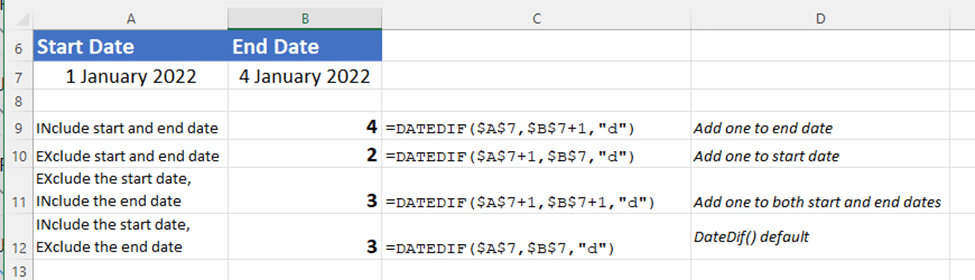
Excel’s NetworkDays() and NetworkDays.Intl() need more help to cope with realistic situations with public holidays and more than one vacation. Annabelle Almer started looking at NetworkDays() & NetworkDays.Intl() and we ended up deep down a geeky rabbit hole trying to get the functions working in realistic situations. The functions work,
Making a list of all the days between two Excel dates is possible in various ways, manually, an Excel 365 formula or some VBA code. We need a way to make a list of all the dates between a start and end date. Use this to make a list of