We’ve already looked at Microsoft Office document properties features. They are fully featured in Word and have limited availability in Excel so now we look at PowerPoint. PowerPoint has little document automation. Word users are often surprised to discover that even basic field codes don’t exist in PowerPoint. As a
We’ve already told you about document properties and how useful they are in Word. We also complained about the poor support for properties in Excel. You can add and edit document properties in worksheets much the same as in Word documents. Go to File | Info in Excel 2013 (Prepare
While delving into the details of Office document properties, we found some curious anomalies. They aren’t major but worth keeping in mind if you use document properties in Word documents. When you enter a document property it should just add the text and the same document property will show the
Microsoft Office has Ebola … meaning it’s in the supplied dictionaries for Word 2013, Word 2010 and Word 2007. As a proper noun, the disease name has a capital letter. Without it, Word marks it as a spelling error. The surname Pooley isn’t in the dictionary and, as we’ll see,
Document Properties is one of those long-standing parts of Office that is worth another look. It can be quite useful and not always in the ways that Microsoft intends. At first, document properties looks like a fixed and rigid feature with limited use. However it can be used in much
While Microsoft Word lumbers along, there’s some interesting and genuinely creative word processors out there. We’re not talking about direct rivals to Microsoft Office 2013 like OpenOffice, LibreOffice, Kingsoft Office Free, Google Docs, iWork or earlier versions of Office. Instead we’ll look at software that takes a very different approach to
In this article we’ll go over some of the, still, little understood ribbon features before looking how to get rid of the ribbon entirely. Yesterday I met a guy who absolutely hates the Office ribbon and wanted tips on how to get rid of it. I didn’t see his Office
In addition to the new 10GB file limit in OneDrive, Microsoft is rolling out two other improvements that may be of interest to Microsoft Office users. Share from Explorer Coming to Windows 7 and Windows 8/8.1 ‘soon’ is an addition to the right-click menu in Explorer. ‘Share a OneDrive link’
Eventually we all need to find a deleted document or a past version of an existing document. You never know when it’ll be needed or for which document. There’s many options available for keeping older versions of a document or file, most of them you have to setup in advance.
Choosing the sort type is really important and Word doesn’t always guess correctly. Office-Watch.com reader Peter M. reminds us that choose the sort type is really important: Text, Number or Date. “I just thought it worth pointing out that, for example 8, 70, 600 would sort in one order as
The last man on the moon is missing from Microsoft Office. Let the conspiracy theories begin! The last man to walk on the moon, Captain Eugene Cernan, is a notable omission from the Microsoft Office dictionary. Update: as of November 2015 we’re delighted to see that Gene Cernan is now
Microsoft adds the Ruble symbol to Windows 8.1 and we show you how to add it to earlier versions of Windows. Part of the Windows 8.1 August 2014 update is the addition of the new Russian Ruble currency symbol. All Microsoft will say about this change is “This feature adds
Why Excel PivotTables get messed up and how to stop it. Time and again we’ve heard from people who try PivotTables and only get nonsense tables. That’s understandable since Microsoft’s hype about PivotTable ignores the basics that we’ll cover in this article. You’ve probably seen a Microsoft demonstration of PivotTables
How to add and remove data from a PivotTable. Thanks for the great feedback from our article on PivotTables. One concern some of you have is about adding or removing source data after the PivotTable has been created. That’s understandable because the original PivotTable releases where unclear and curiously sensitive
Microsoft needs to play ‘catch up’ with email encryption. Yahoo is going to join Google is supporting not just email encryption but the same type of email encryption. Sadly we’ll have to wait until sometime in 2015 for Yahoo to release their version of OpenPGP. That’s good news … but
Some programs let you email documents directly – here’s now. Microsoft Office for iPad has an ‘Email as attachment’ as one of its limited options for sharing a document. Here’s some clever ways to make use of that and workaround the Office for iPad limitations. Some cloud services offer an
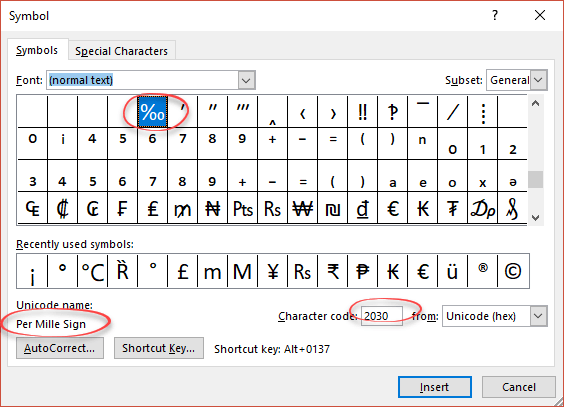
The Insert | Symbol feature in Office is overdue for an overhaul. Our venture into the new Unicode symbols and symbol fonts highlighted how much work Microsoft needs to do on this part of Office. Insert | Symbol has changed for a long time and many versions of Office. Here’s
Microsoft celebrates 25 years of the software suite. Microsoft quietly celebrated the 25th anniversary of their Office suite on 1 August 2014 but were they being a little ‘previous’ in their celebrations? While Word, Excel and PowerPoint for Windows were around on 1 August 1989, were they sold as ‘Microsoft
A simple, practical and non-scary example of how Excel PivotTables can work for you. Excel’s PivotTables are a great feature but one that seems way too hard for most of us … so here’s a simple and practical example of how PivotTables can help. A little fear of PivotTables is
The two procedures will let you easily clear up redundant Word documents, and alphabetize lists of declarations. Access versions: 2007-2013 Level: Intermediate Introduction The two procedures described in this article will let you easily clear up redundant Word documents, and alphabetize lists of declarations. When working on the 3rd edition
Word: how to find the character code used for a particular letter or symbols. Last week we talked about the Unicode v7.0 symbols and how to use symbols in Word. With over 100,000 characters in the Unicode specification, it’s important to know the character code number for the symbol you
A funny example of how you can’t trust the spelling and grammar checks in Word. We laughed at this sign, seen in a Tesco’s supermarket in the UK. Guess what – according to Word 2013 that entire document has no grammar mistakes at all! Even ‘incontinence’ doesn’t get a contextual
How can you get the new Unicode symbols in Office documents? There’s plenty of new symbols included in the Unicode 7.0 standard, here’s how to get them into your Office documents. Most fonts do NOT have all the Unicode characters, after all, there are over 133,000 of them. There are
If you need to create a filter string for filtering by a person’s name, or a city name, you may run into this error: This is because single quotes are used as the delimiter for Text strings, and there is a single quote in the city name. To get around