Suggested Images and Add Visual Emphasis options have appeared in our Microsoft Word … looks like a new but not yet announced feature. We’ve been editing Word documents with Word in a browser, when a small blue diamond icon appears in the left margin: ◇ Clicking on it added a
All you need is a birth date or starting date and Excel can figure out the age, next birthday, days to next birthday or when you reach a milestone like 10,000 or 15,000 days. That’s just some clever tricks with DateDif(). How old is someone or something? To calculate the
Here’s a quick look at some of the modest Excel tricks we used to make the Schengen Visa Calculation worksheet. Table Making the itinerary list an Excel Table lets us make use of some features. Formatting It’s a lot easier to format as a table with banded rows. We’ve turned
Our annual Microsoft Word vs the Spelling Bee Champions contest is on again for 2022. Word has done better than in the past but was still beaten by another extraordinary 14 year-old. 2022’s Spelling Bee Champ is Harini Logan, 14, from San Antonio TX who narrowly beat Vikram Raju a
A large security risk has appeared in Microsoft Word, a zero-day security problem which can infect even fully updated Word. Microsoft has taken at least 14 months and still hasn’t fixed the security hole. We’ll explain the problem and what you can do. It’s a relatively simple hack which takes
The Dictation controls in Word 365 for Windows are moving to another place and getting a lot smaller. The new Dictation toolbar appears on top-right of the document, often just below the Dictate button. That’s the same location as the Read Aloud toolbar. Dictate – when dictation is ‘listening’ the
Sometimes you need to convert a date from the Excel cell saved format to a particular format. There are at least five ways to do that. DateValue(), Date() or converting Unix dates to Excel. Simply typing dates into a cell also works but there are traps for the unwary. Excel’s
Another way to convert text to dates is by adding zero to the text. This is a trick which forces Excel to convert the text into an Excel value so it can then add the zero. Since adding zero doesn’t change the value, you end up with text converted to
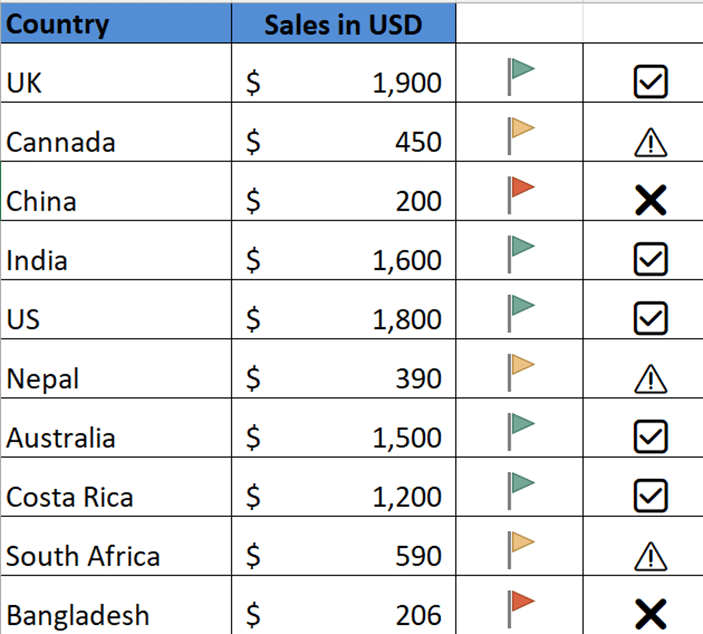
Excel has some nifty and simple options for color highlights the extremes in a list of values. It’s called Conditional Formatting and you can do all sorts of clever things with it. First let’s look at the simple presets that Microsoft has given us, some of the obvious choices they’ve
It’s easy to share appointment details with other people, whether they use Outlook or not. No need to type in appointments when you can send and receive the details right in your calendar. We’ll explain how it works for both sender and receiver (organizer and invitees) on various platforms, including
An IF statement might sound like a complicated thing that programmers do, but it’s actually fairly easy to do in Excel. An IF statement basically puts something into a cell depending on certain conditions – if A is true, put X in this cell. You can even use what’s called a nested
It’s now possible to make an Excel PivotTable directly from PowerBI data in Excel 365 for Windows and Excel on the web. Microsoft PowerBI is a cloud-based data accumulation then reporting and visualization (dashboards etc). BI stands for “Business Intelligence”. PowerBI is a separately licensed product for businesses so it’s
Windows 11 is getting a way to view your Microsoft 365, Office 2021 and Office 2019 licence details within the Windows Settings app. At Windows Settings | Accounts | Your Microsoft account … it shows a lot of the details from the Office.com account web pages. Windows 11 for Microsoft
Microsoft Word has many different ways to view a document and now three primary options are available on a single menu; Editing, Reviewing plus Viewing which is a simple ‘read only’ mode to stop accidental changes while reading. The new menu appears on the top-right between the existing Comments and
The Elizabeth Line (aka Crossrail) is now open in London, a major new tube line crossing the city. Here’s the roundel and color scheme for the new line in a format ready for Word, PowerPoint and Office. The same design elements can be used for any other London Tube line
What Microsoft euphemistically calls ‘gaps’ in the beta release of the New Outlook should really be called ‘enormous chasms’ of missing features and core functions. Let’s look at what Microsoft admits is missing plus other obvious omissions. As the supposedly ‘new’ features of the New Outlook are being hyped, these
Type the fun Otter 🦦 emoji into Microsoft Word, Excel, PowerPoint or Outlook. Both in Office for Windows and Office for Mac. Otter 🦦 emoji represents a light-brown otter (a member of the weasel family) on its back with its paws held together. But the emoji can just be used
OneNote is finally getting the Office Dictation (speech to text) feature that’s already in other Office programs. That’s in addition to the long-standing Look for Dictation in OneNote for Windows Home tab, way off at the right-side. Also, in OneNote in a web browser … Dictation and Read Aloud in
A first look at the new “New Outlook” which Microsoft (deliberately?) leaked ahead of an official announcement. It’s interesting but with one major and very disappointing omission. This article has been updated now “New Outlook” (as it’s now called) has been released to Office 365 Insider users. As you can
There are two ways to try New Outlook — either as a Office 365 Insider on the beta track or direct download (Intel and ARM based devices). Here’s how to do it and the hidden ‘gotchas’. Beware the New Outlook because it’s VERY crippled. Only Microsoft hosted commercial or education
Let’s look at the good or at least interesting parts of the New Outlook that Microsoft are calling ‘new’. As we’ll explain, Loop Components, fast @document links, My Day, Board views, RSVP options, pinned messages and Sweep aren’t really new. We’ve already noted the severe limitations in New Outlook, core
Microsoft has released a new Outlook for Windows which is so limited that we feel it’s necessary to warn people about trying to use it. Beware! Even for Insiders on the ‘beta’ channel this new Outlook is no replacement for the real Windows version of Outlook – not even close.
There are two different ways to access a Microsoft Office document that’s saved on OneDrive. We’ll explain both and why it’s sometimes important. Microsoft’s OneDrive stores documents on servers. Programs (like Office) can open those files directly from the cloud service. Or the OneDrive app can copy (synchronize) files from
Excel doesn’t automatically number lists but there are at least six ways to add numbering depending on your needs and how the list appears. Numbering is important but can be annoying when you’ve got a large dataset. If it’s small, it’s easy to number it manually or by an auto-filling