OneDrive and Copilot 2026 Update: Hero Links, AI Photos and What Microsoft Isn’t Telling You
Microsoft’s October 2026 OneDrive and Copilot update introduces Hero Links, AI-powered photo editing, million-item sync and full Markdown and HTML editing. But behind the headline features, Microsoft stayed silent on licensing, rollout dates and the looming storage cuts that will hit Family and Premium subscribers. Here’s what matters and what to watch out for.
The most interesting abilities are: Hero Links give every file a single sharing link that can be changed later; HTML and Markdown files get proper editing and coauthoring; sync handles up to one million items; and personal photos get a heavy dose of AI.
Office Watch will look at these features in depth once they are available to use, not just relying on Microsoft’s hype.
What Microsoft isn’t telling customers
There are no licensing details and almost no dates.
It’s a typical Microsoft dump of promises — some are available now, but much of it is “rolling out over the coming months” with no firm dates. No mention of which customers will get the features between consumers, business, enterprise, education or government. At least one “What’s new in OneDrive” feature isn’t new at all because it was announced and released about four months ago.
The demo examples also mix platforms (some on Android, some on iOS, some on Windows), so features may not arrive everywhere at once.
The glaring omission is complete silence about the upcoming Copilot changes that will share the AI credits with those on Family and Premium plans. Also not a peep about the massive shrinking of OneDrive quota from 6TB to just 2TB shared.
We’ve been covering the changes behind this announcement in detail. For background, see
How to Count Up Total OneDrive Use
Can You Dodge Microsoft 365’s OneDrive Storage Cut by Renewing Early?
Native Markdown Editing Now in OneDrive and SharePoint
Microsoft Copilot September 2026 Updates.
Hero Links: one link per file, finally
Instead of creating separate links with different permissions for different people, each file or folder now gets one link by default. The marketing people had a long lunch and returned with the twee name “Hero Links”.
To change who can access the file/folder, you change the sharing permissions for the existing link. Then the link will follow the new rules. Even the address in your browser bar works as a sharing link with the same permissions.
No more guessing which of five old links gives edit access. But understand the tradeoff: because everyone shares the same link, changing permissions affects everyone who has it. Widen access and every holder of that link gets it.
Admins will “soon” be able to set expiring Hero Link access. Microsoft’s example is a policy where links shared with the whole organization expire after 90 days and fall back to the secure default, “Only people added.”
HTML and Markdown become everyday document types
Microsoft clearly sees HTML and Markdown as the formats AI produces, and OneDrive now treats them like real documents:
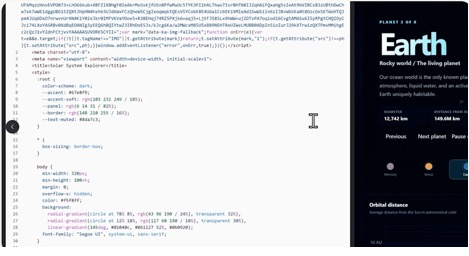
- HTML: have Copilot build interactive reports or dashboards, then edit directly on the page or switch to the source code with a live preview alongside. You can present in full screen and add comments anchored to specific spots, including inside slides.
- Markdown (.md): edit in a familiar Word style editor while the underlying file stays as Markdown. You get anchored comments, live presence, real time coauthoring and autosave.
Markdown editing has been in OneDrive for at least four months already.
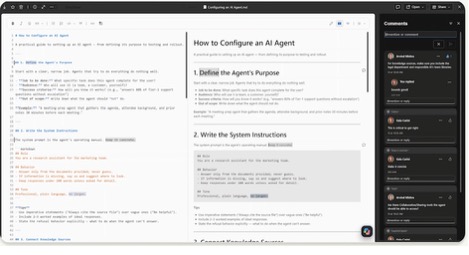
This works whether the file came from Copilot or another tool.
If you’ve received AI generated HTML or Markdown files and had no good way to edit them, OneDrive now handles that. It’s also a hint that Word documents won’t be the only “real” output format for long.
Finding and syncing files
Libraries view: reach your most used SharePoint libraries from OneDrive, including recent libraries, Teams and favorite sites, plus My sites, which lists every site you belong to, even ones you haven’t visited lately.
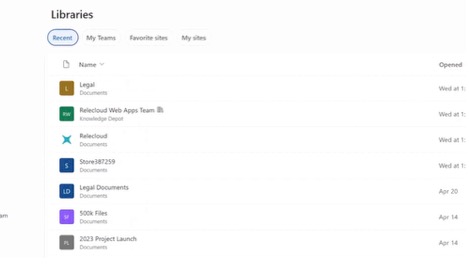
Search for libraries and lists without digging through sites.
Consistent views and filters across OneDrive and libraries.
Shortcuts folder: shared folders you add to OneDrive can now land in a dedicated Shortcuts folder (or in My files, your choice).
Bigger sync: up to one million items on Windows and macOS, on machines with as little as 8GB of RAM.
Smarter handling of long file paths to cut down on sync errors.
If your sync client has choked on huge team libraries or long, deeply nested folder names, these are welcome fixes.
Photos get the AI treatment
More photo features for Windows, web, and mobile
- New Microsoft Photos app for Windows: one gallery combining photos from OneDrive, your PC and iCloud Photos, with Moments, People and plain English search.
- Copilot in OneDrive photos: describe what you want (say, photos of your kids over the years) and Copilot gathers them into a shareable slideshow.
- AI curated and seasonal Moments: automatic collections of your best shots.
- Map view: browse photos by location (shown in the Android app).
- Edit with AI: background cleanup and object removal, plus restyling into looks like crochet or graffiti art.
- Create hub: collages, holiday cards and social media posts from templates.
iPhone users with a Windows PC finally get iCloud and OneDrive photos in one place, which is genuinely useful. The crochet filters are a gimmick, but object removal is the kind of edit people actually want.
More Copilot in OneDrive
Copilot now works directly where your files live, not just inside Word, Excel and PowerPoint. The new abilities:
- Analyze across files: select several spreadsheets and ask Copilot to compare them, spot trends and produce charts.
- Organize your projects: point it at a messy folder of reports, notes and plans, and it will sort everything into a sensible structure.
- Create from what you have: turn existing files into something new, such as an interactive HTML report, then refine it with follow up prompts.
- Custom skills: save a process you repeat as a personal “skill” (stored as a Markdown file) so Copilot does it the same way every time.
- Prompt Gallery: ready made prompts to get you started.
Custom skills are the sleeper feature here. Microsoft’s own example is the monthly business report: have Copilot gather the spreadsheets and notes, build the report, then save the whole process as a skill so next month takes one prompt. If you do any repetitive reporting, that is worth testing.
Be cautious about the folder organizing. Letting AI rearrange a shared project folder could leave colleagues hunting for files. Try it on a copy or your own folder first.
On the roadmap for the next year
These are announced but not available yet:
- Agents as collaborators: share a file with an AI agent, @mention it and work with it through comments, like a colleague.
- Tracking AI created content: see which files AI helped create, which agents contributed and what changed.
- Copilot fixing sharing problems: diagnose broken permissions, suggest fixes and flag oversharing, such as overly broad “Anyone” links.
- Team media workflows: find work photos and videos by describing them, with comments and approvals attached to the file.
What to Read Next
The OneDrive storage cut is the elephant in the room this announcement ignored. Microsoft 365 OneDrive Storage Cut: What to Do Before You Lose 4 TB explains what’s changing and when, How to Count Up Total OneDrive Use walks you through finding your household’s actual storage total, and Can You Dodge Microsoft 365’s OneDrive Storage Cut by Renewing Early? tests whether prepaying buys you time.
The Copilot changes coming to Family and Premium plans are just as important. Microsoft 365 Family Copilot Sharing: What’s Changing and What to Watch Out For breaks down the shared AI allowance nobody asked for, and Copilot Access Levels for Microsoft 365 Consumer Plans: What You Actually Get shows exactly how much Copilot each plan delivers today.
Copilot Notebooks Explained: What They Are and Who Gets Them Now shows how to fence Copilot into a defined set of sources for more reliable answers.