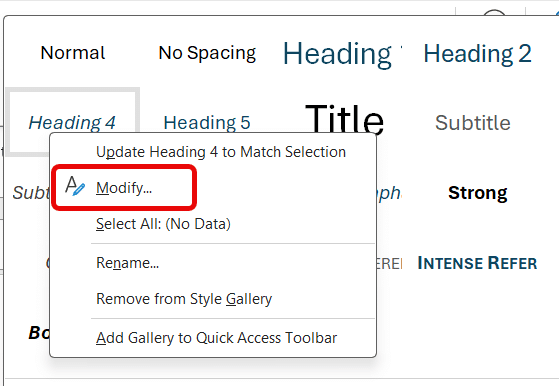
Changing the font, size or style for all Word documents is remarkably easy and there’s two ways to do it. Alter the font that’s automatically used when you make a ‘blank document’. In Word 2007 and later the default font face is Calibri, font size 11 and style Normal. This
There’s a way to quickly change the language setting for a multi-lingual Microsoft Word document, by adding a language selector to the Quick Access Toolbar (QAT) like this. Use this as a pull-down list to change the language setting in parts of a document. The problem is the fixed width
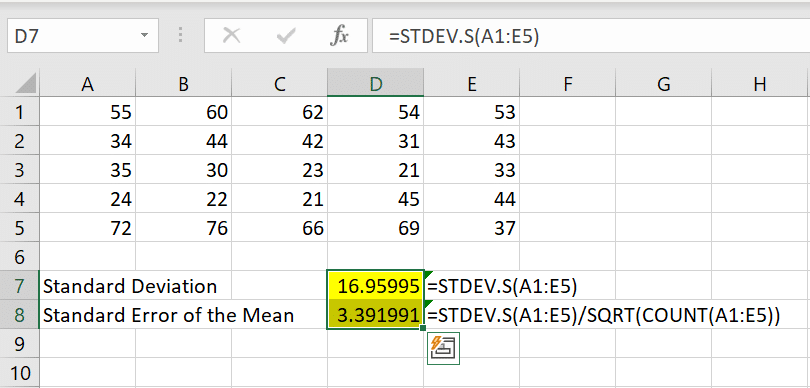
Excel statistical functions have many Average / Mean options including Average with IF for filtering or mean with extreme values excluded. by David Goodmanson In a world which has more and more data, statistics are really important. They help you distill lots of numbers down so that you can see
Type the micron µ, micrometer or mu μ symbol in Word, Excel, PowerPoint and Outlook. Stuart H has an AutoCorrect suggestion: ” I need to use the symbol μ for micron (1/000 mm) and use mu for this. “ The Micrometre / Micrometer is one-millionth of a meter. The μ
How to change the look of Word mail merge data like dates and dollar amounts to exactly what you want to see in the documents. Nancy M asks: “I try to merge data (such as amount, PO#, to whom, as well as the date) from an Excel database. In the
Hiding Footnotes or Endnotes in a Microsoft Word document is possible but needs a little trickery. Maybe you want a ‘clean’ version of the document without the clutter of notes. Or maybe the footnotes/endnotes are your own references for sources of information not intended for others to see. Ideally there
Outlook has had a Categories feature for a long time … here’s how you can use it and why. Categories let you group Outlook items (emails, contacts, calendar and tasks) into broad topic areas or subjects … all without moving from their original folders. They can be subjects that a
Recording Studio lets you make a video of your entire PowerPoint presentation. Not just the slides but hear the presenter talking and even seeing the presenter/s on screen, pointing or drawing on slides. The video you make can be shared and streamed just like any other video. gives users the
Windows Movie Maker is a simple and free video editor from Microsoft that still works in modern Windows. Officially it’s no longer available but it’s still available if you know the magic spell. We’ve explained how to get the much-loved Office Picture Manager even though it’s been officially removed from
Find or change many web links in Word documents using the Replace command, here’s the two tricks – one is good and the other not so effective. For example, you might need to change the domain name due a corporate restructure or update links so they are secure (https) instead
In Microsoft Word you can use Find combined with your own actions and easily switch between the Find and editing. That’s great for situations where a simple Replace command isn’t enough. Find results show up in the left-hand pane or dialog box, you can move between find results and editing,
Why does the same picture appear rotated sideways or flipped in Outlook for Windows/Mac but right side up elsewhere? It’s an image annoyance in older versions of Microsoft Outlook which we’ll explain. Outlook for Windows or Mac lets you preview a picture by clicking on the attachment icon but sometimes
Combine or divide adjacent Microsoft Word or PowerPoint table cells into a merged single cell or split a cell in two. Welcome to ‘Merge Cells’ where you can combine adjacent cells into a single cell. It’s very handy for table formatting tricks and other unusual situations like a longer than
The blank black slide which appears usually at the end of a slideshow is a default setting in PowerPoint. But it can be changed. The blank black slide which appears usually at the end of a slideshow is a default setting in PowerPoint. But it can be changed. Open PowerPoint
How to change the PowerPoint slide numbering to a different start number. In PowerPoint, slides are numbered by default from 1 but that’s not always what you need. For example, you’re working on some slides which are just part of a set of slides eg. working on slides from number
In PowerPoint you can record narration and comments during or after a slideshow. This makes the presentation more interesting and interactive. This feature is especially useful when you convert presentation to video. With narration the video would seem complete and the process of doing this is quite simple and easy.
One of the eye-catching features since PowerPoint 2010 right up to PowerPoint 365 is turning your mouse into a virtual laser pointer. A ‘laser pointer’ transforms the boring mouse pointer to something striking and easier to see on the screen. This is especially useful while delivering presentations as it eliminates
Occasionally you’ll get someone who sends lots of messages you don’t want to see. Outlook has a few options for refusing or politely ignoring messages from certain email senders – either individually or automatically. Most commonly these are enthusiastic zealots on some subject and are trying to ‘spread the word’
How to make mail links on web pages or emails open in Outlook for Windows instead of some other mail app. Fix this in Windows 11, Windows 10 and earlier Windows. Sometimes Outlook ‘forgets’ that it’s the place for all email work. You click on an email address and get
Here’s eight better but simple table formatting options not available from Microsoft Word’s Table Style gallery. Word’s Table Style gallery is a tempting selection of table formats but it doesn’t show you all the options to make your table look good. Some of these variations are right there on the
There are five different types of style (collection of formatting settings) in Microsoft Word. There’s three styles for text plus Tables and List styles. Paragraph styles Originally, Word only had paragraph styles. Styles could only be applied to an entire paragraph. Any changes to an individual word or phrase had
How to get rid of an email conversation or thread in Outlook – it’s called Ignore or Mute. Sometimes you get emails on a topic that doesn’t matter to you and is cluttering up your Inbox. Outlook for Windows has a fairly simple solution – the Ignore button. Ignore tells Outlook
When you open a master document in Microsoft Word it might give you a scare. Instead of showing the document text all you see is some links. All the subdocuments will appear as hyperlinks in the master document. To see the entire master document with sub-documents go to View |
An easy way to make fancy text, especially headings, with extra style and flourish is with the OpenType Ligatures in Word for Microsoft 365, 2021 and earlier versions of Word including Word for Mac. Microsoft Word supports OpenType Ligatures. Apart from Word, OpenType Ligatures are also applicable in Publisher and,