Outlook Categories in Outlook Web Access
Ellen F writes:
” Thanks for this: Outlook Categories – Why and How , which Microsoft of course doesn’t tell us about. However, I’m using Outlook Web Access and I can see how to apply categories to my emails but cannot figure out how to assign text labels to the colors. There’s no “Home | Categories” anywhere that I can find, and none in Office 2007 on my desktop. Any suggestions?“
It depends on the version of Outlook Web Access (OWA) but, from what we can see, the Category text labels have to be setup in Outlook. Once setup they’ll appear in OWA.
In OWA that comes with Exchange Server 2013, Category support is limited to the Manage Categories options (at the bottom of the Categories list). You can delete a Category (the usual black X on right) or change the color (click on the color block on left).
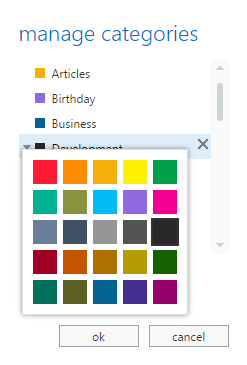
Changing the text labels doesn’t seem possible from OWA. Open up the same account with Outlook software and update the labels there.
In recent versions of Outlook that’s at Home | Tags | Categorize. Outlook 2007 and before it’s on the toolbar as Categorize then All Categories.
Those changes should be pushed back to Exchange Server and appear in OWA and anywhere else the account is accessed from.