Microsoft 365 – the subscription / annual fee plan for Microsoft Office on Windows, Mac, iPhone, iPad and Android.
Includes Word 365, Excel 365, PowerPoint 365, Outlook 365 and many other ‘365’ programs, apps and services.

Quickly add continent maps to your Office documents
Adding a continent map is easy in Word, Excel or Powerpoint, in fact there’s a few ways to get them for the Americas, Europe, Africa, Asia, Australia and Antarctica. It depends on the quality you need and version of Office. Continental Icons Among the many icons are silhouettes of all the continents – at least […]
Paste Icons or SVG from Office documents to other apps
Microsoft is expanding their support for SVG graphics by allowing these ‘Icons’ to be copied from Office documents into other third-party apps. Users can take an Office Icon or SVG and easily copy it to another app to use or change beyond Office’s in-built features. There’s no special menu item or feature, it’s part of […]
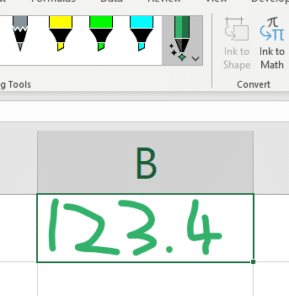
Now you can handwrite directly into Excel cells
Writing into cells is now possible in Excel for Windows using the Action Pen in a new way. Sadly, as we’ll see, the implementation is a bit clumsy and lacks documentation. Action Pen was introduced earlier this year as a way to edit documents with digital ink gestures. Action Pen handwriting into a cell Draw […]
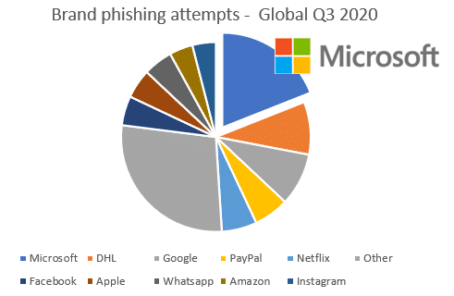
Microsoft leads again! The most impersonated brand on the Internet
Hackers now imitate Microsoft account logins more than any other, so criminals can steal personal and corporate information. So Microsoft leads again, but you won’t see this in their promotions. A brand phishing attack is a fake site that appears to be the real company, often using a similar URL and a page design the […]

Be polite and professional in Zoom and Teams calls
Joining a Zoom or Teams call isn’t as simple as turning on your computer and looking at the camera. Preparation is necessary to make sure you look and sound good and are polite to the other callers. Simple keyboard shortcuts to mute/unmute or ‘Push to Talk’. And we have sage advice from a former British […]
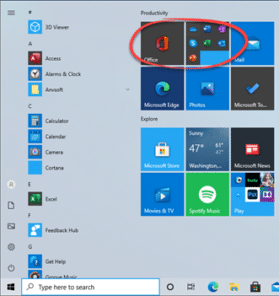
Office dropped onto Windows computers, in a new way
Microsoft is trying a new way to push Office or Microsoft 365 to new customers by dropping links into the Windows Start Menu. We’ve seen this on the Start Menu of Windows 10 preview releases. It’s a group of icons for Word, Excel, PowerPoint, Outlook, OneNote and Skype. Most of the links are to the […]
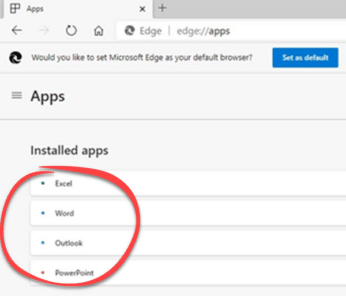
Office apps forced into Edge browser
Microsoft appears to be pre-installing the Office web apps into their Edge browser. The web based versions of Word, Excel, PowerPoint and Outook are way beyond mere web pages. They are programs in their own right known as Progressive Web Apps or PWA. As reported by WindowsLatest, these Office PWA’s are being installed without permission […]

Office 365 continues to be a hackers treasure chest
Office 365 hosting is still a big target for hackers and criminals to infiltrate organizations around the world. There are two new terms to know: Lateral Movement and Breakout Time. As Microsoft pushes their cloud services, it’s become a bigger and more valuable target for anyone wanting private data to sell or blackmail. Office 365 […]

Microsoft bug fixes have October Outlook surprise
There are 87 different security breaches fixed in this months rollout of Microsoft bug fixes, including an important one for Windows. Also a Critical fix for Outlook and patches for Word, Excel. We’ll start with a very critical Windows bug that’s important to patch right away. Vital Windows 10 bug fix It’s possible to run […]

Is Excel ready for negative interest rates?
Are your Excel worksheets ready for negative interest rates? The world is seeing historically low interest rates. So low that they can drop to zero or even lower rates. Not only can Excel worksheets break with unexpected negative percentages but modelling can accidently move into negative territory. Interest rates might get more precise going to […]

8 tips for great Excel Sparklines
Excel’s Sparklines have a good range of options for highlighting high and low values, text or calculated overlays, changing axis and handling blank or zero values. Sparklines are in Excel for Windows and Mac. Excel Mobile (iPhone, iPad, Android) shows existing Sparklines made elsewhere but they can’t be changed, only resized or deleted. Even the […]

WTF! Microsoft 365 goes offline … again. This has got to stop.
There’s been another breakdown in Microsoft’s crucial online services – the third in only ten days. The trouble started on Thursday 7th October about 2:45pm US East Coast time (18:45 UTC). Users could not login to Microsoft cloud services. According to Microsoft, the outage affected “Microsoft Teams, Outlook, SharePoint Online, OneDrive for Business, and Outlook.com.” […]
Office 365 for Mac has major change coming
Microsoft is changing their operating system requirement for Office 365 on Mac from 10 November 2020. From 10 November 2020, Office 365 will need one of these macOS release: 10.14 (Mojave) 10.15 (Catalina) the upcoming 11.0 (Big Sur) to get Office 365 updates or install on new computers. Keep up with the latest Microsoft Office […]
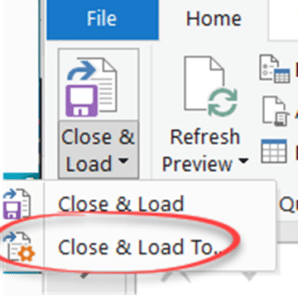
Better management of large databases in Excel
Excel isn’t the best way to store a large database but it’s a great way to sort, filter, analyse, chart and PivotTable from it. Here’s the best way to import and update a large database into Excel. The standard way to store a list in Excel is to import CSV’s or other data into a […]
What happened with UK COVID tracking and Excel?
The UK has been embarrassed (again) with the news that around 16,000 COVID-19 test results were missing from the official database and so contact tracing wasn’t done. The culprit? Excel. Or, to be fair, bad use of Excel is to blame. Not understanding it’s limits and how to workaround them. We’ve tried to figure out […]
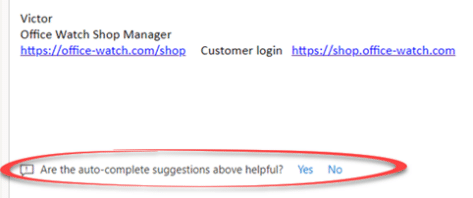
Text predictions will type for you in Outlook and Word
Word and Outlook are getting a new text prediction feature which suggests the rest of a sentence and phrase as you type. It’s like an advanced form of autocomplete that appears in browsers. As you type, the rest of a word or more will appear in light gray. Accept the text prediction, press Tab. Reject […]