Microsoft 365 – the subscription / annual fee plan for Microsoft Office on Windows, Mac, iPhone, iPad and Android.
Includes Word 365, Excel 365, PowerPoint 365, Outlook 365 and many other ‘365’ programs, apps and services.

How to put Office Watch ebooks on an iPad or iPhone
Reading an Office Watch ebook on a portable device like an iPad or iPhone is quite easy. We’ll take you through the steps, which work for any PDF or other files, not just our ebooks. Many thousands of our Office Watch ebook readers use their iPad/tablet to read our books. The other day we received […]
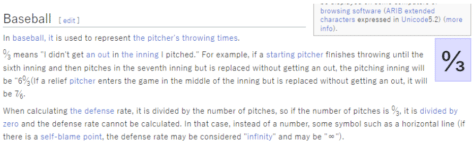
Zero Thirds (Baseball) ↉ emoji in Word, Excel, PowerPoint and Outlook
How to insert the Zero Thirds (Baseball) ↉ fraction or symbol into Microsoft Word, Excel, PowerPoint or Outlook. Both in Office for Windows and Office for Mac. Zero Thirds ↉ symbol (officially called ‘Vulgar Fraction Zero Thirds’) is a rarely used Baseball scoring symbol. The best explanation we could find was a Japanese Wikipedia page, here’s […]

All about MROUND() in Excel
MROUND() is lesser known but really useful rounding function in Excel, it’s worth considering for anyone dealing with cash money. In short: MRound() rounds up or down to the nearest multiple you choose. It’s very handy for rounding prices to match the lowest coin or note you want to handle, but it’ll have other uses […]

The important difference between Int() and Trunc() in Excel
There’s an important difference between two seemingly similar Excel functions: Int() and Trunc() don’t always give the same results so we’ll explain how to choose wisely. Both Int() and Trunc() ‘shorten’ a number by removing digits to the right of the decimal place. Int() rounds the number, Trunc() doesn’t. And Trunc() has an option to […]

Discover all the Function Key goodies for PowerPoint
Here’s a complete list of the PowerPoint Function Key features from fast access to Help, jumping around the presentation, doc panes, spelling, grammar and guidelines. What you can do with the F-keys labelled F1 through F12 on your keyboard. Don’t like Function Keys? KeyTips are your way to faster Microsoft Office F1 – Help, hide ribbon […]

Secrets still left in docs after Document Inspector in Office
Office’s Document Inspector is supposed to remove or scrub information being accidentally included in Word, Excel or PowerPoint files. It’s not perfect and misses out on some critical hidden information that can give away secrets. Details in images, layers and even highlighting. Document Inspector is at File | Info in Office for Windows. The feature […]
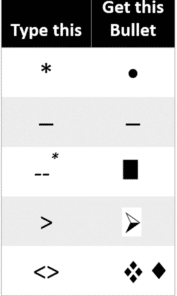
Use the fast list shortcuts in PowerPoint
PowerPoint has, finally, added shortcuts to quickly make bullet or numbered lists without using the ribbon. Here’s the full list of typing shortcuts and how to turn them off. In Word, you’re probably familiar with a list being automatically created if you type * or 1. at the start of a new line. PowerPoint has […]

Dates, time and duration, the truth in Excel
Date handling in Excel can be confusing and it’s not your fault. Microsoft could do a better job. Here’s a quick guide to how Excel handles dates and date arithmetic with the settings you should know. What you see isn’t what’s saved What Excel shows in a cell is only a version of what’s actually […]

Line And Paragraph Numbering In Word
How to number lines and paragraphs in Microsoft Word and format the numbers with a different font, size or color. Plus some ‘wish list’ features that are missing from Word. When you’re discussing a speech or other document ‘in progress’ you might want to number the lines or paragraphs for easy reference “Please change paragraphs […]

Construction Sign 🚧 emoji in Word, Excel, PowerPoint and Outlook
How to insert the Construction or Roadwork Sign 🚧 emoji into Microsoft Word, Excel, PowerPoint or Outlook. Both in Office for Windows and Office for Mac. Construction, Roadwork or Warning Sign 🚧 symbol can be used in PowerPoint slides and in other Office documents sometimes to mark WIP or “Work in Progress“. Need more than an […]

How to get better results with Bing Image Creation
Make better and faster images with Bing Image Creation, Dall-E and other AI tools using a few simple tricks. Here’s some ideas and comments with plenty of examples. If you’ve tried Microsoft Designer, Dall-E or other AI image makers, Bing Image Creation is nothing new and works the same way. See What is Dall-E and […]

Make your own pictures in a flash with Bing Image Creation
Microsoft has released their version of an AI image maker (like Dall-E) called, imaginatively, Bing Image Creation. We’ll explain how to access and use the preview with some examples of freshly made images and how the Content Warning/Block works. All these images are original, made by Bing Image Creation from a text description like ‘Woman […]
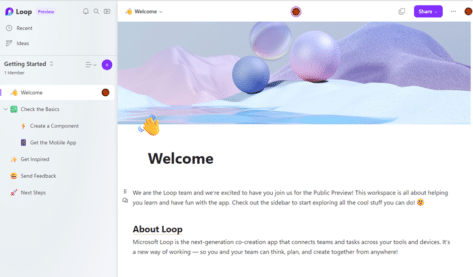
Try out Microsoft Loop, now available to the public
Microsoft Loop is coming for everyone and is now in a public preview of this new way to collaborate online. Here’s how to get into the Loop preview and how to get started exploring this new tech. Loop components are live mini-documents, worksheets or lists that people can collaborate on within other Office features like […]
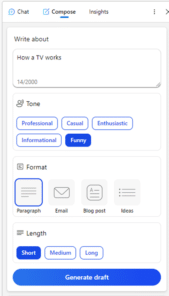
Copilot might “transform the way we work” but not right now
According to Microsoft, their AI integration Copilot is “A whole new way to work” and will “Transform the way we work”. That’s true, but not as quickly or as well as their overstated hype suggests. Here’s why I’m cautious about the Copilot promises. Microsoft is rushing both publicity and release to keep ahead of Google, […]

Fixing Microsoft Office Unlicensed Product errors
Here’s what to do if you get the dreaded Microsoft 365 / Office 2021 or Office 2019 Unlicensed Product / View only error message. Assuming you have a current Office 2021/2019 or Microsoft 365 subscription (we’ll show you how to check that, below). The unlicenced product warning usually happens if you’ve started Office after a […]
Find more and faster in Word using these tricks
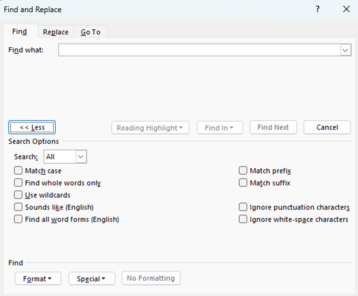
Use these Microsoft Word options to quickly find words and word variations that you might have thought impossible. Finding words that sound the same or past, present and future tenses in the one search or ignoring punctuation to find “its” and “it’s” in one search These options are in the two places you can Find […]









