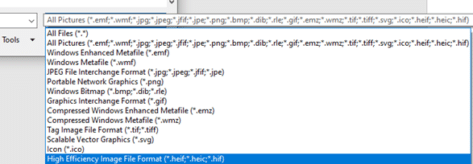
How to use HEIF/HEIC/HIF Apple images in Microsoft Office
Microsoft has added support for Apple’s iPhone and iPad image formats .HEIC .HEIC and .HIF but there’s a small extra price to pay. After an unsubtle reminder from us, Microsoft has clarified the two extensions needed and the extra to be paid. iPhones and iPads now use a new image format .HEIC or ‘High Efficiency […]
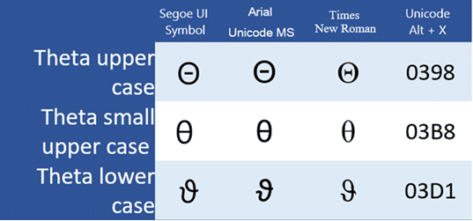
Type Theta Upper Case Θ Small Upper Case θ or Lower Case ϑ Symbols
Theta upper case Θ, Theta small upper case θ and Theta lower case ϑ symbols in Microsoft Word, Excel, PowerPoint, or Outlook. Both in Office for Windows and Office for Mac. Theta (uppercase Θ or θ / lowercase ϑ) is the eighth letter of the Greek alphabet. The lowercase symbol represents many things, such as an unknown variable in trigonometry, or a plane angle in geometry. […]

New mystery message in Office apps on Chromebooks
Chromebook users are getting unexplained messages when they use some Office apps, leading to rumors about Microsoft Office support of Chromebooks. Microsoft isn’t helping by their silence but the signs are not good for paying Office customers with Chromebooks. It all started when Chromebook users reported getting pop-up messages and it was reported by WindowsUnited.de […]
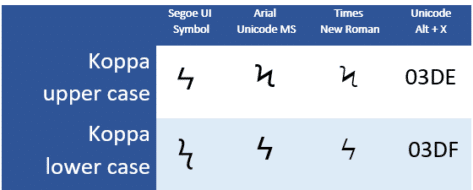
How to type Koppa upper case Ϟ, or lower case ϟ symbols in Word or Office
Type the Koppa upper case Ϟ and Koppa lower case ϟ symbols in Microsoft Word, Excel, PowerPoint, or Outlook. Both in Office for Windows and Office for Mac. Koppa (uppercase Ϟ / lowercase ϟ) is a letter used in the earlier forms of the Greek alphabet, it was originally used to denote the ‘k’ sound but […]
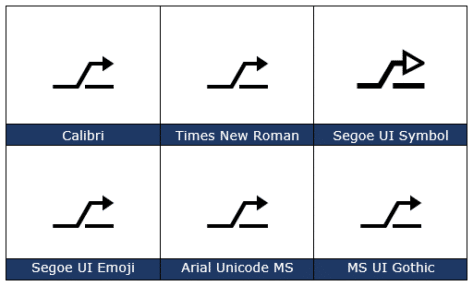
How to type the Alt Key ⎇ symbol in Word, Excel, PowerPoint & Outlook
How to insert the Alt key ⎇ symbol into Microsoft Word, Excel, PowerPoint or Outlook. Both in Office for Windows and Office for Mac. Alt key ⎇ symbol is a modifier key, used in a similar fashion to the Shift key. On a Mac, the same key is called Option. Most keyboards will have one […]

Thinking Face 🤔 emoji in Word and Office
Insert the Thinking Face 🤔 emoji into Microsoft Word, Excel, PowerPoint or Outlook. Both in Office for Windows and Office for Mac. Thinking Face 🤔 emoji has several other names; Thinker, Throwing Shade, Chin Thumb, puzzled and skeptic. How Thinking Face 🤔 looks in different fonts. Here’s some examples of how Thinking Face 🤔 looks in common Office fonts. Thinking Face 🤔 codes These are the important code numbers […]
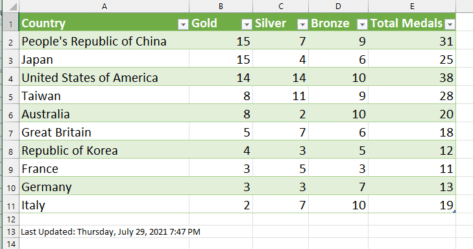
Make your own live Olympics medal tally in Excel
Our readers and supporters can now download a free Excel workbook which imports the latest Tokyo Olympics medal tally into Excel. All you need is a recent Excel for Windows with Get & Transform – Excel 365, Excel 2019 or Excel 2016 for Windows. (Alas, not Excel for Mac). There’s a simple table of the […]

Discover Office Scripts, the new way to automate Office
There’s a new way to program or automate actions in Microsoft Office called Office Scripts. We’ll explain what it is, how it’s different from Javascript or VBA and who can get it. Office Scripts is available for some commercial users in Excel but it’ll spread to other Office apps and possibly/hopefully non-Business users. Even if […]

Om or Devanagari Om ॐ symbols in Word and Office
Type the Om or Devanagari Om ॐ symbol in Microsoft Word, Excel, PowerPoint, or Outlook. Both in Office for Windows and Office for Mac. The Om symbol is a divine sign that denotes the essence of absolute truth, Atman or consciousness. In Hinduism, Buddhism, and Jainism. The syllable is chanted either separately or before a spiritual recitation. The Om symbol is independent […]

Excel’s better Average(), try TrimMean() instead
TrimMean() function is a slightly different and useful measure than the regular Excel Average(). It’s still an average/mean but without the high and low, extreme or outlier values in the list. Average() (and its partners AverageA() and AverageIFS() use all the values in the array or list provided. TrimMean() excludes the highest and lowest extreme […]
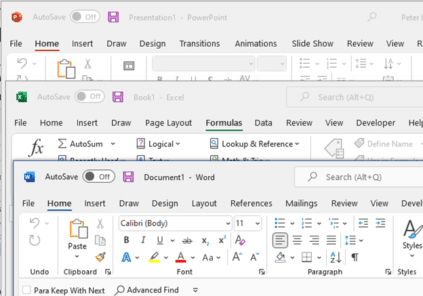
Why is the new Office 365 look so bland?
Office 365 for Windows is getting a ‘visual refresh’ a changed look to the ribbon and overall appearance of Word, Excel, PowerPoint and Outlook (the other Office apps will change later). This new look is currently in beta testing and may change a little before public release. It’s only fair to start by saying we […]

Weary / Distraught face 😩 emoji in Word and Office
Type the Weary / Distraught face 😩 into Microsoft Word, Excel, PowerPoint or Outlook. Both in Office for Windows and Office for Mac. Weary / Distraught face 😩 emoji is also called Wailing, Frustrated or Sadness. How Weary / Distraught face 😩 looks in different fonts. Here’s some examples of how Weary / Distraught face […]

Office shortcut of the Week – 2005 compendium
The Office Watch “Shortcut of the Week” tips for Outlook, Excel and PowerPoint from 2005 in the one convenient place. Tip 1 – Outlook navigation The Outlook navigation shortcuts could be more intuitive but here they are: Switch to Mail CTRL+1 Switch to Calendar CTRL+2 Switch to Contacts CTRL+3 Switch to Tasks CTRL+4 Switch to […]

Office 2007-Office 365 – new look – same shortcuts
Office 2007 and later to Office 365 not only has keyboard shortcuts but in many ways they are better than previous versions of Microsoft Office. For the most part the shortcuts used in Office XP and Office 2003 still work in Office 2007 through 365 also – despite the very different look of the screen. […]
Office shortcut of the week – 2004 compendium
We place all of the “Shortcut of the Week” tips from 2004 in the one convenient place. Tip 1 – Undo The Undo function has become especially important over the years as Microsoft puts more ‘intelligence’ into their products. Sometimes it ‘corrects’ your spelling or re-formats something you were quite happy with, thank you very […]

Fire 🔥 symbol in Word, Excel, PowerPoint and Outlook
Type the Fire 🔥 symbol or emoji into Microsoft Word, Excel, PowerPoint or Outlook. Both in Office for Windows and Office for Mac. Fire 🔥 emoji has many names like Hot, Lit, Flame and Snapstreak How Fire 🔥 looks in different fonts. Here’s some examples of how Fire 🔥 looks in common Office fonts. Fire […]









