
Simplify Excel Formulas with the CHOOSE Function
Tired of endless nested IF statements in Excel? The CHOOSE function offers a cleaner, smarter way to pick from multiple options using a single, simple formula. Learn how to replace complex conditional logic with CHOOSE(), streamline your spreadsheets, and make your formulas easier to read, maintain, and debug. Choose() an alternative to IF or NestedIF […]
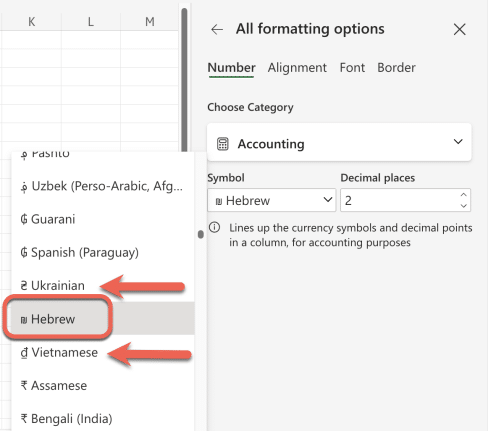
Excel’s “Hebrew Shekel” Label Sparks Unfounded Online Rage
A viral post recently accused Microsoft Excel of bias for labeling the shekel as “Hebrew” instead of “Israel.” However, there’s no conspiracy—Excel lists currencies by language, not country, using the same format for all entries. Thanks to Office Watcher, Gary B. from Portland for alerting us to this bit of ragebait on social media. It […]

Copilot is not as popular as Microsoft says, Customers Aren’t Buying the hype
Microsoft’s Copilot is NOT the wildly popular, world class AI product that Microsoft says it is. That’s not just an opinion; there are hard facts to back it up. The recent sharp price drop and ignored user frustration suggest otherwise. From intrusive integration to privacy concerns, Copilot’s rollout has backfired. Of course, nothing could be […]
Keep Vintage Microsoft Office Alive: Zero‑Day Patches to the Rescue
Your trusty Office 2016 or 2019 has lost official Microsoft support. There’s a smart, affordable way to keep your ‘vintage’ Office software secure and running smoothly after October 2025. Zero-day micropatching can protect you from new security threats, extend the life of your software and help you avoid costly upgrades. The sun has finally set […]

Excel’s Copilot() Function Can Be Dangerous in the Wrong Hands
Microsoft’s Copilot() function in Excel comes with real risks. When used incorrectly, Copilot() can produce misleading or nonsensical results that could compromise data accuracy and decision-making. Treat this AI feature with caution and Microsoft should add stronger safeguards and clearer warnings against misuse. It all started with this post on the socials. Please, please don’t […]
Excel dates: How to Reveal Year, Month & Day Details in many different ways
Want to show only the year, month, or day from an Excel date? We explain how to use the TEXT(), YEAR(), MONTH(), and DAY() functions or cell formatting to display or calculate date details efficiently. Learn when to use each method, which is fastest, and how your choice affects Excel performance and spreadsheet clarity. Once […]
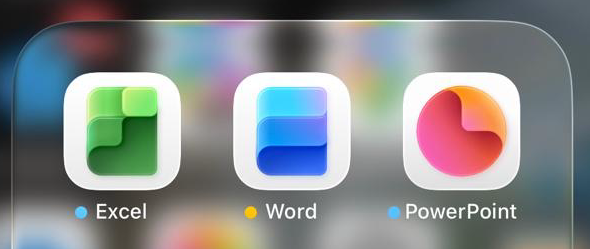
Microsoft Office Icons Lose Their Letters — Users Push Back on Confusing New Design
Microsoft is testing new Office icons for Word, Excel, and PowerPoint that drop their signature “W,” “E,” and “P” letters. The minimalist redesign, currently seen in iPhone preview apps, aims for simplicity but sacrifices instant visual recognition. Without letters, the icons blend into a sea of app symbols, making it harder to find the right […]
Microsoft 365 Copilot Expands for Personal & Family Plans — But Limits Remain
Microsoft is extending more Copilot features to Microsoft 365 Personal and Family subscribers, offering expanded AI tools across Word, Excel, Outlook, and more. While users now gain access to enhanced drafting, summarizing, image generation, and voice features, the long-standing cap of 60 AI credits per month still applies. Compared to the unlimited use in the […]

Microsoft 365 Premium: Copilot AI, new Features & Pricing Explained
Microsoft 365 Premium is the newest consumer plan that bundles the popular Family subscription with Copilot Pro at a much lower cost. For $199 a year, subscribers get six accounts with full Microsoft Office apps, 1TB OneDrive storage each, and premium Copilot AI tools for the plan owner—including research, data analysis, and workflow automation. Our […]
Microsoft 365 Adds ‘Vibe Working’ Copilot Agent for Word, Excel & Office
Microsoft is rolling out a new wave of AI-powered tools in Microsoft 365. Copilot Agent for Word, Excel, and Office promise to generate full documents, reports, spreadsheets, and presentations from natural language prompts, then refine them through AI chat. Microsoft aims to make content creation faster and more consistent across its apps, though concerns remain […]
What Excel Agent Mode Can (and Can’t) Do: Real-World Test Results
Microsoft is promoting Excel Agent as a powerful new AI feature designed to build entire worksheets from a single prompt—but how well does it actually work? Office Watch put Excel Agent to the test and found a mix of promise and pitfalls. From creating a mortgage comparison sheet to handling complex formulas, Excel Agent shows […]
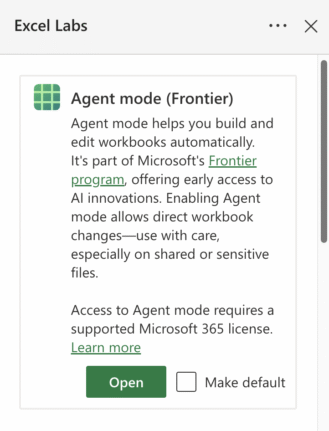
How to Join Microsoft Frontier: Early Access to AI in Microsoft 365
Microsoft has quietly opened up its Frontier program—a public preview for Copilot and AI features—to Microsoft 365 Family and Personal subscribers. While Enterprise users have had access for a while, everyday users are now being invited to test AI-driven tools across Word, Excel, and the web apps. The process to sign up isn’t entirely clear […]
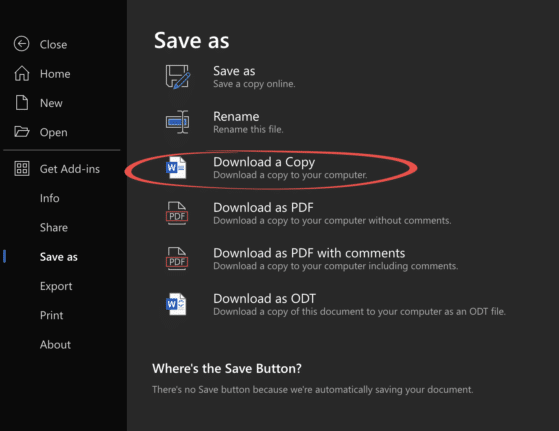
Edit Locally Saved Documents with Office Online – Free and Easy
You don’t need Microsoft 365 or desktop Office to edit your Word, Excel, or PowerPoint files. With Office Online, anyone can upload documents from their computer, make changes directly in a browser, and save the updated file back to their hard drive—all for free. This simple method works across Windows, Mac, and even Linux, making […]
Microsoft Redefines “Red” for Better Accessibility in Word, PowerPoint, and Outlook
Microsoft has quietly adjusted its classic Office “red,” shifting to a slightly softer. While the change may seem minor, it means improved readability and compliance with accessibility standards. But there’s a downside too in Word, PowerPoint, Outlook, and OneNote on both Windows and Mac, ensuring users get a color that looks the same but works […]
Ask Excel to Write or Fix Your Formula, Copilot and Beyond
Struggling with complex Excel formulas? Microsoft’s latest update brings AI-powered assistance directly into Excel, making it easier than ever to write, explain, or fix formulas. Or use free alternatives to quickly solve formula errors, create advanced calculations, or understand unfamiliar functions without needing deep technical knowledge. Here’s how Excel and AI tools can transform the […]
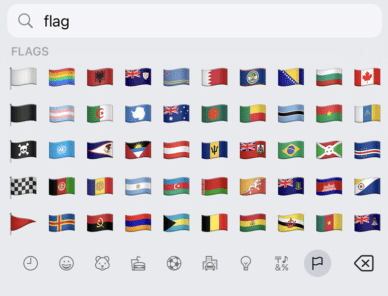
Get flag emoji in Microsoft Office with Windows workaround
Why you can’t insert national flag emoji (among many) in Microsoft Office and Windows but can in Office for Mac, macOS, iPhone and iPad. We’ll explain the workaround necessary to insert national flags in Windows and Office for Windows. Apple devices (macOS, iPhone and iPad) show flag emoji properly like this: But a Windows user […]









