Get flag emoji in Microsoft Office with Windows workaround
Why you can’t insert national flag emoji (among many) in Microsoft Office and Windows but can in Office for Mac, macOS, iPhone and iPad. We’ll explain the workaround necessary to insert national flags in Windows and Office for Windows. Apple devices (macOS, iPhone and iPad) show flag emoji properly like this: But a Windows user […]
Excel worksheet protection is not encryption
Hiding and protecting an Excel worksheet is NOT the same as full encryption. Protected workbooks can be encrypted and not available without the right password. Worksheets protected or hidden with a password are absurdly easy to view whether you have the password or not. Excel has long had the ability to hide a worksheet (tab) […]
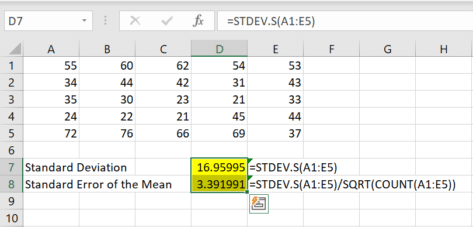
Understand and use Excel’s Standard Error of the mean
Calculating the ‘Standard Error of the mean’ or SEM is simple using Excel’s in-built functions. Understanding ‘Standard Error of the mean’ isn’t hard either. We’ll explain the formula and what it all means. To calculate standard error of the mean get the Standard Deviation of a sample (STDEV.S() or STDEV()) then divide by the square […]
Standard Deviation made easy in Excel
Understanding Standard Deviation isn’t hard, especially with Excel’s help. This quick guide shows the difference between sample and population functions so you can choose the right one and get accurate, informative results every time. Standard Deviation in Excel The standard deviation measures the variation from the average or mean of a sample set of values. A […]

Excel 365 has Searchable Drop-Down Lists with AutoComplete
Excel 365 for Windows and now Excel 365 for Mac and Mobile apps have a great improvement to its drop-down list selector. At long last we have AutoComplete or Search for pull-down lists and you don’t have to do anything to make this work. You can type a search into the drop-down list so Excel […]
Explore Cloud Fonts: A Fast, Free Design Boost in Office 2024 and Microsoft 365
Cloud fonts—your next creative shortcut—are now seamlessly integrated into Office 2024/2021 and Microsoft 365. These lightweight fonts download instantly when needed, bypassing the hassle of system installations and making them ready for use across your Word, PowerPoint, Excel, Outlook (and more) apps in mere moments. Whether on Windows or Mac, simply pick the font from the dropdown, […]
How to protect Excel sheets from unwanted changes – Part 2
How to lock certain cells in an Excel workbook and allow people to edit ranges of cells. In part one we covered the basics, how locking works with protection to stop unwanted editing of your worksheets while leaving them visible. Now we’ll cover some more, locking certain cells in a worksheet and allowing people to […]
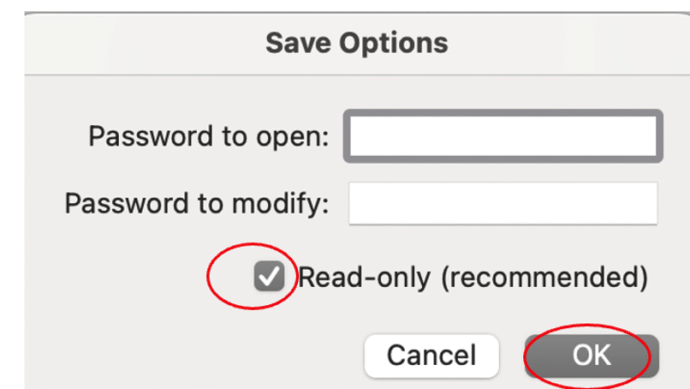
Protect or Encrypt Your Excel Workbooks
In Excel there are various ways to either protect sheets or cells from access, make a them read-only or totally encrypt the workbook with a strong password. It’s important to understand the difference in Excel between Protect and the stronger Encrypt feature. Excel’s password protection is more complicated than in Word or PowerPoint because there […]
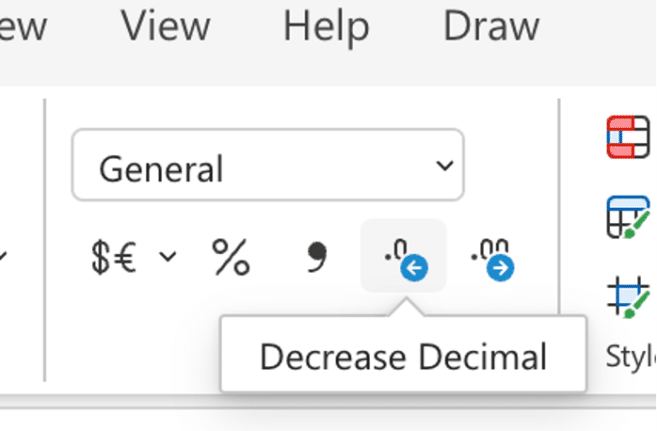
Excel increase/decrease decimal buttons change
Keep a close eye on the increase/decrease decimals buttons on the Excel ribbon because Microsoft has changed them for one version of Excel. Increase / decrease decimals is a very common Excel feature to change the visible accuracy of a number. For example, choosing Currency or Accounting style (which defaults to two decimal places / […]
How to protect Excel sheets from unwanted changes – Part 1
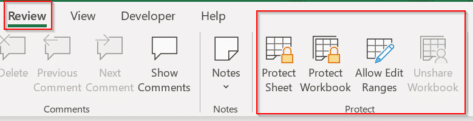
Protecting an important Excel worksheet from careless editing, or allowing only specific cells to be modified is all part of a powerful and highly flexible feature in Microsoft Excel known collectively as “Protect”. It’s been there for a long time but is little understood, so we’ll do our humble best to fix that. The idea […]
How to use Copilot() in Excel for analyzing text
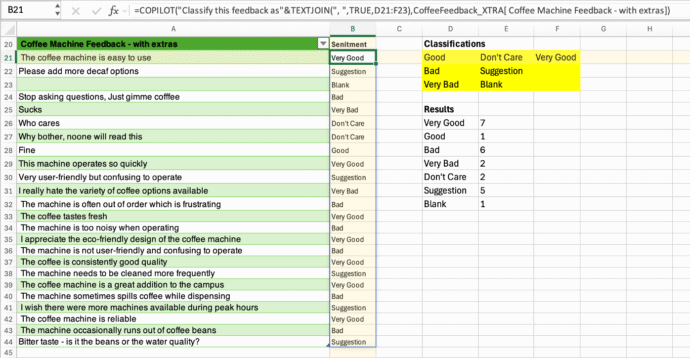
The new Copilot() function can be great for taking disorganized data like feedback from people and grouping it quickly. We’ll explain the best ways to do that and the pitfalls of relying on AI. One of Microsoft’s examples for Excel 365’s Copilot(() caught our eye and we were pleasantly surprised when we extended their example. […]
Discover the COPILOT Function in Excel
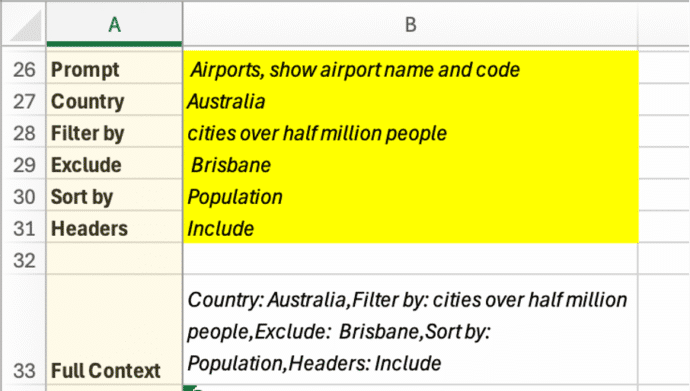
It had to happen, there’s now a Copilot() function in Excel to drop AI responses directly into spreadsheets. It’s a clever trick but, as usual, there are problems that Microsoft overlooks in their hype. Excel’s new COPILOT() function brings AI directly into spreadsheet formulas. Available now in Excel for Windows and Mac (Insider Beta channel), […]

Simple ‘one click’ force an update to Microsoft Office
A simple way to update Microsoft Office 365 for Windows with one click instead of digging into the menus to do it. We’ll show you the simple command line with options that make it possible. Normally, the Windows versions of Microsoft Office 365, Office2024, Office 2021 and Office 2019 all update automatically and you don’t […]

Python in Excel for Microsoft 365 Consumers: Available Now
Microsoft has begun rolling out Python in Excel—the powerful integration that allows users to write Python formulas directly inside Excel—to Microsoft 365 Family and Personal subscribers. That’s great news because Python adds a lot to Excel, making available a lot of features that previously Excel users could only dream about. What’s Available Now (Preview) For consumer […]
Excel gets Python – who, when and why
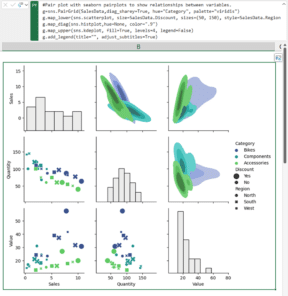
Excel 365 has access to the Python language and packages. We’ll explain what that means, who gets it and why Python in Excel is a big deal. Python is a high-end and widely used programming language with many features in its many packages or add-ons. It’s this last bit that makes Python an important extension […]
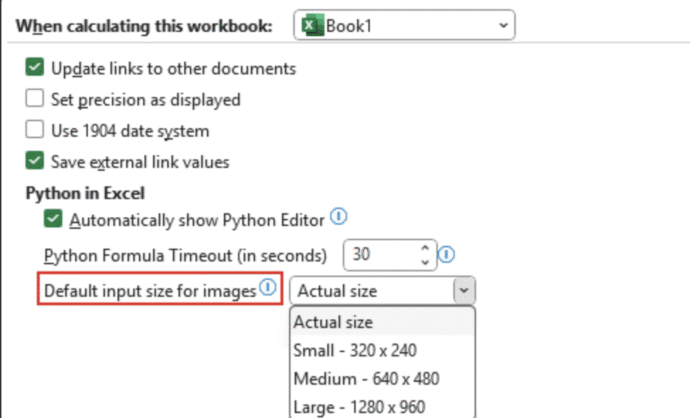
Python Meets Pixels: Excel Now Analyzes Images Like a Pro
Excel, long known for its love affair with numbers, has now developed a taste for images—thanks to Python. Microsoft has rolled out a feature that lets users insert images into individual Excel cells and analyze them using Python code. Yes, the spreadsheet just got a little more artsy and a lot more tech-savvy. Forget floating […]