All about Microsoft Office for Apple Mac. Word, Excel, PowerPoint, Outlook on macOS, Microsoft 365 for Mac, Office 2021 for Mac and earlier versions.

Excel’s Copilot() Function Can Be Dangerous in the Wrong Hands
Microsoft’s Copilot() function in Excel comes with real risks. When used incorrectly, Copilot() can produce misleading or nonsensical results that could compromise data accuracy and decision-making. Treat this AI feature with caution and Microsoft should add stronger safeguards and clearer warnings against misuse. It all started with this post on the socials. Please, please don’t […]
Excel dates: How to Reveal Year, Month & Day Details in many different ways
Want to show only the year, month, or day from an Excel date? We explain how to use the TEXT(), YEAR(), MONTH(), and DAY() functions or cell formatting to display or calculate date details efficiently. Learn when to use each method, which is fastest, and how your choice affects Excel performance and spreadsheet clarity. Once […]

How to Create a Striped Border in Microsoft Word for Emergency or Warning Signs
Need an attention-grabbing border for safety notices or urgent messages? Creating a striped border in Microsoft Word isn’t as simple as it seems—but with the right technique, you can design professional-looking emergency or warning signs in minutes. This step-by-step guide from Office Watch shows how to use Word’s background picture feature and text boxes to […]

Create Better Striped Borders in Microsoft Word with This Simple Trick
Want to make your Microsoft Word pages or signs stand out? Skip the frustrating page background tool and try this smarter way to add diagonally striped borders. Get full control over stripe position, color, and layout — perfect for eye-catching warning signs, notices, or creative designs that look sharp on every version of Word. A […]

Microsoft 365 Premium: New Plan, Lower Prices, and Built-In Copilot AI
What does the new Microsoft 365 Premium plan mean for all subscribers? It’s all good news with no major changes or price rises to worry about. Microsoft 365 Premium: Copilot AI, new Features & Pricing is the the second major change in Microsoft 365 consumer plans in less than a year. The changes come with […]
Microsoft 365 Copilot Expands for Personal & Family Plans — But Limits Remain
Microsoft is extending more Copilot features to Microsoft 365 Personal and Family subscribers, offering expanded AI tools across Word, Excel, Outlook, and more. While users now gain access to enhanced drafting, summarizing, image generation, and voice features, the long-standing cap of 60 AI credits per month still applies. Compared to the unlimited use in the […]
How to Upgrade to Microsoft 365 Premium: Step-by-Step Guide
Thinking about switching to Microsoft 365 Premium? Whether you’re moving from a Personal or Family subscription, upgrading unlocks expanded AI-powered Copilot features and enhanced productivity tools. This guide walks you through the upgrade process, highlights what to expect, and answers common questions about credits, shared accounts, and potential billing issues—helping you decide if Premium is […]

Beware fake Microsoft 365 Premium for Consumer
Confused by ads promoting “Microsoft 365 Premium for Consumer”? You’re not alone. Until late 2025, no such plan even existed—making many online offers misleading at best and outright scams at worst. With Microsoft now officially releasing Microsoft 365 Premium, it’s crucial to understand how to spot the real subscription and avoid being tricked into buying […]

College and Uni students get Microsoft 365 for half price
Microsoft is making it easier for college and university students to afford essential productivity tools. Eligible students around the world can now get Microsoft 365 Personal starting with a year free before continuing at for 50% off. The plan includes full access to Word, Excel, PowerPoint, Outlook, 1TB of OneDrive storage, and limited Copilot AI […]

Microsoft 365 Premium: Copilot AI, new Features & Pricing Explained
Microsoft 365 Premium is the newest consumer plan that bundles the popular Family subscription with Copilot Pro at a much lower cost. For $199 a year, subscribers get six accounts with full Microsoft Office apps, 1TB OneDrive storage each, and premium Copilot AI tools for the plan owner—including research, data analysis, and workflow automation. Our […]
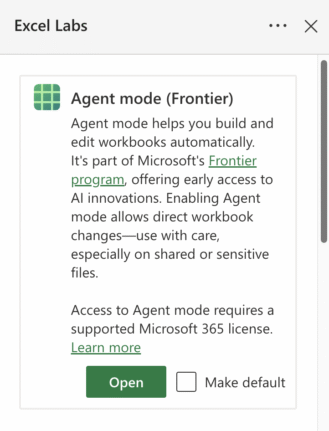
How to Join Microsoft Frontier: Early Access to AI in Microsoft 365
Microsoft has quietly opened up its Frontier program—a public preview for Copilot and AI features—to Microsoft 365 Family and Personal subscribers. While Enterprise users have had access for a while, everyday users are now being invited to test AI-driven tools across Word, Excel, and the web apps. The process to sign up isn’t entirely clear […]

Beware “Evil Kerning”: How Hackers Trick You with Fake Email Addresses
Cybercriminals are exploiting a subtle typography trick called evil kerning to disguise fake domains as trusted ones like Microsoft.com or Gmail.com. By tightening letter spacing, “rn” can appear as “m,” making scam addresses like rnicrosoft.com or grnail.com nearly indistinguishable from the real thing. Here’s how the scam works, why it’s so dangerous, and what you […]
Your Outlook.com Emails Could Kill Your OneDrive Storage—Here’s Why
Microsoft has quietly changed how storage is handled in Outlook.com: email attachments now count against your OneDrive quota. For users on free Outlook.com accounts with only 5GB of OneDrive space, this shift can quickly consume cloud storage and even disrupt email if quotas are exceeded. Here’s what this means for your mailbox, storage limits, and […]
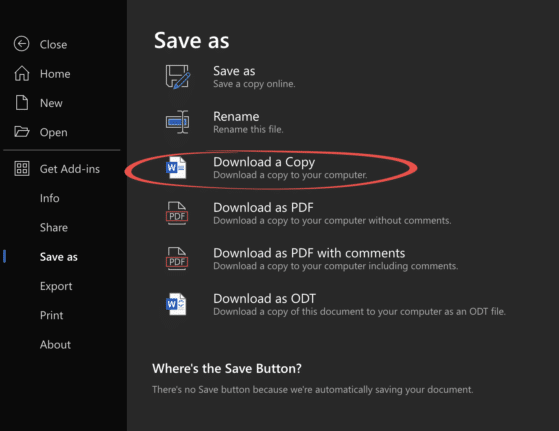
Edit Locally Saved Documents with Office Online – Free and Easy
You don’t need Microsoft 365 or desktop Office to edit your Word, Excel, or PowerPoint files. With Office Online, anyone can upload documents from their computer, make changes directly in a browser, and save the updated file back to their hard drive—all for free. This simple method works across Windows, Mac, and even Linux, making […]
Microsoft Redefines “Red” for Better Accessibility in Word, PowerPoint, and Outlook
Microsoft has quietly adjusted its classic Office “red,” shifting to a slightly softer. While the change may seem minor, it means improved readability and compliance with accessibility standards. But there’s a downside too in Word, PowerPoint, Outlook, and OneNote on both Windows and Mac, ensuring users get a color that looks the same but works […]
Ask Excel to Write or Fix Your Formula, Copilot and Beyond
Struggling with complex Excel formulas? Microsoft’s latest update brings AI-powered assistance directly into Excel, making it easier than ever to write, explain, or fix formulas. Or use free alternatives to quickly solve formula errors, create advanced calculations, or understand unfamiliar functions without needing deep technical knowledge. Here’s how Excel and AI tools can transform the […]









