All about Microsoft Office for Apple Mac. Word, Excel, PowerPoint, Outlook on macOS, Microsoft 365 for Mac, Office 2021 for Mac and earlier versions.
What Is Email Quarantine? How It Protects You or hides missing messages
Email quarantine is a security feature used by mail systems to protect users from suspicious or spam messages while ensuring that potentially important emails aren’t lost forever. Instead of automatically deleting uncertain messages, quarantine places them in a separate holding area for you to review and decide whether they’re safe or malicious. This guide explains […]

MacOS 26 Finally Adds Clipboard History — But It’s Still No Match for Windows
After years of requests, Apple has introduced a multiple-item clipboard with macOS 26 “Tahoe.” The new Clipboard History lets users access recent copies via Spotlight, offering a long-awaited boost for productivity. But compared to Windows’ slick Win + V shortcut, Apple’s version feels clunky, limited, and far from the game-changer Mac users were hoping for. […]
Microsoft Word Accepts “Accidently” as Correct — Here’s How to Fix It
Fed up with Microsoft Word’s refusal to fix “accidently”? You’re not imagining things—Word’s spellchecker lets this typo slip through. If you want to finally solve the “accidently” vs “accidentally” debate, you’ve come to the right place. Office Watch reader Steve D. noticed something strange in the Microsoft Word dictionary. According to Word ‘accidently’ is a […]
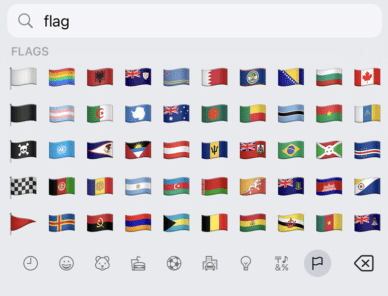
Get flag emoji in Microsoft Office with Windows workaround
Why you can’t insert national flag emoji (among many) in Microsoft Office and Windows but can in Office for Mac, macOS, iPhone and iPad. We’ll explain the workaround necessary to insert national flags in Windows and Office for Windows. Apple devices (macOS, iPhone and iPad) show flag emoji properly like this: But a Windows user […]

If “Microsoft” Calls, Hang Up — It’s a Scam (How to Spot & Stop It)
“Microsoft ” will never cold-call you. If you get an unexpected call about “Windows errors,” “Defender alerts,” or subscription refunds, it’s a tech-support scam. The safest move is simple: hang up, don’t say a word, and never read out codes or grant remote access. We show the warning signs, what to do if you answered, […]
All about Font Embedding in Microsoft Word — make sure your document looks the same across devices
Make sure your Microsoft Word documents look the same everywhere by embedding fonts, just in case the right fonts aren’t installed on recipients’ systems. How to embed fonts in Word on both Windows and Mac plus the options and alternatives for font embedding. Allow anyone opening the document to see what you intend. When you […]
Stop Microsoft Word’s Automatic Formatting Tricks
Take control of automatic formatting in Microsoft Word, the AutoFormat and AutoCorrect features. Whether you’re frustrated by Word turning your asterisks into bullet points or want to customize how your documents handle quotes, lists, and spelling corrections, this guide explores every option available. Discover how to manage, disable, and fine-tune Word’s automatic helpers so you […]
Excel worksheet protection is not encryption
Hiding and protecting an Excel worksheet is NOT the same as full encryption. Protected workbooks can be encrypted and not available without the right password. Worksheets protected or hidden with a password are absurdly easy to view whether you have the password or not. Excel has long had the ability to hide a worksheet (tab) […]
Microsoft 365 Classic: Watch Out for Hidden Full-Price Auto-Renewals
If you have Microsoft 365 Classic, watch for a sneaky Microsoft trick to make you pay more. They are automatically renewing Classic plans to more expensive Microsoft 365 plans without notice. That’s not just tricky but possibly illegal. We’ll explain how to keep Microsoft 365 Classic or complain if it’s already happened. Microsoft 365 Classic […]
Understand and use Excel’s Standard Error of the mean
Calculating the ‘Standard Error of the mean’ or SEM is simple using Excel’s in-built functions. Understanding ‘Standard Error of the mean’ isn’t hard either. We’ll explain the formula and what it all means. To calculate standard error of the mean get the Standard Deviation of a sample (STDEV.S() or STDEV()) then divide by the square […]
Standard Deviation made easy in Excel
Understanding Standard Deviation isn’t hard, especially with Excel’s help. This quick guide shows the difference between sample and population functions so you can choose the right one and get accurate, informative results every time. Standard Deviation in Excel The standard deviation measures the variation from the average or mean of a sample set of values. A […]

Make your own 3D models from a photo
Transform your photos into interactive 3D models in seconds with Copilot 3D, Microsoft’s experimental tool makes it easy to generate high-quality 3D models from simple images. Discover how this experimental technology can let you change the view of a person or object. Take a photo of an object with a plain background and the smarties […]
Explore Cloud Fonts: A Fast, Free Design Boost in Office 2024 and Microsoft 365
Cloud fonts—your next creative shortcut—are now seamlessly integrated into Office 2024/2021 and Microsoft 365. These lightweight fonts download instantly when needed, bypassing the hassle of system installations and making them ready for use across your Word, PowerPoint, Excel, Outlook (and more) apps in mere moments. Whether on Windows or Mac, simply pick the font from the dropdown, […]
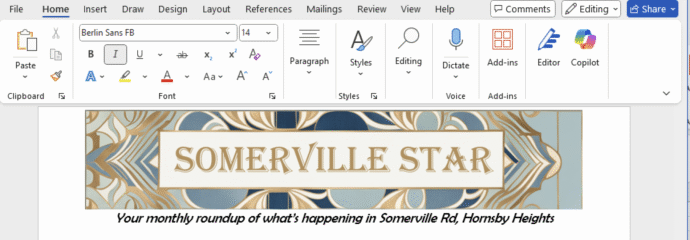
Create Eye‑Catching Titles for Word Docs with Microsoft Designer
Use Microsoft Designer to make compelling but effortlessly professional titles for Word documents, sheets or slides. We’ll explain how to do it, not the simplistic way that Microsoft hypes, but how Designer works in the real world. Start a banner, tweak sizing, customize fonts and colors, then seamlessly insert your perfected headline. According to Microsoft, […]
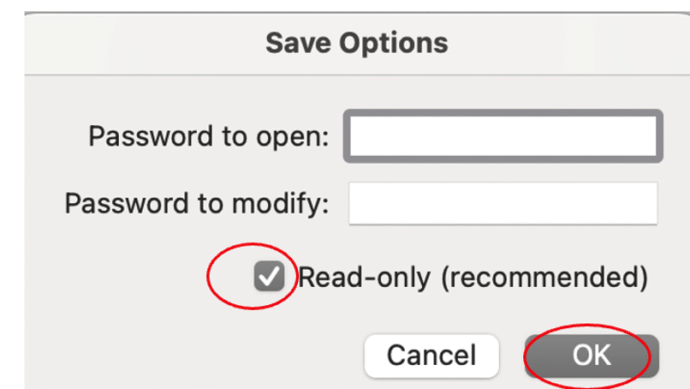
Protect or Encrypt Your Excel Workbooks
In Excel there are various ways to either protect sheets or cells from access, make a them read-only or totally encrypt the workbook with a strong password. It’s important to understand the difference in Excel between Protect and the stronger Encrypt feature. Excel’s password protection is more complicated than in Word or PowerPoint because there […]
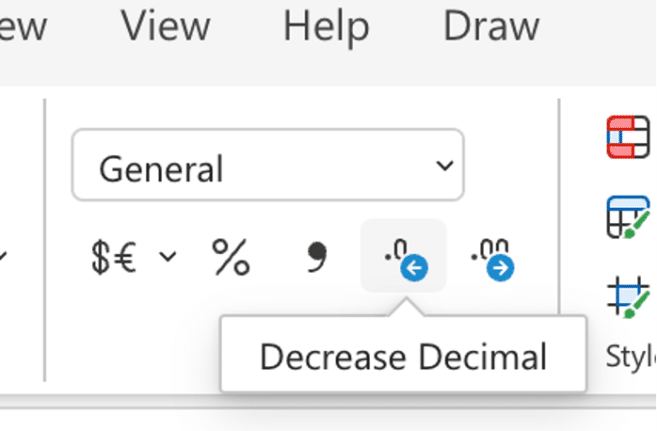
Excel increase/decrease decimal buttons change
Keep a close eye on the increase/decrease decimals buttons on the Excel ribbon because Microsoft has changed them for one version of Excel. Increase / decrease decimals is a very common Excel feature to change the visible accuracy of a number. For example, choosing Currency or Accounting style (which defaults to two decimal places / […]









