All about Microsoft Office Word, Excel, PowerPoint and Outlook, Microsoft 365, Office 2021 and earlier versions.
Keep Vintage Microsoft Office Alive: Zero‑Day Patches to the Rescue
Your trusty Office 2016 or 2019 has lost official Microsoft support. There’s a smart, affordable way to keep your ‘vintage’ Office software secure and running smoothly after October 2025. Zero-day micropatching can protect you from new security threats, extend the life of your software and help you avoid costly upgrades. The sun has finally set […]
Copilot Deep Research Tested: Real Results, Flaws, and Formatting Fails
Microsoft’s Copilot “Deep Research” promises detailed, AI-generated reports—but does it deliver? Office Watch’s hands-on tests reveal the strengths, limitations, and frustrating formatting flaws behind Microsoft’s most ambitious Copilot feature yet. From factual errors to messy Word documents, here’s what you should know before relying on Deep Research for serious work Copilot’s Deep Research option creates […]
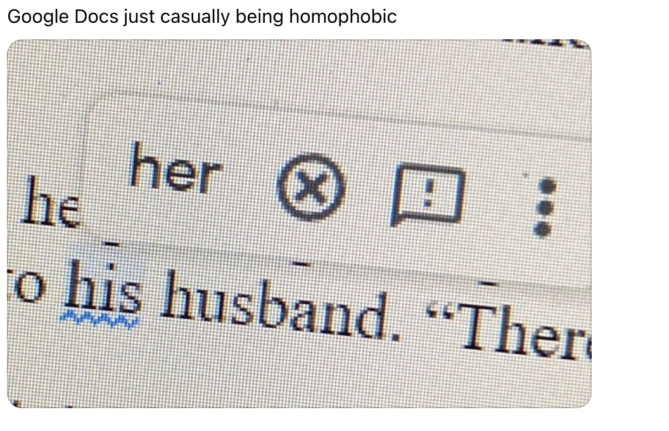
Is Microsoft Word Casually Homophobic? Why Grammar Checkers Differ
A viral post sparked debate over whether Microsoft Word’s grammar checker shows hidden bias, but the truth is more technical than cultural. Office Watch investigated and found that Word and Google Docs simply make different choices about what to flag in grammar suggestions. There’s no homophobia here, just decisions that shape how language tools interpret […]
Excel’s Copilot() Function Can Be Dangerous in the Wrong Hands
Microsoft’s Copilot() function in Excel comes with real risks. When used incorrectly, Copilot() can produce misleading or nonsensical results that could compromise data accuracy and decision-making. Treat this AI feature with caution and Microsoft should add stronger safeguards and clearer warnings against misuse. It all started with this post on the socials. Please, please don’t […]
Microsoft’s Aptos Fonts for Free — Use the New Office Font Anywhere
Microsoft’s default font family, Aptos, isn’t limited to Microsoft 365 or Office 2024. Anyone can download and install the complete Aptos font set directly from Microsoft to use across any app or platform. Whether you’re running Office 2021, older Office versions, or non-Microsoft software like LibreOffice, this quick download ensures full compatibility and access to […]
The real choices for Office 2016 and Office 2019 customers
As Microsoft ends support for Office 2016 and Office 2019, millions of users face an important decision, stick with their trusted software, move to Microsoft 365, upgrade to Office 2024, or switch to a free alternative. While your current Office apps will still work, they’re now more vulnerable without security updates. Here’s what you can […]
Excel dates: How to Reveal Year, Month & Day Details in many different ways
Want to show only the year, month, or day from an Excel date? We explain how to use the TEXT(), YEAR(), MONTH(), and DAY() functions or cell formatting to display or calculate date details efficiently. Learn when to use each method, which is fastest, and how your choice affects Excel performance and spreadsheet clarity. Once […]

Microsoft 365 Premium: New Plan, Lower Prices, and Built-In Copilot AI
What does the new Microsoft 365 Premium plan mean for all subscribers? It’s all good news with no major changes or price rises to worry about. Microsoft 365 Premium: Copilot AI, new Features & Pricing is the the second major change in Microsoft 365 consumer plans in less than a year. The changes come with […]
Microsoft 365 Copilot Expands for Personal & Family Plans — But Limits Remain
Microsoft is extending more Copilot features to Microsoft 365 Personal and Family subscribers, offering expanded AI tools across Word, Excel, Outlook, and more. While users now gain access to enhanced drafting, summarizing, image generation, and voice features, the long-standing cap of 60 AI credits per month still applies. Compared to the unlimited use in the […]
How to Upgrade to Microsoft 365 Premium: Step-by-Step Guide
Thinking about switching to Microsoft 365 Premium? Whether you’re moving from a Personal or Family subscription, upgrading unlocks expanded AI-powered Copilot features and enhanced productivity tools. This guide walks you through the upgrade process, highlights what to expect, and answers common questions about credits, shared accounts, and potential billing issues—helping you decide if Premium is […]

Beware fake Microsoft 365 Premium for Consumer
Confused by ads promoting “Microsoft 365 Premium for Consumer”? You’re not alone. Until late 2025, no such plan even existed—making many online offers misleading at best and outright scams at worst. With Microsoft now officially releasing Microsoft 365 Premium, it’s crucial to understand how to spot the real subscription and avoid being tricked into buying […]
College and Uni students get Microsoft 365 for half price
Microsoft is making it easier for college and university students to afford essential productivity tools. Eligible students around the world can now get Microsoft 365 Personal starting with a year free before continuing at for 50% off. The plan includes full access to Word, Excel, PowerPoint, Outlook, 1TB of OneDrive storage, and limited Copilot AI […]

Microsoft 365 Premium: Copilot AI, new Features & Pricing Explained
Microsoft 365 Premium is the newest consumer plan that bundles the popular Family subscription with Copilot Pro at a much lower cost. For $199 a year, subscribers get six accounts with full Microsoft Office apps, 1TB OneDrive storage each, and premium Copilot AI tools for the plan owner—including research, data analysis, and workflow automation. Our […]
Austria’s Military boosts security by dropping Microsoft Office for LibreOffice
Austria’s Armed Forces have officially completed their migration from Microsoft Office to LibreOffice across 16,000 workstations, marking one of the largest government moves to open-source software in Europe. While cost savings were a factor, the driving force behind the switch was ensuring data security, independence from external cloud providers, and long-term control of IT infrastructure. […]
Microsoft 365 Adds ‘Vibe Working’ Copilot Agent for Word, Excel & Office
Microsoft is rolling out a new wave of AI-powered tools in Microsoft 365. Copilot Agent for Word, Excel, and Office promise to generate full documents, reports, spreadsheets, and presentations from natural language prompts, then refine them through AI chat. Microsoft aims to make content creation faster and more consistent across its apps, though concerns remain […]
Agent vs Agents vs Actions: Understanding Microsoft Copilot’s Confusing AI names
Microsoft has made Copilot more powerful—but also more confusing. With Agents, Agent, and Actions all referring to very different AI tools, even experienced Office users are left wondering what does what. Agents (plural) for Copilot in business and enterprises can take actions automatically such as tasks setup a new employee. Now, they’ve introduced three different Agent […]