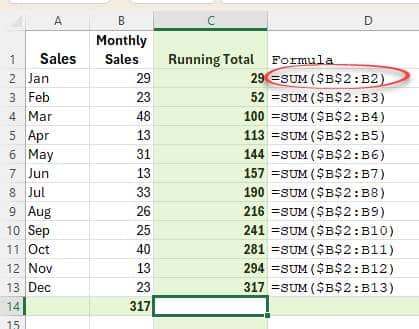
The venerable SUM() function in Excel is simple, really too simple. It just adds up a range of cells with no way to filter or limit what’s included. SumIF selects what to add-up from a longer list. SumIf sometimes confuses people because they, understandably, expect the range to be SUMmed
Microsoft and some contractors listen to Skype calls but that shouldn’t be a surprise to anyone. And Microsoft’s response was quite typical – they refuse to stop. Microsoft can and does let it’s ‘associates’ listen and read from Office documents and voice data. Word, PowerPoint and Outlook users are also
A supposedly ‘new’ feature in PowerPoint 365 for Windows is already in regular PowerPoint? The latest Insiders version of Office 365 for Windows has no truly new features. The only ‘new’ feature is something that’s already in Office 365. As we looked down the list of changes in version 1909
The long-standing Ursnif trojan is back in a new form to infect computers and steal personal information, all via a Microsoft Word document. To begin, we’ll repeat a warning we’ve been making for years … No .doc files DO NOT open .doc files from any source (not .xls or .ppt
There are two similar text formatting options in Excel. The well-known Merge & Center and the hidden away Center across selection. Both have their advantages, the choice is yours. Merge & Center Most Excel users know ‘Merge & Center’ because it’s atop the Merge list at Home | Alignment |
An interesting forum thread suggests a problem between the ISP, Bell Fibre, and Microsoft’s OneDrive for Business. Several users report a severe slowdown in connections between their computers and OneDrive for Business. Speeds are capped around 600 kbps instead of the 500-800 MB/s. NOT standard OneDrive for Office 365 Home/Personal,
A recent Windows update is causing VBA code to fail in Excel, Access and other VBA parts of Office. The culprit isn’t Office, but the version of Windows that it’s running on. After the 2019-08 Cumulative Update KB4511553 is applied, some VBA code will stop working. The patch bug is
A lot of press reports about Office 2019 give the impression that the single-payment, non-subscription version of Microsoft Office is about to disappear off retail shelves. Everyone needs to take a deep breath and calm down … Office 2019 isn’t dead or even on life-support though Microsoft would love to
At last! After months of delay, Microsoft has released product icons for Access, Project and Visio. Yawn, ho hum. We know Microsoft customers have been desperate to see these graphics (not). Back in March we first saw the Word, Outlook, Excel and PowerPoint graphics. As before, when it comes to
The desperately needed feature is coming to Microsoft Office … the ability to search for Icons. Microsoft added Icons to Office 365 and even more a few months ago … 300 more icons in Office, but which ones and where? The problem has always been finding the right icons from
Office now has sensitivity options to label Word, Excel, PowerPoint docs plus emails. Not ‘touch-feely’ sensitivity like ‘loving’ or ‘compassionate’ but instead corporate, privacy labels. It’s a new feature for Office 365 corporate hosted E3 or E5 accounts and the admins have enabled Sensitivity options. Sensitivity appears on the Home
Despite all the possibilities for importing or sharing appointments, most of the time we have to manually type in new appointments or events. Here’s some tips to do it faster and get it right. We’ve all been there, a web page or email (below right) with details that need copying
The Format Cells dialog can be accessed from Home | Alignment | Orientation, or by right-clicking on selected cells and selecting Format Cells. See Excel’s text and number alignment choices Text formatting in Excel with wrapping, line breaks and merging This dialog gives you more detailed options to choose from than
Under Excel’s Home | Alignment ribbon you can change the indents, alignment or angle of the text in selected cells. As usual, a seemingly simple set of buttons have some hidden tricks. See Text formatting in Excel with wrapping, line breaks and merging Alignment Adjust alignment of the text, both
Here’s this months list of bug fixes and updates for Office 2016 and Office 2013. These apply only to the older ‘MSI’ Windows installs not the modern ‘Click to Run’ Office including all Office 365. For most people, these patches will be installed automatically via Microsoft/Windows Update. PowerPoint 2016 –
As Office Watch noted back in July, Office 2019 (Professional Plus or Home & Business) are no longer available in the Home Use Program. Until last month, Office 2019 Professional Plus or Office 2019 Home and Business could be had for the trivial price of $14.99 instead of well over
Microsoft and Samsung have a long announcement about Windows, Office and the new Samsung Note10 but there’s little really new. Under the bland title “Microsoft and Samsung partner to empower you to achieve more” is a carefully worded press release which mostly goes over existing Microsoft products which are available
If you thought that Microsoft’s move to multi-platform apps and cloud computing was hype, think again. The latest filing with the US Securities commission has a notable change in Microsoft’s policy. For a long, long time, Windows has been the core of Microsoft’s strategy. There’s been support for other operating
It’s amazing to see how people use Excel in ways probably not dreamt of by the programs makers. We usually think of Excel as a financial tool either for businesses or personal budgeting or managing lists. Anything to do with numbers or lists has a place in Excel, like a
A report commissioned by the Dutch Ministry of Justice and Security warns government departments NOT to use Microsoft Office Online or the apps for Apple or Android. The Privacy Company report was made public with the Ministry’s permission via two blog posts short and long. Many governments and organizations have
Office-Watch.com reader Jeffrey J. offers this look at Emailmerge.cc an add-on that fixes some limitations in the Word/Excel/Outlook mail merge system. “ Outlook email merge function does not allow multiple To line addressees, nor allows creating any cc or bcc addressees. And you cannot customize the Subject line. Manually adding/modifying
Microsoft is improving (fixing?) the activation system for Office 365 Home and Personal customers. This comes a few weeks after they announced the same changes for Office 365 Enterprise customers. The per device activation limit will be handled in a much better way. Each Office 365 user is limited to login/activations on
Word allows you to insert other files with data and functionality from another document or program directly into your Word document. Microsoft calls these additions ‘Objects’ which makes it sound overly technical and difficult but it’s not. Don’t get fazed by all the nerd talk about ‘objects’, that’s programmer speak
The latest release of Excel 365 for Windows is a right mess with missing Dynamic Arrays and, for a while, Stock and Geography data types disappeared too! We received some reports late Friday, US time that Excel 365 for Windows v1907 build 11901.20176 wasn’t showing Stock or Geography data types