How to Open Publisher Files Now That Microsoft Killed Publisher
Microsoft Publisher is dead. If you have years of newsletters, flyers, or brochures saved as .pub files, you need a way to open and edit them. LibreOffice Draw is free, handles .pub files, and is the most practical rescue tool available right now. Here’s how to use it and what to watch out for.
The Document Foundation, which makes LibreOffice, used the occasion to pitch Draw as the answer for stranded Publisher users.
As we’ve pointed out, Microsoft’s own conversion advice isn’t enough, because PDF keeps the layout but isn’t meant for editing, while Word can edit but isn’t a page layout tool, so complex files lose formatting when converted.
How to open Publisher files in LibreOffice Draw
The .pub format was never published by Microsoft. Volunteers at the Document Liberation Project reverse-engineered it and built a library called libmspub, which both LibreOffice and Scribus use to import Publisher files.
To open a file:
- Download LibreOffice from libreoffice.org. The current release is 26.8.1, and it’s free for Windows (X64 and ARM), Mac and Linux.
- Open LibreOffice and choose File | Open, then pick your .pub file. It opens in LibreOffice Draw automatically.
- .pub files are associated with the .pub extension so you can just double-click or right-click on a file to open in Draw.

- Check every page carefully. Draw seems to do a good job opening Publisher files but there may be anomalies.
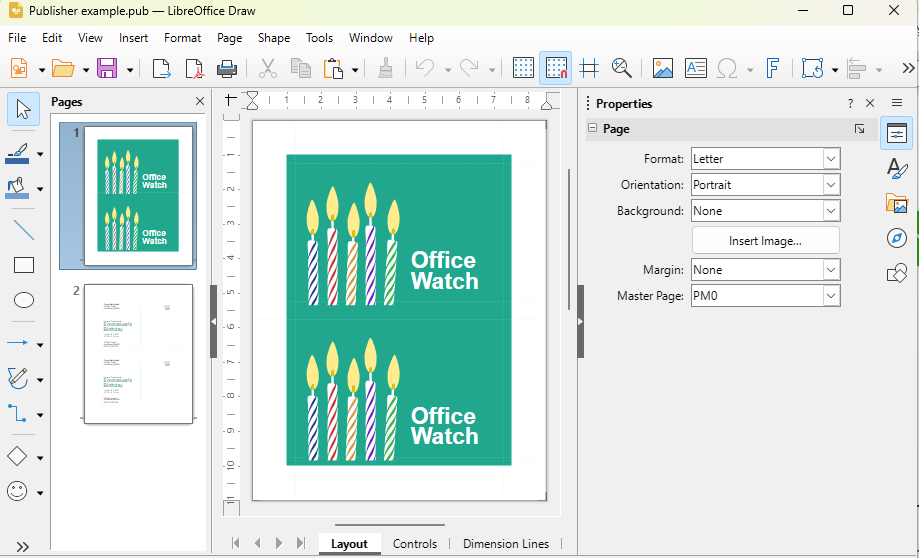
- Save an editable copy with File | Save As in Draw’s own “ODF Drawing” format with an .odg extension.
What to expect when opening Publisher files in LibreOffice
It’s a one-way street. LibreOffice can open .pub files but can’t save back to .pub. Once you edit in Draw, you stay in Draw (or PDF).
Fonts are the most common problem. If text looks wrong, the original font probably isn’t installed on your computer. Install it and reopen the file.
Complex layouts can shift. Linked text boxes, tables and fancy effects are where conversions usually break. Simple flyers and posters generally come through well.
Draw is not a desktop publishing program. Even The Document Foundation admits this, saying it suits short multi-page documents like newsletters and single page items. For heavier work, Scribus is a free proper layout program that also imports .pub files.
Converting a whole folder at once
If you have hundreds of files, opening them one by one is painful. LibreOffice can batch convert from the Windows Command Prompt. Close LibreOffice first, change to the folder holding your .pub files, then run:
for %f in (*.pub) do "C:\Program Files\LibreOffice\program\soffice.exe" --headless --convert-to pdf "%f"Swap pdf for odg to get editable Draw files instead. Run it twice if you want both, which we recommend.
Our advice: convert now, keep two copies
Don’t leave .pub files sitting in a folder “for later.” Your ability to open them now depends on volunteers maintaining a reverse-engineered format, not on Microsoft.
- If you still have a working copy of Publisher, use File > Save As to make PDFs directly from Publisher. That’s the most faithful copy you’ll ever get but it has very limited use for editing.
- Then make .odg copies in LibreOffice for anything you’ll need to edit again.
- For new work, decide whether Word, PowerPoint, Microsoft Designer, LibreOffice Draw or Scribus fits. For a simple church bulletin or club flyer, Word or Draw is plenty. For a 24-page magazine, look at Scribus.
Related Reading
If you’d rather keep Publisher itself running instead of switching tools, Microsoft Publisher Ends October 2026: How to Keep It Working explains exactly what happens to each version and when, while Keep Publisher Working: Which Microsoft Office Version to Buy in 2026 helps you pick the right older Office bundle. If you go that route, How to Install Only Publisher and Skip the Rest of Microsoft Office shows how to avoid conflicts with your existing Microsoft 365 apps.
We tested Microsoft’s own recommended way to move .pub files into Word, and the results weren’t great — Publisher to Word Conversion Tested: Microsoft’s Method in the Real World has the details and screenshots.
If you’re batch-converting Publisher files to PDF, Hidden Word Options That Make Better PDF Files is worth a look for any PDFs you later pull into Word for editing, and Free PDF Merge and Split on Windows or Mac covers combining those converted files without paying for Acrobat.
Looking beyond Microsoft altogether? Free Microsoft Office Clones: WordCraft, GridCraft and DeckCraft Are Here, Should You Try Them? reviews three new open-source apps that open real Office files, and The Real Choices for Office 2016 and Office 2019 Customers lays out every option if you’re rethinking your whole Office setup.