Visio now has an option to export diagrams directly into Word. Export to Word has been in preview for about a year. It’s now available to all users on Visio Online Plan 2 The feature doesn’t just export the diagram images. Metadata is also exported in a table. Process |
PowerPoint is getting a new feature ‘Auto Fix’ that Office users have wanted for many, many years. We hope it’s the start of deployment to Word and Excel across all platforms. Auto Fix is a way to automatically arrange a collection of shapes and other objects into neat rows and
How to insert the Currency ¤ or scarab symbol into Microsoft Word, Excel, PowerPoint or Outlook. Both in Office for Windows and Office for Mac. Currency ¤ symbol is used to denote an unspecified currency. It’s the generic sign you could use if the correct symbol isn’t available. It doesn’t
An Excel Table Form is a simple no-code way to view a single table row in an editable box. If a row of data is too wide, instead of scrolling left/right to find what you need, use a data form to add, edit, find, and delete rows. Table Form is
How to use AutoCorrect for more than a word or single character. It can speed up typing of large blocks of text or expanding an acronym into the full name. Paul G writes: “Autocorrect is fantastic for the numerous standard letters, or specific instructions for various computer actions (downloads, etc).
Word 365 for Windows now has an even darker dark mode option which changes the page area to black with white text. Until now ‘Dark Mode’ only applied to the ribbon and other interface areas, not the document area. The newly extended Dark mode only changes the look on the
A fascinating article digs into the ‘new’ Windows 10 look to reveal that it’s not as new as Microsoft hype would have you believe. Some parts of Windows 10 are over 25 years old and it’s a similar story in Microsoft Office, despite the Ribbon. It’s the same in Microsoft
The full collection of Van Gogh masterpieces are available online, ready to be used in PowerPoint slides. Here’s how to get good quality images of the great man’s work and use them wisely in slides. Not interested in Van Gogh? These tips show how to fit any image into PowerPoint
Apple’s new Privacy tags sound like a great idea but they rely on the honesty of app makers (Ha!) The simple labels can cover an enormous amount of privacy intrusion in Microsoft Office and Outlook mobile apps. The Washington Post is behind a paywall but the ‘general tenor of his
Outlook.com / Hotmail users got a shock when told can’t send or receive email because their mailbox is way too big. What’s happening and what to do about it? Free Outlook.com accounts have a 15GB storage limit but some users have managed to go way over that quota without complaint
Here are some more ‘right pointing’ symbol options for Word, Excel, PowerPoint or any Microsoft Office app. We’ve already looked in detail at: White Right Pointing Index Hand ☞ Right arrow → symbol Now let’s see some other ‘right pointing’ options that can be used in Office documents. Right pointers
How to insert the white right pointing hand ☞ into Microsoft Word, Excel, PowerPoint or Outlook. Both in Office for Windows and Office for Mac. Officially called “WHITE Right POINTING INDEX” ☞ symbol is a different or novelty form of the right arrow as a hand. It can be used
Shutterstock are offering two nicely designed PowerPoint templates for free. We’ll explain how to get more from the professional templates with a few clicks. Minimalistic PowerPoint templates comes in two styles: Dawn and Midnight. Dawn Template Evokes a meadow at dawn with a muted color scheme. Midnight Template Midnight template
There are two security risks in iPad and iPhone devices that are being used by hackers. It’s important to get the latest iOS update to protect your devices. Some Apple updates are bug fixes or self-serving for Apple to add links to new devices or services. 14.4 is a little
Metric to Imperial/US conversion or vice-versa can be a little messy in Excel, the new Lambda() feature lets you make an easier and simpler conversion function. It’s a simple and practical example of what’s possible with Lambda(). See Lambda – strange name for a really good extra in Excel Metric
OneDrive’s single file size limit is now 250GB up from a ‘mere’ 100GB. That’s a welcome increase for video editing and other volume users who have to deal with really big files. Word, Excel or PowerPoint users don’t need to worry about their files getting that large <g>. It is
There are two different levels of hidden sheets within Excel, hidden and the less well-known very hidden worksheets. We can easily hide our worksheets by right-clicking the sheet tab and selecting hide. There’s a more extreme option available. Very Hidden means the sheet/tab doesn’t show up at all in regular
It’s been a slow process, but now it’s possible to move a file from Outlook to Teams across both web clients and programs. Users have been asking Microsoft for years to be able to quickly copy an Outlook attachment to a Teams area. Customers had to save the attachment to
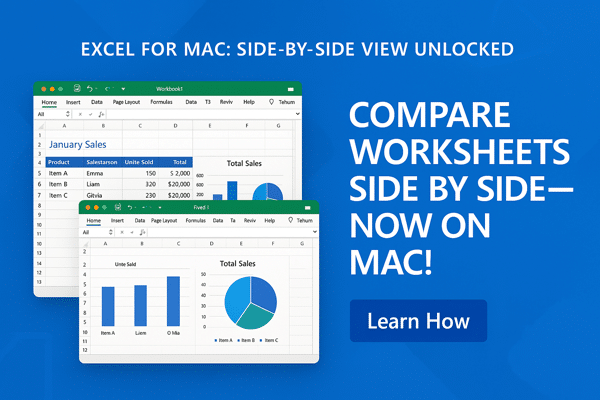
Excel for iPad now has Split View, allowing two workbooks to be seen side-by-side. That’s catching up with Word and PowerPoint for iPad which got Split View in mid-2020. iOS 13 is required for Split View on iPad. Get more about Office on iPad and iPhone from Office Watch for
Presenter Coach or Rehearse with Coach is now available in PowerPoint for iPad. You can practice your presentation with Microsoft’s systems ‘listening’ and giving advice on how to improve. Presenter Coach is already in PowerPoint 365 for Windows or PowerPoint Online on the web. See Presenter Coach makes for better
For a short time, Microsoft hinted at an important improvement to Excel. But this promise was quickly removed, leaving Excel customers hanging. The feature is/was ‘Show Changes’ and would let you see a history of changes in an individual cell. Show past values or formula in that cell. “Excel can
Excel users owe thanks to Sumit Gulwani . He’s the guy who turned the Flash Fill feature from a vague dream into something that makes life easier for Excel and other Microsoft customers. Flash Fill is a way to join, split or reformat text in Excel without coding. You type
Continuing our series on the ‘Not Allowed’ symbol, let’s make a version with a black background and white center graphic. This isn’t part of the official ISO specification for the symbol but it’s widely used. It’s done by adding a black circle under the main circle/line & graphic (which is