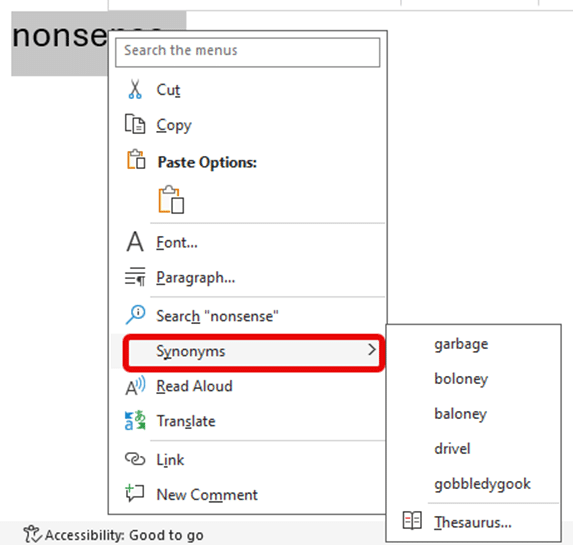
Word has a feature to translate text from one language to another. Whilst the translation may not be perfect, it does give you a starting point to understanding what the text says. You can either translate a selected piece of text, or the whole document. Translate works slightly differently depending
If you’re the sort of person who’s easily distracted, or just want to focus on the content of your document without worrying about formatting, there are a number of ways you can clear the distractions from Microsoft Word, so you can focus on the text you’re writing. Minimize the Ribbon
Here’s a summary of the July non-security updates for Office 2016, Office 2013 and Office 2010. These updates should be automatically installed via Microsoft Update or you can apply them manually. Install them now if there’s a listed bug you need fixing, otherwise play it safe. Leave some time for
The US government has issued a new warning about malware which takes advantage of a security lapse in Outlook for Windows, which was patched over 18 months ago. The warning generated a lot of scary headlines, especially since there’s suspect Iranian involvement. If you’ve been taking standard precautions and updated
The Power Query exploit in Excel is a concern but one that most Excel users are already protected from. Look past some of the shock headlines (e.g “120 million users personal information at stake due to Microsoft Excel flaw”) . Mimecast did a good job tracing this security bug in
There are times when we wonder about the decision-making process at Microsoft and the revelation about the stopping of registry backups in Windows 10 is a sad example of a bad choice. We’ll explain what Microsoft secretly did last year to make Windows 10, Office and other programs less reliable
Microsoft is hyping the addition of 300 more icons to Office 365 perhaps hoping to distract customers from the many problems finding and using the Insert | Icons feature in Office 365. We like the addition of SVG graphics (Icons) into Office because it opens up a much wider range
Microsoft is boasting that the Office 365 ‘Icons’ collection now has 300 more graphics but no information on what they are and no help finding them. The release of more Icons just emphasizes the problems with this cloud feature. Icons is a cloud service that delivers SVG graphics to Word,
The 21 June 2019 Office 365 for Windows Insiders release 11815.20002 has a new Dark Mode feature in Outlook plus some fixes. Here’s the details including Microsoft’s report on ‘Notable Fixes’. Outlook New features Outlook 365 for Windows now has a Sun/Moon button when using Dark mode and the black
Microsoft is planning an Office key addition to keyboards, to go with the existing Windows key. Here’s what we know and don’t know. The company is testing physical keyboards with an Office key combined with preview versions of Windows. Source: originally Microsoft via leaks It seems the Office key code
The 14 June 2019 Office 365 for Windows Insiders release 11807.20000 has a new feature in Word plus some fixes. Here’s the details including Microsoft’s report on ‘Notable Fixes’. Word – precision ink erasing PowerPoint already has small and medium ink erasers. They are now in Word too. In PowerPoint
We’re delighted to announce a new ebook from Office Watch — all about Office 365 for Windows: Straight Talk. In-depth with Word, Excel, PowerPoint and Outlook 365 plus buying and configuration. For anyone with Office for Windows on an Office 365 subscription. It’s a truly independent guide to Office 365
While most Office users have nothing to worry about, there are big changes in the next macOS codenamed Catalina. macOS v10.15 Catalina is out now for Mac computers and represents a major change. See MacOS Catalina update tips and Office compatibility Catalina = 64-bit programs only For the first time, macOS
Microsoft has announced that the Office apps for Android won’t update for older versions of Android. These are the Word, Excel, PowerPoint and Outlook apps for Android. Quietly, the system requirements were changed to cover only the last four major versions of Android. Misleading news alert Despite what you may
As part of Microsoft’s support for the new Japanese Imperial era, they’ve added support for traditional Gannen writing of dates as well as the newer Ichinen style. Windows 10 now supports Gannen style Japanese dates but that support doesn’t flow through to Excel formatting. Normally the default date presentation in
Yet again, Microsoft Word is beaten by mere humans when we pit the software against words used in the 2019 Spelling Bee finals. We made a list of some words from the 2019 Spelling Bee finals including the last eight words which confirmed the winners. See for yourself how Microsoft
WhatsApp will starting showing ads in 2020 which is another reason to give up on the messaging app and move to a more private and secure but very similar app, Signal. WhatsApp has over 1.5Billion users which makes it a too tempting target for the owners Facebook and advertisers. Facebook
The benchmarking software PCMark 10 has added a new test that directly checks the performance of Microsoft Office programs on various hardware and software configurations. There are three separate Office Applications tests: Word covers typical word processing tasks for office workers. The test measures PC performance when opening, editing, and
How to easily make and receive appointments with other people using Outlook. This is a feature that’s been in Outlook for many, many years and so is often overlooked amid the hype for the latest ‘exciting’ thing from Microsoft. We’ll look at how to send an create an appointment to
There’s an important feature in Word and other Office programs that we all have, and many people use, except the US Congress … document collaboration and comparison. It’s even more amazing because most, if not all congressional offices have Microsoft Office. An article about the Select Committee on the Modernization
Word can automatically add a bibliography or list of sources or works cited in a document. Here’s how to do it with formatting to make your teacher or professor happy. To make a Bibliography, you first have to add citations and sources to your document. Once you’ve added all the
A lovely email from Mary S in New Hampshire proves that the Office-Watch.com money saving tips for Office 365 Home or Personal really do work. It’s exactly why we write those articles, so our customers can buy Office 365 for less than what Microsoft wants. “Just followed your “Office Watch”
Finally, and quietly, Microsoft Access has been given a new icon. We know people have worried about this omission <not>. A few months ago, Microsoft released new icons for Word, Excel, PowerPoint and Outlook to a collective yawn across the globe. Now they’ve slipped the MS Access icon into the
Tucked away in the Windows 10 Explorer options is a choice that should be turned on and is now the default setting for Windows 10 May 2019. Normally Explorer is a single program no matter how many windows are open on the computer. That made sense when memory was limited