How to Type Eyes emoji 👀 in Word, Excel, PowerPoint and Outlook
Here’s how to type the Eyes 👀 emoji into Microsoft Word, Excel, PowerPoint or Outlook. We’ll show you every shortcut and insert method for both Windows and Mac, including the character codes you need.
Eyes 👀 symbol / emoji is a bit of fun for documents and PowerPoint slides.
Emoji and symbols can add personality to your documents. See our complete guide to inserting degree, currency and other symbols in Microsoft Office, or if you’re in a seasonal mood, check out Halloween icons and symbols for Word, PowerPoint and more and Halloween emoji, fast find and copy.
How Eyes 👀 looks in different fonts.
Eyes 👀 symbol / emoji is a bit of fun for documents and PowerPoint slides. Eyes are available in symbols fonts like Segoe UI Emoji and Segoe UI Symbol. Here’s how Eyes 👀 look in those fonts with variations. Segoe UI Emoji has been improved so we’re showing both the new and older versions of the same emoji.

The Segoe UI Symbol versions are more cartoonish and might suit some docs/slides better than the more realistic modern Emoji.
Eyes 👀 Emoji Icons in Microsoft 365
Icons in Microsoft 365 and Office 2019 have two ‘eyes’ options.

Eyes 👀 Emoji Character Codes and Shortcuts
These are the important code numbers or values you’ll need to enter the Eyes 👀
Decimal: 128064 Hex: 1f440
Web: 👀 or 👀
(web codes aren’t used in Microsoft Office, we’ve included them for the sake of completeness.)
Word and Outlook
The Eyes 👀 sign does NOT have an inbuilt shortcut in Word.
Use the standard Word Alt + X symbol shortcut: 1f440 + Alt + X
Once in a document you can copy it to AutoCorrect and make your own shortcut.
Word, Excel, PowerPoint and Outlook
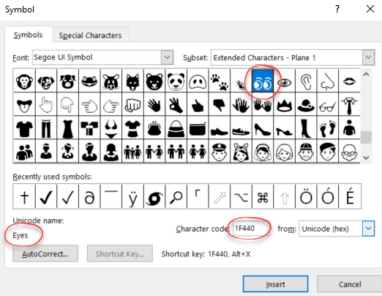
Insert | Symbols | Symbol and look for the Eyes symbol via character code 1F440
MacOS and Office for Mac inserting characters
On a Mac, you can enter the Eyes 👀 symbol, which has some nice color not available in the Windows fonts.
- Command + Control + Spacebar shortcut to open the Character Viewer.
- Search for “ Eyes “ and the Viewer should find the symbol you need.

Despite the name Character Viewer, the Apple system tool will also insert characters into any program, including Office for Mac.
Keep Exploring: Symbols and Emoji in Office
The Eyes emoji is just one of many symbols you can type directly into Office. How to Insert Symbols in Word and Outlook Instantly Using Alt + X walks you through the shortcut that makes entering any Unicode character, including emoji, a two-keystroke job.
For a bigger picture of every insert method available, How to Insert Degree, Currency and Other Symbols in Microsoft Office covers shortcuts, AutoCorrect tricks and the Symbol dialog across all the Office apps.
If the Eyes caught your attention for a spooky slide or email, Halloween icons and symbols for Word, Powerpoint and more shows the built-in icons, stock images and stickers you can pair with it, and Halloween emoji, fast find and copy has a searchable list of over 30 Halloween emoji ready to paste.
Other popular symbol guides follow the same steps: Two checkmark or tick ✓ choices in Word, Excel, PowerPoint and Outlook and Type Playing Card Suit Symbols ♠♥♦♣ in Word, Excel, PowerPoint and Outlook cover two of the most-requested characters, with codes and font comparisons for both Windows and Mac.
Need a symbol that carries more meaning? How to Type Male ♂ Female ♀ and Both ⚥ Gender Symbols in Microsoft Office explains the codes, font differences and Icon options for all three gender symbols.