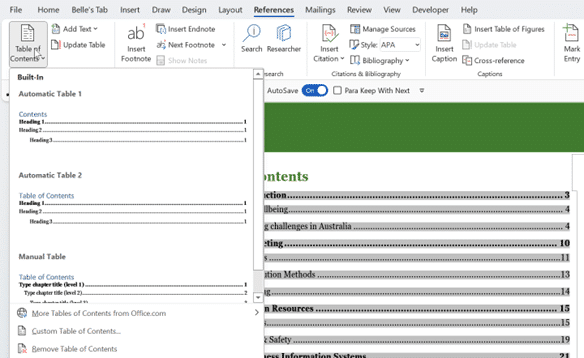
If you’re the sort of person who’s easily distracted, or just want to focus on the content of your document without worrying about formatting, there are a number of ways you can clear the distractions from Microsoft Word, so you can focus on the text you’re writing. Minimize the Ribbon
Here’s a summary of the July non-security updates for Office 2016, Office 2013 and Office 2010. These updates should be automatically installed via Microsoft Update or you can apply them manually. Install them now if there’s a listed bug you need fixing, otherwise play it safe. Leave some time for
The US government has issued a new warning about malware which takes advantage of a security lapse in Outlook for Windows, which was patched over 18 months ago. The warning generated a lot of scary headlines, especially since there’s suspect Iranian involvement. If you’ve been taking standard precautions and updated
The Power Query exploit in Excel is a concern but one that most Excel users are already protected from. Look past some of the shock headlines (e.g “120 million users personal information at stake due to Microsoft Excel flaw”) . Mimecast did a good job tracing this security bug in
Drop-down list boxes are useful in Excel but, like many things in Office, there’s more than one way to do it and more to know that the simple examples often given. Making a pull-down list is easy and there’re many tips showing the basics. In this article we’ll go beyond
Here’s some other problems with the Word Sort feature and tricks to work around them. Generally speaking, long or complex sorting is better done in Excel. Excel has much better data management features to split and sort. The final result can be copied into Word. Sort a list of names
Microsoft has released a series of pages describing their support for the new Japanese era in Windows, Office and .NET. Plus a new Windows feature to support a nicety of Japanese date formatting. Japan’s traditional dating system works around the Emperor’s reign. The abdication of the last Emperor and enthronement
As part of Microsoft’s support for the new Japanese Imperial era, they’ve added support for traditional Gannen writing of dates as well as the newer Ichinen style. Windows 10 now supports Gannen style Japanese dates but that support doesn’t flow through to Excel formatting. Normally the default date presentation in
Yet again, Microsoft Word is beaten by mere humans when we pit the software against words used in the 2019 Spelling Bee finals. We made a list of some words from the 2019 Spelling Bee finals including the last eight words which confirmed the winners. See for yourself how Microsoft
WhatsApp will starting showing ads in 2020 which is another reason to give up on the messaging app and move to a more private and secure but very similar app, Signal. WhatsApp has over 1.5Billion users which makes it a too tempting target for the owners Facebook and advertisers. Facebook
Excel has a new currency option. Bitcoin BTC is now available as a Currency symbol or text from the main list but we’ll show how to get it now on any version of Excel. There are four options available: Bitcoin symbol ₿ prefix ₿12.34 Bitcoin symbol ₿ suffix 12.34 ₿
How to easily make and receive appointments with other people using Outlook. This is a feature that’s been in Outlook for many, many years and so is often overlooked amid the hype for the latest ‘exciting’ thing from Microsoft. We’ll look at how to send an create an appointment to
There’s an important feature in Word and other Office programs that we all have, and many people use, except the US Congress … document collaboration and comparison. It’s even more amazing because most, if not all congressional offices have Microsoft Office. An article about the Select Committee on the Modernization
Word can automatically add a bibliography or list of sources or works cited in a document. Here’s how to do it with formatting to make your teacher or professor happy. To make a Bibliography, you first have to add citations and sources to your document. Once you’ve added all the
A few of the May 2016 patches Microsoft Office caught our eye with embarrassing bug fixes, previously not disclosed to customers. They all apply to older Office releases: Office 2016 and before. It’s a long-standing Microsoft trick to hide embarrassing bugs from customers until they have a fix. In the
The WhatsApp security bug made a lot of headlines this week. As the virtual dust settles, what should you do and what is there still to worry about. A company discovered a bug in WhatsApp which they packaged up and sold to various parties. The Pegasus bug allowed hacking of
Unclear date formatting in documents, worksheets, presentations and other media is a pet peeve of ours. These days it’s bad practice to show dates in digits only such as 01-05-2019 12/3/18 etc. Yet we often see these formats used in booking confirmations and other documents. Either of those dates can
Microsoft has admitted a security breach which allowed hackers to access the accounts and data of customers. The admission from Microsoft isn’t complete and the hackers say it’s worse than the company is saying. Who is affected? Some people with a free Microsoft accounts like Outlook.com, Msn.com Hotmail.com etc. Microsoft
If, while typing, you notice that Word has automatically changed capitalization of something you did not want changed, you can correct this easily as you type. Hover your mouse over the part of the word that has been automatically changed. A blue line will appear under the changed part. We
Google has announced that their G Suite customers will be able to edit and collaborate with Microsoft Office documents. It will be available to all G Suite users by the end of May 2019. Source: Google. Until now, a clumsy Office compatibility app for Chrome allowed Microsoft Office documents to
It’s income tax time in the USA and that means a new round of email scams and infected Excel documents to watch out for. IBM Security Intelligence reports on a series of scam emails courtesy of the Trickbot hackers. All the emails look like legitimate messages from big companies like
Microsoft continues to struggle with their support for Japanese Era date format in Excel. The new Imperial Era, ‘Reiwa’ is known but the necessary changes for Excel aren’t released yet. New Japanese Imperial Era changes in Excel and Office explains how to add the new Reiwa era without waiting for
Microsoft has never been great about documenting patches and bug fixes but this month they have sunk to a new low. Maybe it’s a delayed April Fool’s prank with Microsoft ‘taking the Mickey‘ or treating Office customers with contempt? Sustained Engineering isn’t sustained Maintaining Office software is the thankless job
The current Google Drive plug-in for Microsoft Office will stop working near the end of June. There’s an improved update already available for some customers and an alternative for the rest. If you’re using the Google Drive plug-in, you’ll start seeing a warning about the plugins death on 26 June