Microsoft Forms can export survey/quiz results to an Excel workbook, here’s how to do that easy and efficiently and the limitations that Microsoft hasn’t fixed for most customers. The current method of getting Microsoft Forms results into Excel isn’t very elegant. It doesn’t make use of Excel’s excellent data import
If you look in the Outlook desktop for Windows data folder, you might see a .NST file as well as the usual .OST and .PST data files. Office Watch explains what a .NST file is, should you do a backup and whether it’s safe to delete. An .NST file is
You might see mentions of “Outlook Groups” or even Groups appearing in your Outlook navigation pane. What are Outlook Groups, Microsoft 365 Groups and what can you do with them? For many people, the first thing they know about Groups is when the name appears in their Outlook, either Outlook
Deep inside Microsoft Word’s (Windows/Mac) grammar checks are some detailed settings like one to look for contractions such as: I’m, you’re, shouldn’t, couldn’t and haven’t. These contractions are normal and accepted by Word 2016 Windows/Mac in it’s standard settings but you can change that. Formal Language, Consider avoiding contractions You’ll
One of the ‘emergency’ options to remember is WordPad, which can open Word documents, available in modern Windows 11, 10, 8.1 and 7. Often overlooked, WordPad can be very useful. It’s always available when Windows is running even in the Safe mode. No extra install or setup needed. It’s on
It’s possible and practical to make ‘handwritten’ notes or edits direct on your Word, Excel or PowerPoint documents. Instead of printing them out and using a pen/pencil, do it on-screen with a digital pen. Here’s a real-world guide to how you can do it, leaving aside the hype and flashy
Two ways to put left and right aligned text on the same line in Microsoft Word. There’s the commonly used option and the less well-known choice. BONUS: putting left, center and right aligned text on one line. We’ll show how to make Left and Right aligned text looking like this.
Type the Facsimile sign or Fax symbol ℻ into Microsoft Word, Excel, PowerPoint or Outlook. Both in Office for Windows and Office for Mac. FAX ℻ symbol is a single character with the letters FAX, normally used to prefix a telephone number in a letter heading or footer. For younger readers:
Occasionally OneNote pages or whole notebooks go missing … here’s eight places to try finding them again. Don’t Panic OneNote saves everything … it was designed that way from Day One. It’s unlikely that something has truly been erased. More likely that the page, section or notebook is hiding somewhere
Outlook for Windows lets you draw into emails. It’s an extension of the existing drawing features in Word, Excel and PowerPoint for Microsoft 365, Office 2021 and Office 2019. Outlook’s message ribbon has Draw tab but unlike Word (where you can draw directly onto the document), the drawing tools only
Type the Hundred points 💯 emoji into Microsoft Word, Excel, PowerPoint or Outlook. Both in Office for Windows and Office for Mac. 100 points 💯 symbol is also known as ’100’, ‘Keep it 100’ or ‘Keeping it real’. How 100 points 💯 looks in different fonts. Here’s some examples of how
Type the Face with Tears of joy 😂 emoji into Microsoft Word, Excel, PowerPoint or Outlook. Both in Office for Windows and Office for Mac. Face with Tears of joy 😂 emoji is one of the most popular, if not THE most commonly used emoji. Also known as Laughing Crying, Laughing Tears,
You can add a Twitter blue or gray checkmark to your Microsoft Office documents including Word docs, PowerPoint slides. We’ll show you how to add the ‘verified’ graphic at any size you need with the exact blue, gray or some other color. Oh, and save yourself $8 a month <kidding>.
Microsoft Create is a new part of Microsoft 365 that will replace the existing Office templates site and more. Office Watch explains how to use the Create site now, the many categories available and what’s to come. Cut through all the usual Microsoft Hype™ like “ultimate creator launchpad” and the
Kerning is a font setting that’s important in Word and PowerPoint. We’ll explain kerning and why you mostly don’t have to worry about it except for large size text like titles and headings. Kerning adjusts the horizontal space between letters so they look right to the human eye. It’s necessary
Insert the TEL – Telephone symbol ℡ into Microsoft Word, Excel, PowerPoint or Outlook. Both in Office for Windows and Office for Mac. TEL – Telephone ℡ symbol is a single character with the letters TEL, normally used to prefix a telephone number in a letter heading or footer. How
Type the Tilde ~ into Microsoft Word, Excel, PowerPoint or Outlook. Both in Office for Windows and Office for Mac. Plus an emoji alternative to Tilde. Tilde is used to mean ‘approximate’ as in “ ~30 minutes late”. In maths it means ‘similar order of magnitude’ e.g. “ a ~
There’s a way to view the attachments to items in a Outlook.com mailbox either in the web browser or, the better option is Outlook desktop software (Windows or Mac). Finding attachments is useful for recovering a lost file or past version of a document. Also vital to reducing the mailbox
The 2022 Word of the Year is “Permacrisis” according to one dictionary, is that and other new words recognized in the Microsoft Word dictionary? Surprisingly, one of the 2022 words is and there’s another strangeness in the Word Grammar and Style checks. According to the Collins Dictionary, the 2022 Word
Yet again, Microsoft finds itself accused of “censoring” some “politically incorrect language” in another outbreak of the culture war. It puts Office Watch in the unusual situation of defending Microsoft, using some facts about how Microsoft Word really works. There are all sorts of accusations being spread, most of which
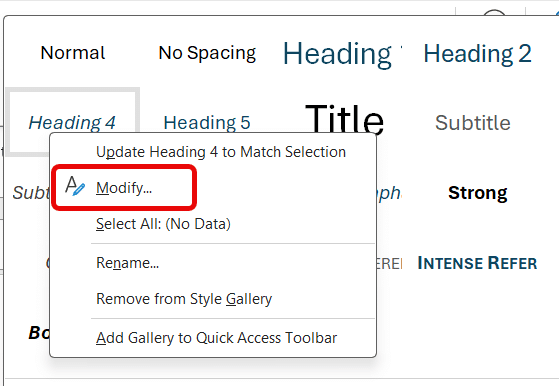
Changing the order of styles in Microsoft Word’s Style Gallery is possible but buried way down inside the message boxes. A standard Word Style Gallery looks like this. Right-clicking on a style gives some options, including Remove from Style Gallery. Moving the styles into another order is more complicated. You’d
Managing Styles and priority / order settings in Word for Mac is harder but possible if you’re willing to dig in document or template settings. Word for Mac has two style lists available, just like Word for Windows. The Quick Style Gallery across the ribbon Home tab (called Style Gallery
Word can check if you use a single or double space after a sentence (fullstop/period) but how can it be changed single space to double throughout a document? The Sentence Spacing settings (single, double or don’t care) is in Word’s Grammar settings see Sentence Spacing in Word. These days, sentences
There are many ways to save an Outlook email or other items to a separate file. Which one you choose depends on your needs. One Outlook message or many? Compatible for many people or not? Easy to search or not? Some options work for a single message only. Others can