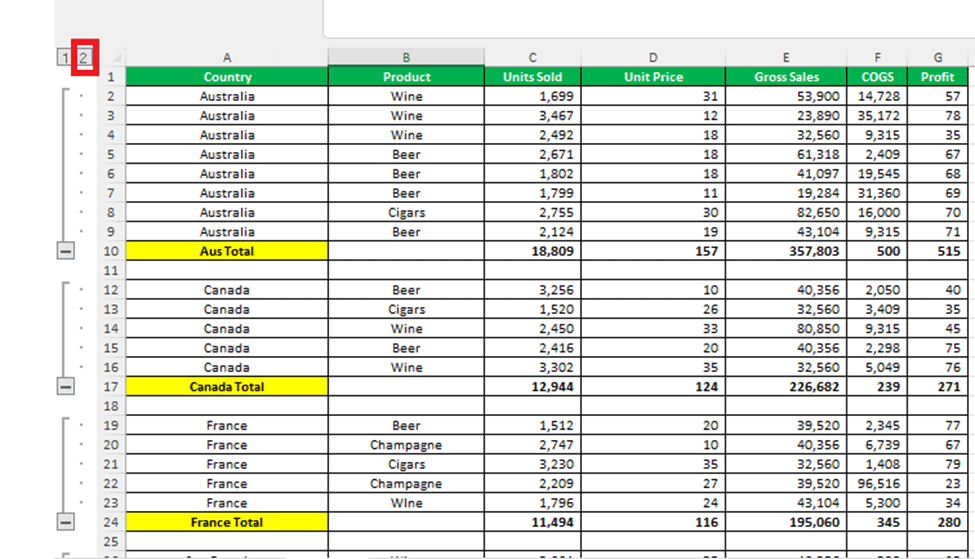
You still want to explore more Excel PivotTable sorting, there are some additional options like Click More options button on the Sort dialog box. The More Sort Options dialog box appears for your Sorting list of the Pivot Table. Let’s see what these additional features can do for you: As
Excel allows you to sort a PivotTable in alphabetical order or from largest to smallest values. They are similar to the standard Excel sorting options but worth looking at separately because there are automatic sorts, custom sortings and a manual sorting option. Quick PivotTable Sort Sort the PivotTable by right-click
Next Wednesday, Australia gets the results of their Same Sex Marriage survey with the details available to everyone with Excel. Here’s how to get the survey results, prepare for the announcement and when it’ll happen. We know most people won’t be interested in this singular Aussie exercise in democracy (don’t
Microsoft’s mail hosting Outlook.com now comes with extras for Office 365 Home and Personal subscribers, as we foretold a while ago. In short, the ‘Premium’ $50/$20 a year Outlook.com is dead. The Premium benefits are now available to all Office 365 Home and Personal users. If you’re one of the
There are interface changes coming to Outlook for Windows and Mac which Microsoft quietly previewed recently. As usual, interface changes are accompanied by the same vague promises and jargon. Long standing Office users will find a lot of what follows to be tiresomely familiar. We’re told this change will ‘increase
Moving or swapping fields around in a PivotTable is both amusing and addictive at the same time. You cannot stop yourself from rearranging your data in different ways. Each time you move a field, the Pivot Table will restructure to the new field configuration and you see the same data
Apple has introduced a new image and video format for iPhone and iPad, here’s how to handle it in Microsoft Office documents. .HEIC image files are made by default in some Apple devices with iOS 11. Microsoft Office and Windows don’t support the new format yet but there’s workarounds available
OneDrive will automatically save past versions of an Office document, here how to access those revisions quickly. The advertised way to view a document history is through the Activity button, next to Share on the top right. In Office 2016 for Windows, Office 365. The Activity pane shows a list
A recent Office addition is ‘Shared with Me’, a list of the documents you’ve been invited to collaborate on with others. It’s available in Office 2016 Windows/Mac and the iPad, iPhone and Android Mobile apps. According to Microsoft ‘Shared with Me’ ” lets you see the files others have shared
It’s always been possible to email a document for reviewing or editing. Modern versions of Office make that easier by letting you email from the document directly, instead of an email program like Outlook. Instead of opening your email to send an attachment, click on Send as an attachment from
The Share pane in modern Office is fine within an organization or with people who are familiar with document collaboration. But what if you want to share a document link with more detail in the email or using a non-email method like Instant Messaging? Well, you want to get just
The US Justice Department (DoJ) has stepped back a little in their legal battle with Microsoft over government access to cloud data, including email. Microsoft had sued the US government over orders which compelled the company to hand over customers cloud stored files and emails. This could be done without
Ever since Microsoft added shared, collaborative documents via OneDrive, they’ve had problems with saving and sign-in. Here’s how to deal with some of those persistent bugs. These bugs can happen in Word, Excel, PowerPoint or OneNote. Most commonly with documents saved to OneDrive but also Dropbox or other cloud storage.
It was a small but long awaited addition to Excel for Windows but now it’s disappeared? Why did the Chart option “Show #N/A as an empty cell” go missing? There was a small cheer in the Excel charting community when Microsoft put this extra option in the Chart | Hidden
PivotTables really are great and we’re not just saying that because it was one of Bill Gate’s favorite features. The original PivotTable feature was clumsy and difficult so you’re forgiven for trying them and giving up in disgust. Mayurakshi wants to show you some of the nifty parts of PivotTables
10 October 2017 was an important date for Microsoft Office. It marks the end of support and updates for all ‘flavors’ of Office 2007. From now on there’ll be no updates or patches. Not even security patches to fix vulnerabilities available to hackers. It applies to the entire Office 2007
The prices of Office 365 Home and Personal go up in Australia. Only four days from now on Thursday 12 October 2017. Now’s the time to save before Microsoft grabs more money. The price increase hasn’t been widely reported and Microsoft Australia is keeping important details to themselves. Here’s what we
Money saving tips for all Office 365 customers when a price increase is about to happen. There’s an opportunity to save some money by buying in advance of any price rise. Office 2016 the real startup guide has a lot of detail about the cheapest ways to buy Microsoft
Last week Microsoft ‘announced’ Office 2019, we put ‘announcement’ in quote marks because they said very little. There’s been a lot of guesswork, mostly hopeful guesswork, about Office 2019. Even at this early stage, it’s time for a reality check on Office 2019. Office 2019 will be the next version
Office 2016 for Mac is getting some big improvements in the next few months. That’s not just Microsoft hype, it seems very real. Last week, Microsoft quietly declared that they were making some big changes to how Office 2016 for Mac works. Those ‘under the hood’ changes would let them
How easy is it to switch from the one-time purchase/perpetual licence version of Office 2016 to the Office 365 annual payment / ‘subscription’ version? You might think that the switch is no big deal but it’s not just about how you buy Office 2016. The perpetual licence version is installed
Microsoft has released to their ‘Fast Track’ some improved Translation features in Word 2016 for Windows. The new Translator is cloud powered and will eventually flow to all Office 2016 ‘subscribers’. Yes, even Office 2016 for Mac! The new features replace the existing Research Pane and Mini-Translators. It’s only for
A table bug in Word 2016 for Windows was caused by not one but two different software patches with customers expected to wait up to two months for a proper fix. The trouble started with 8 August 2017 patch and continued a month later with the 5 September 2017 patch.
Excel 2016 for Windows is getting some welcome ‘under the hood’ performance improvements. It’s great to see some work on the fundamentals of Office instead of the apparent focus on flashy new features that look great in demonstrations. Word and Outlook teams: please follow suit. The Problems The aim is