Microsoft is adding new features and interface to Dictation in Word for Windows. Voice commands, auto punctuation and even a !@$#$ profanity filter. Clicking the Dictation button on the Home tab or pressing Alt + ` now opens a dialog at bottom center of the document. It will start ‘Listening’
Microsoft has announced seven extra languages added to their ‘speech to text’ Dictation feature in Outlook and Word. The new languages announced are: Hindi Russian Polish Portuguese (Portugal) Korean Thai Chinese (Taiwan) Your milage will vary As a cloud service, the available languages will vary. It depends on the version
Microsoft is hyping natural language searches in Outlook for Windows and Mac, so we dug down to see how it works and for whom. There’s a lot of ‘gotchas’ overlooked in the boasting. According to Microsoft, Outlook now has better searches: “With Natural Language in search, you simply type the
PowerPoint is getting a new feature ‘Auto Fix’ that Office users have wanted for many, many years. We hope it’s the start of deployment to Word and Excel across all platforms. Auto Fix is a way to automatically arrange a collection of shapes and other objects into neat rows and
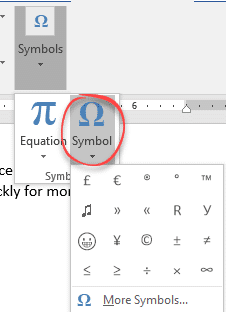
How to insert the Currency ¤ or scarab symbol into Microsoft Word, Excel, PowerPoint or Outlook. Both in Office for Windows and Office for Mac. Currency ¤ symbol is used to denote an unspecified currency. It’s the generic sign you could use if the correct symbol isn’t available. It doesn’t
An Excel Table Form is a simple no-code way to view a single table row in an editable box. If a row of data is too wide, instead of scrolling left/right to find what you need, use a data form to add, edit, find, and delete rows. Table Form is
How to use AutoCorrect for more than a word or single character. It can speed up typing of large blocks of text or expanding an acronym into the full name. Paul G writes: “Autocorrect is fantastic for the numerous standard letters, or specific instructions for various computer actions (downloads, etc).
Word 365 for Windows now has an even darker dark mode option which changes the page area to black with white text. Until now ‘Dark Mode’ only applied to the ribbon and other interface areas, not the document area. The newly extended Dark mode only changes the look on the
A fascinating article digs into the ‘new’ Windows 10 look to reveal that it’s not as new as Microsoft hype would have you believe. Some parts of Windows 10 are over 25 years old and it’s a similar story in Microsoft Office, despite the Ribbon. It’s the same in Microsoft
The full collection of Van Gogh masterpieces are available online, ready to be used in PowerPoint slides. Here’s how to get good quality images of the great man’s work and use them wisely in slides. Not interested in Van Gogh? These tips show how to fit any image into PowerPoint
Apple’s new Privacy tags sound like a great idea but they rely on the honesty of app makers (Ha!) The simple labels can cover an enormous amount of privacy intrusion in Microsoft Office and Outlook mobile apps. The Washington Post is behind a paywall but the ‘general tenor of his
How to insert the white right pointing hand ☞ into Microsoft Word, Excel, PowerPoint or Outlook. Both in Office for Windows and Office for Mac. Officially called “WHITE Right POINTING INDEX” ☞ symbol is a different or novelty form of the right arrow as a hand. It can be used
Shutterstock are offering two nicely designed PowerPoint templates for free. We’ll explain how to get more from the professional templates with a few clicks. Minimalistic PowerPoint templates comes in two styles: Dawn and Midnight. Dawn Template Evokes a meadow at dawn with a muted color scheme. Midnight Template Midnight template
Metric to Imperial/US conversion or vice-versa can be a little messy in Excel, the new Lambda() feature lets you make an easier and simpler conversion function. It’s a simple and practical example of what’s possible with Lambda(). See Lambda – strange name for a really good extra in Excel Metric
OneDrive’s single file size limit is now 250GB up from a ‘mere’ 100GB. That’s a welcome increase for video editing and other volume users who have to deal with really big files. Word, Excel or PowerPoint users don’t need to worry about their files getting that large <g>. It is
There are two different levels of hidden sheets within Excel, hidden and the less well-known very hidden worksheets. We can easily hide our worksheets by right-clicking the sheet tab and selecting hide. There’s a more extreme option available. Very Hidden means the sheet/tab doesn’t show up at all in regular
It’s been a slow process, but now it’s possible to move a file from Outlook to Teams across both web clients and programs. Users have been asking Microsoft for years to be able to quickly copy an Outlook attachment to a Teams area. Customers had to save the attachment to
For a short time, Microsoft hinted at an important improvement to Excel. But this promise was quickly removed, leaving Excel customers hanging. The feature is/was ‘Show Changes’ and would let you see a history of changes in an individual cell. Show past values or formula in that cell. “Excel can
Excel users owe thanks to Sumit Gulwani . He’s the guy who turned the Flash Fill feature from a vague dream into something that makes life easier for Excel and other Microsoft customers. Flash Fill is a way to join, split or reformat text in Excel without coding. You type
Continuing our series on the ‘Not Allowed’ symbol, let’s make a version with a black background and white center graphic. This isn’t part of the official ISO specification for the symbol but it’s widely used. It’s done by adding a black circle under the main circle/line & graphic (which is
Entering blocks of text in Excel is quite easy. What’s not obvious are all the options to make the text easier to enter and look better. Just typing in a cell will enter text. By default it will extend into any unfilled cells. If there’s something ‘in the way’ the
You may have heard about ‘Project Monarch’, Microsoft’s plan for a single Outlook program for Windows, Mac and maybe other platforms. This is what we know so far about Microsoft’s ‘vision’ for ‘One Outlook’ Project Monarch is an early Progressive Web App (PWA) which will have email, contacts, calendar and
Here’s how to install Outlook as a standalone web app or PWA. This looks like Outlook in a browser but it’s not, it’s Outlook as a standalone Progressive Web App (PWA). It’s available now in Windows 10. It’s not the upcoming Project Monarch but a part-way step in that direction. See