Helen Feddema our Access guru is looking for people to test her Time & Expense application … “After a long delay, I have updated my Time & Expense application for Office 365 (it is my Coronavirus project!). The app uses custom Journal items to record time worked and expenses incurred
Microsoft Excel is the perfect tool to analyze and rank your fantasy football ranking. This article explains how to import players, other rankings and add your own opinion. How to Build Your Own Fantasy Football Rankings “There is no reason to re-invent the wheel by typing out all of the
We continue our look at the options for the ‘Ken Burns Effect’ in PowerPoint by combining the pan and zoom animation features into a complete effect. It adds interest and movement to a still image with two separate animation effects available, in part, in PowerPoint. Ken Burns Effect in PowerPointThe
One of our readers just saved over 20% on her Microsoft 365 renewal using one of Microsoft’s own products – Outlook! Julia A. a long-time Office-Watch.com reader took our advice about early renewal of Microsoft 365 (formerly Office 365). She just bought another year of Microsoft 365 from a retailer
Not sure when your Microsoft 365/Office 365 plan expires? Go to https://www.office.com/ login with the Microsoft account linked to your Office 365/Microsoft 365 plan. Look for the icon at top right, it looks different for each person and might be your initials. Choose ‘My Account’. Then ‘Services & Subscriptions’ on
Word, Excel and PowerPoint 365 for Windows are getting better control over what appears on the new-style Save dialog. Folders can be ‘pinned’ to always be show up in the list and a quick way to share a document. But a major annoyance remains unchanged. On the ‘Save this file’
The promise of shared Outlook signatures is a little closer. Microsoft has announced that signatures in Outlook for Windows will be saved to the cloud from June 2020. At the moment, customers have to manually copy email signatures between Outlook’s or use a folder sync method to share the signature
A friend of Office Watch has enhanced our latest COVID-19 global statistics workbook and offered to share it with all our readers Phil Y from Sydney is interested in the number of active Coronavirus cases and how many new cases. That data was in the external connection so he made
When Outlook displays a ‘This will be permanently deleted’ it’s not really deleted. For anyone interested in the gory details or testing themselves, here’s how we checked that out. It’s standard database procedure for a deleted record simply to be flagged ‘deleted’ rather than fully erased or overwritten. Tagging as
Outlook for Windows and Mac can easily add appointments or events using times from another time zone. They’ll show up and remind you in your local time. That’s really handy for global meetings or live streams scheduled in other locations. Enter the Outlook appointment or event using the time and
Now we’re allowed out again, social distancing signs are popping up all over the place. They are simple to make in Microsoft Word using a few lesser known tricks. Here’s five examples that use some of the latest features in Word 365 like Cutout People plus some Word tricks learnt
The Drawing Tools in Word 365 is now larger with separate tools like Lasso and Eraser now in a single combined gallery. There are other changes and new limitations on the Drawing Tools gallery, some of them undocumented. Compare that to the old Draw tab where the Lasso, Eraser and
Give a still image some interest and movement by adding a simple ‘pan’ animation across the photo. This continuing our look at making the Ken Burns or ‘pan and zoom’ effect in PowerPoint. We’ve already shown how to add a Zoom to a still photo – PowerPoint calls it ‘Grow/Shrink’.
Businesses are reopening, which is great. Here’s some suggestions for big signs to let customers know you’re open, with some Word tips to make the letters as big as possible. What’s needed is a BIG sign that catches the eye from a distance or when passing in a bus. Getting
The ‘moving picture’ or Ken Burns effect can be done in PowerPoint for Windows or Mac. It converts a still image into a slowly moving ‘pan and zoom’ over the photo.. There are several ways to apply a ‘Ken Burns effect’ which we’ll explain starting with a very simple option
Microsoft is testing a new feature or template, Money in Excel. You can apply to be one of the first to try it. Money in Excel is a separate Excel ‘premium’ template that will connect with bank accounts, import transaction information and display as charts and lists. Transactions Bank accounts
Office 365 hosted organizations will soon get protection from Reply All email storms. Reply All storms happen with large distributions lists (e.g. whole company or division). Too many people hit ‘Reply All’ sending thousands of messages to already cluttered mailboxes. Now, if there’s too much ‘Reply All’ activity in a
It’s now possible to open two Word docs or PowerPoint decks side-by-side on an iPad. iOS has multiple window or side-by-side support already, but Word and PowerPoint didn’t allow more than one document open at a time. That meant you could have a Word document open alongside another app but
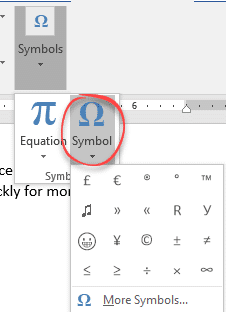
Elon Musk and partner have named their child X Æ A-12 (no kidding) how do you type Æ in Microsoft Word and Office generally. The child’s name doesn’t trigger any spelling or grammar errors in Word. No squiggly lines. What is Æ ? Æ or æ is a a-e ligature
A long last, Excel is getting a quick summary of the workbook statistics including the bounds of the sheet, tables, formulas and external connections. Look on Review | Proofing | Workbook Statistics in Excel 365 for Windows or Mac. There are details for the currently selected sheet and the whole
It’s possible to add a virtual background of your choice to a Microsoft Teams video call or just blur the background for a little privacy. Microsoft hastily added some virtual background options to Teams but the whole calling part of Teams is still woefully inadequate. For example, many of the
Transport for London knows some of us are missing our bus and tube journeys so they’ve made some virtual backgrounds you can use on Zoom, Teams or anywhere else that supports it. Or use as a background on a PowerPoint slide. Go to https://londonblog.tfl.gov.uk/2020/05/01/video-conference-backgrounds/ There’s ‘Sit in collection’, pretend you’re
We’ve updated our workbook that imports the latest COVID-19 statistics and combines with population data through Excel 365’s Stock Data Type. No technical changes in the workbook but we’ve added a few more ‘interesting’ or outlier countries. Plus some repeat help tips. Download COVID-19 Global Statistics workbook there’s also a
Adding a moving average line to an Excel Chart is very easy, just a few clicks, with many options. Any chart with a series of values over time will benefit from a trendline like a moving average. What is a moving average? An average / mean is a single value