Skype for Meetings
Microsoft has released ‘Skype for Meetings‘ a new multi-person video conferencing service which is available free with more features to Office 365 business plan customers.
Before you get too excited there’s lots of conditions and hidden tricks in this latest announcement. We count at least six conditions * either in the fine print or when trying to use it.
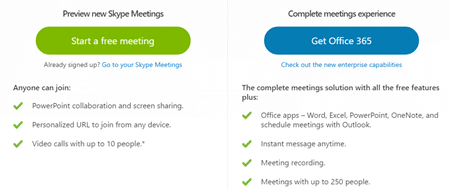
All comers (see conditions below), including Office 365 Home and Personal subscribers can create meetings of up to 3 people (10 for the first 90 days * ). Video conferencing with PowerPoint collaboration and screen sharing.
To start a meeting go to go.skype.com/meetings you need what Microsoft calls a ‘US business address’ * whatever that’s supposed to exactly mean.
All this is only available for US customers at present. Microsoft says nothing about the rest of the world * but presumably it’ll come in due course.
Currently the services is geoblocked so even if you have a ‘US business address’ you also have to be in the USA (not working overseas) in order to use it * .
If you can get access, you can invite others into the virtual meeting by sending them a unique link.

Source: Microsoft
According to Microsoft “All you need is a device with an Internet browser, a microphone, speaker and camera, which are included on many devices.” But in many cases you’ll also need the Skype Meetings app too * so for first-timers it’s better to give them advance warning and time to install the necessary software. As usual, Microsoft leaves to customers the tedious job of training and helping people to setup their latest service.
Office 365?
Microsoft plays one of their little tricks in the promotion of Skype Meetings by talking about the additional features being available with ‘Office 365‘ but that’s not the whole story * . See the image above with the mention of ‘Get Office 365’ for the ‘complete meetings experience’ when it should read ‘Get Office 365 for Business’ . To get the full Skype for Meetings you need specific Office 365 for Business plans – Office 365 Home or Personal plans don’t qualify. Not that you’d know it from the promotion of Skype Meetings which seems intended to deceive but ultimately disappoint customers.
It’s little wonder that people are confused about what ‘Office 365’ really is when Microsoft itself throws around the term so loosely. ‘Office 365’ means whatever Microsoft wants it to mean.
Assuming you have the right Office 365 for Business plan, you can get the full Skype for Meetings with links to Office apps, instant messaging, meeting recording and up to 250 people connected.
You may already have better …
Skype for Meetings is a new ‘mid-range’ offering. Organizations with Office 365 plans that include Skype for Business (according to Microsoft) “ already have richer online meetings capabilities, such as the ability to conduct large group meetings for up to 250 people and the ability to IM anyone in your organization at any time–not just during meetings.” *
Or something that’s enough ….
Regular free Skype includes Group Video calls which include instant messaging and screen sharing. It lacks some of the conferencing features but is enough for many people. There’s a fair use limitation on this feature which is fully disclosed (nice).
By all means try Skype for Meetings – if you have a US based business email and have the time to help others through the setup process.