Word’s “Punctuation Required with Quotes” Setting: Inside, Outside, or Off?
Microsoft Word has a built-in grammar setting that decides where commas and periods should sit when they appear next to closing quotation marks. American English puts them inside the quotes. British English puts them outside. The Punctuation Required with Quotes setting in Word’s Grammar options lets you enforce whichever rule you follow, or none entirely so Word stays out of your way. Here’s where to find it, what each option does, and which one you should choose.
This setting controls where Word places punctuation marks like commas and periods when they appear next to closing quotation marks. It’s one of those small details that can make Word either your ally or your enemy depending on which style guide you follow.
America vs Britain
American English convention puts commas and periods inside closing quotation marks, like this:
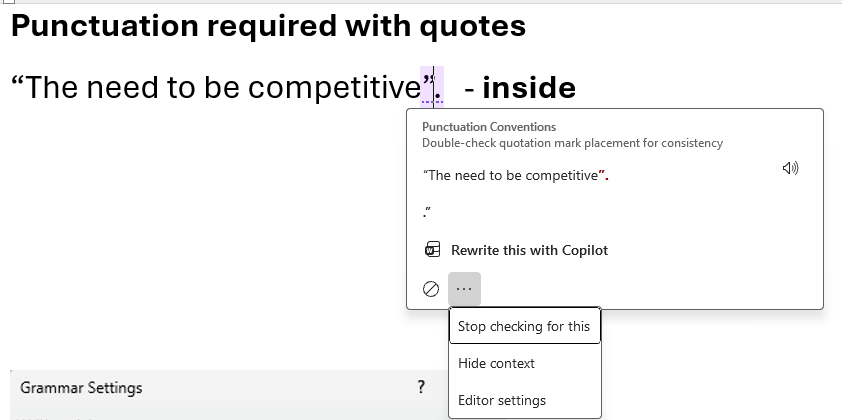
She said it was “absolutely fine.”
British English convention puts them outside, like this:
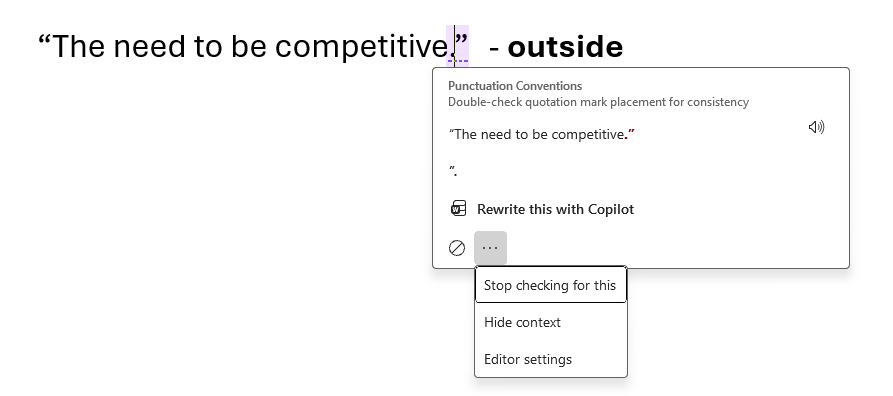
She said it was “absolutely fine“.
The Punctuation Required with Quotes setting tells Word’s grammar checker which approach to enforce, whether to flag the other style as an error or ignore the whole thing.
Where to Find It
The setting is buried a few levels deep:
- Go to File | Options | Proofing (Mac: Word Preferences | Spelling and Grammar)
- Click Settings next to “Writing Style”
- Scroll way down to the Punctuation section
- Look for Punctuation required with quotes
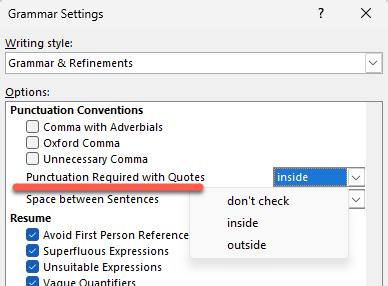
In Word for Mac, it’s a lot easier to find without scrolling down the long list.
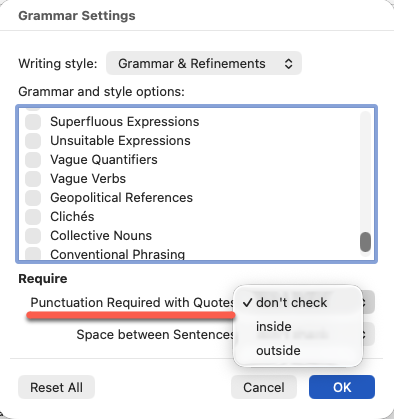
This is in the Grammar Settings dialog, which controls all of Word’s grammar rules individually.
The Three Choices
Word gives you three options:
Inside
Inside – flags punctuation placed outside quotes as an error (American style). Here’s how this looks when enabled.
Outside
Outside – flags punctuation placed inside quotes as an error (British style), if the sentence does it the other way, here’s what Word will do.
Don’t check
Don’t Check is the default. Word ignores this entirely and leaves you alone.
The Default is off
The default is Don’t check. Word ships with this rule turned off, so most users never encounter it unless they or their IT department has turned it on deliberately.
History
The Punctuation required with quotes grammar check has been around for a long time, since at least Word 2010.
From Word 2016 onwards, the check works for both single and double quotes. Earlier Word’s only checked with double quotes.
What This Means for You
If you’re writing for an American audience or following a US style guide such as Chicago or AP, switch it Inside.
If you write for a British or international audience, use Outside.
If you work across both markets, Don’t check is the pragmatic choice since there’s no one right answer and you’ll just be chasing false positives.
How to Fix or Stop Microsoft Word’s Incorrect Grammar Suggestions
Stop Word’s Grammar ‘Help’ Once or Always
Oxford Comma Choices in Microsoft Word
Switching Languages in Word: A Guide to Language Settings
Busting the Myth of Word’s Language Defaults
Control Contractions in Microsoft Word for Windows and Mac