Insert the Eye of Horus 𓂀 into Microsoft Word, Excel, PowerPoint or Outlook. Both in Office for Windows and Office for Mac.
Eye of Horus 𓂀 is an Egyptian Hieroglyph symbolizing protection. According to Egyptian myth, Horus lost his left eye during his struggle with Seth, and it was restored by Hathor, symbolizing the process of healing and wellbeing. This type of symbol was commonly made into an amulet, commonly Ancient Egyptians would be buried with these types of amulets, or it was incorporated into larger pieces of jewellery alongside other protective symbols, or within Egyptian art. In modern Egypt the Eye of Horus is commonly seen in tourist gift shops <g>.
It’s sometimes used as a fancy version of an ‘eye’ and it’s also used in the UK quiz show Only Connect.
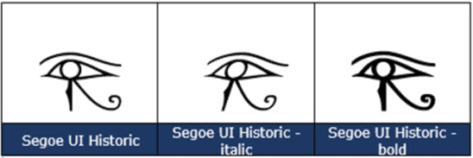
How Eye of Horus 𓂀 looks in different fonts.
If you try to enter Eye of Horus, Word will switch to Segoe UI Historic because it’s the only font that has that character. You won’t find Eye of Horus 𓂀 in other common Office fonts.
Eye of Horus 𓂀 codes
These are the important code numbers or values you’ll need to enter the Eye of Horus or 𓂀
Decimal: 77952 Hex: 13080
Web: 𓂀 or 𓂀
(web codes aren’t used in Microsoft Office, we’ve included them for the sake of completeness.)
Word and Outlook
The Eye of Horus 𓂀 sign does NOT have an inbuilt shortcut in Word.
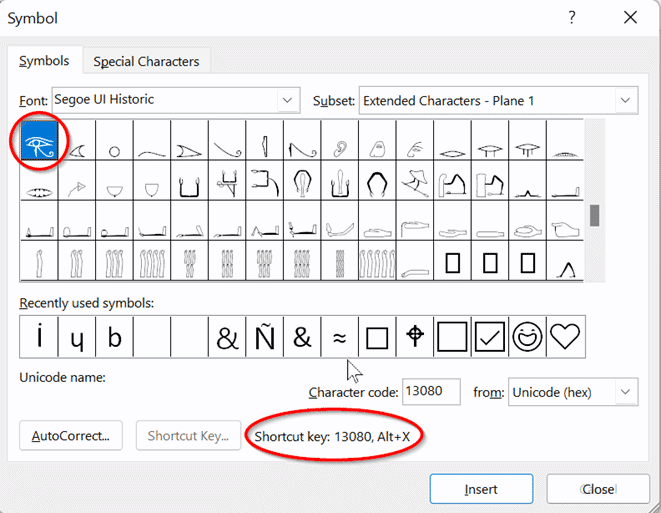
Use the standard Word Alt + X symbol shortcut 13080 + Alt + X
Once in a document you can copy it to AutoCorrect and make your own shortcut.
Word, Excel, PowerPoint and Outlook
Insert | Symbols | Symbol and look for the Eye of Horus symbol after selecting the font Segoe UI Historic.
Windows
In Windows there are several shortcuts to enter the Eye of Horus 𓂀 character into any program, but they use a numeric keypad, not the number row above the letters.
Alt + 77952
Window 11 Emoji Panel
You won’t find the Eye of Horus 𓂀 character in the Windows 11 Emoji Panel, partly because there’s no proper search function.
Windows Character Map
The Windows Character Map accessory in all Windows releases, but it can’t cope with the higher ranges of Unicode symbols which Eye of Horus is part of.
MacOS and Office for Mac inserting characters
On a Mac, we could not find the Eye of Horus 𓂀 symbol. Searching for “ Eye of Horus “ and the Character Viewer could not find the symbol.
Why are three symbols censored by Microsoft Windows and Office?
Word’s Find can’t find all Unicode symbols and emoji
Black Chess King ♚ symbol in Word, Excel, PowerPoint and Outlook
Trademark ™ symbol in Word, Excel, PowerPoint and Outlook
