Microsoft 365 Classic Explained: A Lower-Cost, No-AI Subscription Option
Microsoft have two little-known cheap plans called Microsoft 365 Classic. Designed for consumers who want the familiar Office apps without Microsoft’s new Copilot AI features and steep price increases. Classic plans offer the same core features of Word, Excel, PowerPoint, and Outlook at pre-2025 pricing. This concealed plan helps price-conscious people and those who are wary of AI while maintaining their Microsoft 365 productivity tools at a reduced annual cost.
Microsoft 365 Classic is a hidden part of the changes to Microsoft 365 in early 2025, including the addition of Copilot AI to the Office apps. See HUGE changes to Microsoft 365 happening now
The revised Microsoft 365 Family and Personal plans got hefty price rises from 22% to 30% to reflect general price increases over the years and the inclusion of limited Copilot AI services.
Microsoft knows some people won’t like paying more. There are also folks who hate the intrusion of Copilot into their Office apps, a factor that Microsoft is underestimating. Microsoft 365 Classic can be offered to those canceling their Microsoft 365 Family or Personal subscription. Microsoft would prefer to keep a customer at a lower price than lose the money completely.
They hope that people will accept the Microsoft 365 price increases when they come up for renewal, whether they want the limited Copilot extra or not. If not, they might offer Microsoft 365 Classic (Personal or Family) to encourage someone to stay.
Microsoft’s exact policy on the Classic option is unclear. It might only be available when canceling, and only if the customer hasn’t already renewed their Personal or Family plan at the higher price.
You can try canceling your Microsoft 365 consumer plan to see if any offers come up before you decide to go through with the cancellation, see below for details.
What’s in Microsoft 365 Classic?
“Microsoft 365 Classic” only appears to customers trying to cancel their Microsoft 365 Personal/Family plan.
It’s Microsoft 365 “without AI” and possibly without some future features.
The “Classic’ plan is merely the Microsoft 365 plans with:
- all the existing features of the 365 versions of Word, Excel, PowerPoint and Outlook
- BUT not the new Copilot extra and the big price rise that comes with it.
- Some future features in Microsoft 365 might be blocked from Classic plan customers.
- Microsoft isn’t specific about what might be blocked or when.
There are two plans “Microsoft 365 Classic Personal ” and “Microsoft 365 Classic Family”.
The ‘Classic’ option is NOT available to new customers or sold at retail stores.
If someone tries to sell you a Microsoft 365 Classic plan — ignore them because there’s no such retail product.
‘Classic’ costs less
Microsoft 365 ‘Classic’ is available at the old prices that were in effect until mid-January 2025.
In the USA that means $99.99 for Microsoft 365 Classic Family or $69.99 for the Classic Personal, plus any taxes.
See Microsoft 365 global price rises for a cost comparision.
How to get Microsoft 365 “Classic” plan
The Microsoft 365 Personal or Family plan must be managed directly by Microsoft (not Apple Appstore, Google Play, or retail partners like Amazon or Best Buy). If you’re not sure, you’ll see a notice when trying these steps on the Microsoft site. See Beware Microsoft 365 buying traps from Amazon, Best Buy and more
- Go to Subscriptions on the Microsoft site.
- Use the Microsoft account associated with the Microsoft 365 plan.
- Go to your current Microsoft 365 plan then Manage | Cancel subscription
- Before you cancel, you might see other options, including the possibility of downgrading to a plan with fewer features, like Microsoft 365 Personal Classic or Microsoft 365 Family Classic
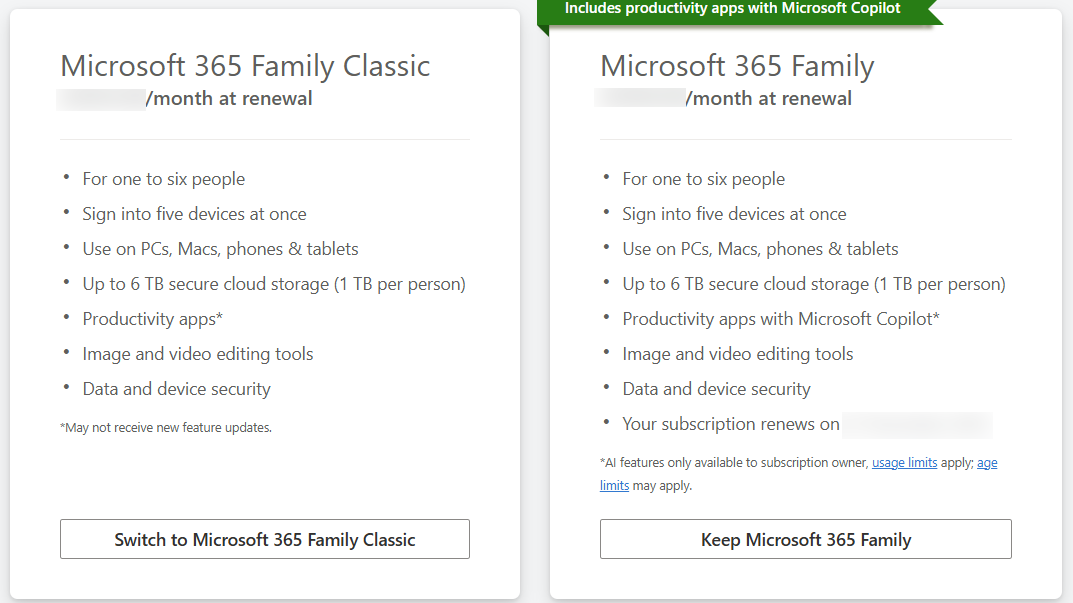
- Choose what you like, then follow the instructions.
According to Microsoft “Your existing subscription might not change immediately, but it will automatically switch to the new plan at renewal. You will not be charged for the new plan until it renews. “
In April 2026, according to Microsoft Classic plans “aren’t publicly listed or directly purchasable” and
“only appear as a limited downgrade option for some existing Family subscribers, usually during the cancellation process.”.
We’ve emphasized the word ‘some’ because it suggests that the Classic option isn’t always available, and Microsoft can modify the rules at any time. It might depend on the type of plan you’re referring to (e.g. Military Appreciation or Workplace Discount/Home Use), location, time (Classic might be dropped at any time) or, frankly your horoscope 😎
Beware renewals
Microsoft 365 Classic plans must have automatic renewal (aka “recurring billing”) turned on. Unlike the regular Personal or Family plans, there’s no option to stop auto-renewal.
Reports suggest that customers on the Classic plan are being automatically transitioned to a higher-priced plan rather than retaining their existing lower rate.
See Microsoft 365 Classic: Watch Out for Hidden Full-Price Auto-Renewals
Set an Outlook reminder or make a diary note of the expiry date, and be sure to review each renewal carefully before it happens automatically. Make sure the renewal is for the Classic plan or use that end date to consider other options.
‘Classic’ plans from other retailers.
It’s NOT possible to extend a M365 Classic plan by buying extra years at lower prices from other retailers.
That’s because the Classic plans are only available directly from Microsoft as part of a standard renewal.
New customers can’t buy Microsoft 365 Classic Family or Personal plans. Only the more expensive, Copilot included, Microsoft 365 plans.
The SAME software
‘Classic’ Microsoft 365 installation and software is the same as other Microsoft 365 plans.
It’s the same software, just with slightly different features appearing.
Microsoft 365 software features are determined by the license you have purchased. When an Office app starts, it looks at your Microsoft 365 licence and that shows or hides the appropriate parts of Office.
If you’re asking for help/tech support, always mention which Microsoft 365 (or Office) plan you have because it might make a difference.
Switching to or from Microsoft 365 Classic
Is someone chooses to move from Microsoft 365 Personal/Family to a Classic plan, the changeover should be quite painless. No manual uninstall should be necessary because it’s the same software, just changed visible features according to a different licence.
If you switch to or from ‘Classic’ Microsoft 365 plans you do NOT need to reinstall Microsoft 365. Just close all Office apps and restart, the software should detect the licence change automatically. At least that’s the theory.
If not, go to File | Account in any Office app (Office Account in Outlook) and choose ‘Update License’.

That will force the software to check your licence with Microsoft’s servers.
A change of Microsoft 365 licence isn’t a new thing. A similar thing already happens when people switch between a consumer <> business M365 licence on the same machine. There’s just a pause while the software resets itself to the new licence.
For the moment …
For now, the ‘Classic’ plan has all the Microsoft 365 consumer features. In other words, it’s the same as Microsoft 365.
In the coming years, it’s likely that Microsoft will add more features to its standard 365 plans, but not to the “Classic” options. That will widen the feature gap between the two types of plan to make the cheaper “Classic” plan less appealing.
Microsoft 365 Classic: Watch Out for Hidden Full-Price Auto-Renewals
HUGE changes to Microsoft 365 happening now
Microsoft 365 price increases around the world
All about AI Credits in Microsoft 365
Beware Microsoft 365 buying traps from Amazon, Best Buy and more