Discover the Edit Points bug in Word
An interesting bug in Microsoft Word, thanks to an Office Watch reader. Changing the edit points around a rectangular image can hide some text that should be visible.
It appears to be a bug in the code to wrap text around an object in some narrow circumstances. Here’s how to recreate the bug, start with an image with text wrapped around it.
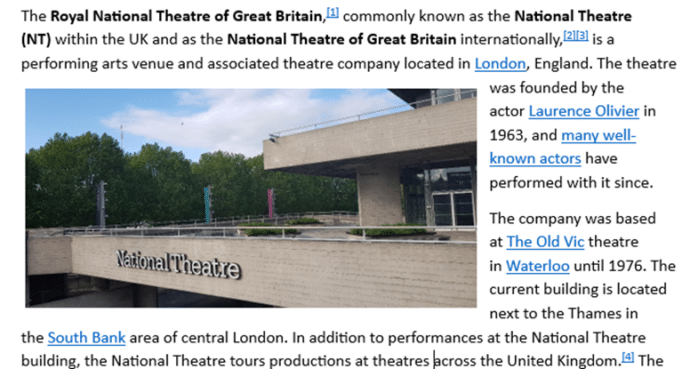
Now change the edit points (right-click on the image Wrap Text | Edit Wrap Points). Edit Points are the boundaries for wrapping text. For most photos that’s a rectangle but it can be changed, as in this extreme example.
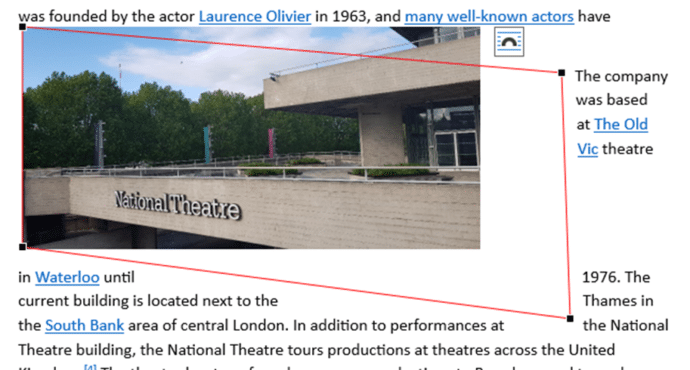
But look what happens to the wrapped text at the top of the image. Text is hidden behind the image instead of around it and, in this case, there’s a gap on the left before the words ‘was founded’.
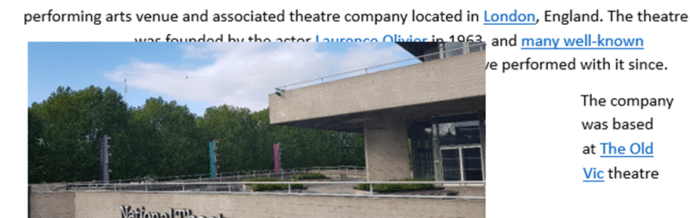
We recreated the bug in both Word 365 and Word 2021 for Windows. It’s possible the bug has been in Word for some time.
It’s an uncommon situation but these kinds of reports are often just the ‘tip of the iceberg’, revealing a bigger problem in the code.
Likely the bug applies not just to images but some other Word objects.
The bug has been acknowledged by Microsoft support and ‘escalated’. A fix might be a long time coming though because it’s an unusual scenario and it might take a lot of time & money to repair.
Many thanks to Office Watch reader ‘PM’ for letting us know.