Email quarantine is a security feature used by mail systems to protect users from suspicious or spam messages while ensuring that potentially important emails aren’t lost forever. Instead of automatically deleting uncertain messages, quarantine places them in a separate holding area for you to review and decide whether they’re safe or malicious. This guide explains how email quarantine works and what steps you should take to avoid missing legitimate emails.
Email quarantine is when a message is ‘set aside’ for you to decide if it’s something you want or spam that can be ignored.
Mail systems will quarantine a message if it’s not sure if the email is good or bad, so it lets a human decide.
How it works
Email security systems scan each incoming message and gives a score based on the likelihood that it’s spam or dangerous. The higher the score, the more likely the message is bad, Any bad sign (like a known hackers email address or malicious attachment) adds points to the score. Any good signs (a known safe sender) subtracts points.
Once the message is scored, the mail system will move the message based on the number.
For paid Microsoft hosted email, they call it the score a Spam Confidence Level (SCL) and messages are processed like this as defaults:
- 8 or higher: Silently delete the message.
- 7: Reject the message with an NDR (non-delivery report to sender)
- 6: Quarantine the message.
- 5: Deliver the message to the user’s Junk Email folder.
- 4 or lower: Deliver the message to the user’s Inbox.
The open-source SpamAssassin uses similar scoring.
It’s important to remember that any spam/security system is not perfect. Some bad or unwanted messages will reach the Inbox and, crucially, some messages you want can be deleted without you knowing.
Email quarantine in action
Exactly how email quarantine works, depends on your mail host. Some don’t have quarantine at all.
Most commonly, quarantined messages end up in a Spam or Junk Email folder. That folder can be in email software like Outlook but in some cases, it’s a separate location online.
Organizations that use Microsoft Defender can specify a special quarantine folder.
Outlook.com doesn’t support quarantining and many ISP based emails don’t either.
In other cases, the receiver gets a notification like this from Office Watch reader Kate M. who wasn’t sure what to do about this email from her mail host.
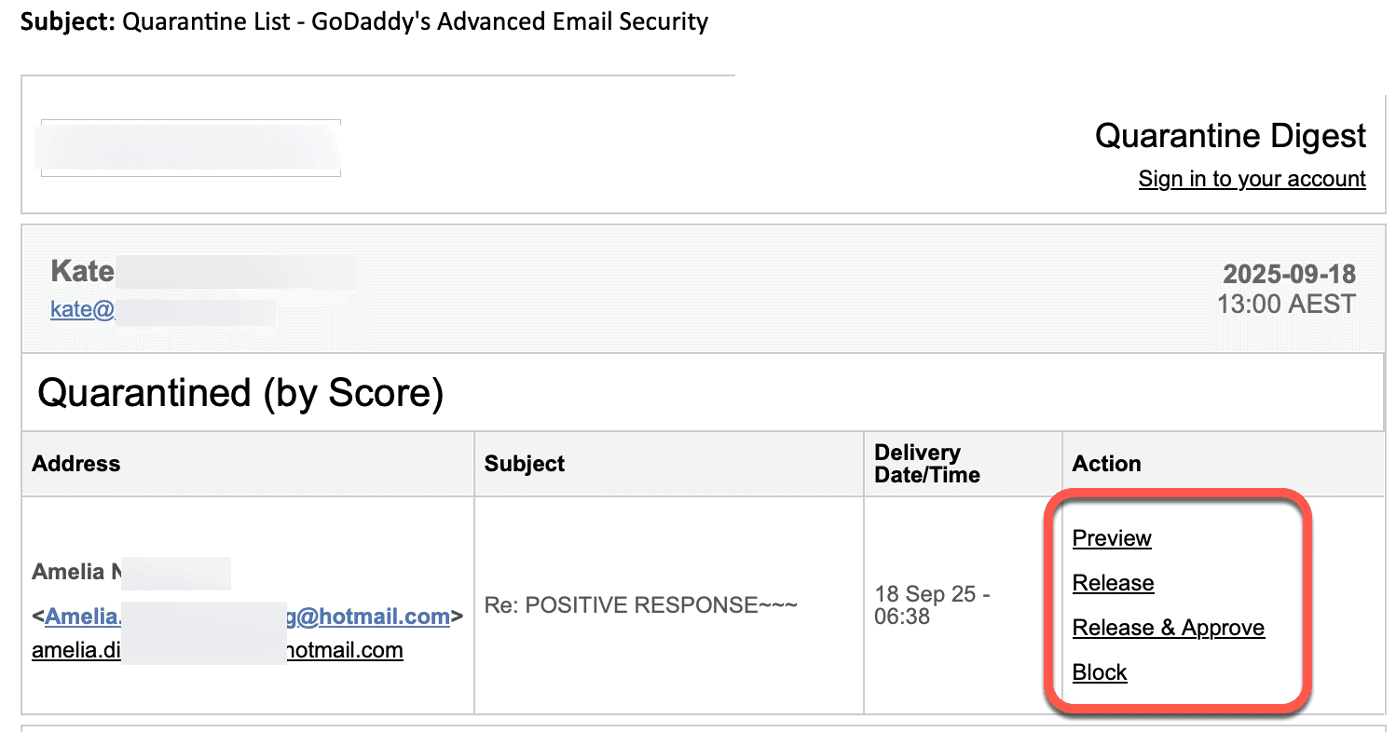
The options for a quarantined message on this system are:
Preview – see the message on a web page
Release – move message to the Inbox
Release & Approve – move the message to the Inbox and marks FROM address as a “Safe Sender” for future emails.
Block – mark the message as unwanted and delete.
Do nothing – eventually the quarantined message will be deleted.
What to do?
In addition to the Spam or Junk Email folder there might be a Quarantine location where a missing message might be hiding.
Be aware of what your mail host does with Quarantine messages, if anything.
