AI Writing & Rewriting Made Easy: How Anyone Can Get Better Text with Modern AI
Struggling with writer’s block, phrasing, or finding the right tone for your text? Modern AI tools can help anyone rewrite, rephrase, and polish text quickly and effectively. From simple prompts like “Rewrite this in a friendly tone” to advanced style adjustments, here are practical and ways to draft writing before adding the vital human touch.
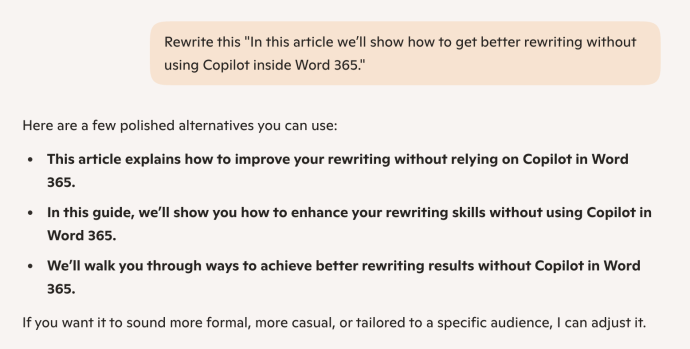
In this article we’ll show how to get better rewriting without using Copilot inside Word 365. You can use the “Auto Rewrite” option in Word in much the same way that we’ll explain here. AI might not give a perfect answer, but it can give you some big hints or at least free you from the dreaded writers block.
These tricks will work with any version of Word, Outlook or other program. The only skill required is Copy (Ctrl/Cmd + C) and Paste (Ctrl/Cmd + V).
Use any general and free AI (in a browser or app); ChatGPT, Copilot, Gemini, Claude or another .
Rewriting with AI 101
At its simplest, ask the AI to rewrite by typing ‘Rewrite this …’ then paste some text within quote marks.
Add a writing style
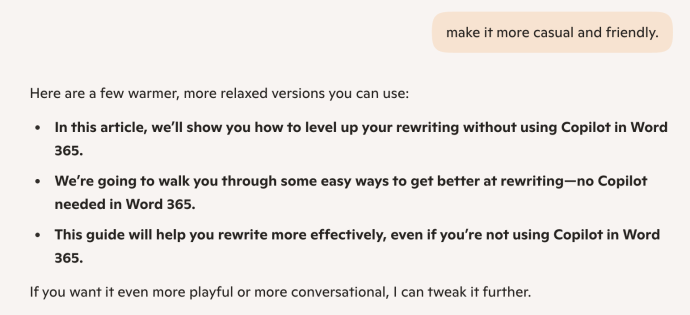
Get a more useful response by giving a writing style to use. With modern AI ‘chat’, there’s no need to repeat the whole question/prompt, just add another ‘follow on’ request such a “Make it more casual and friendly”.
Inspiration not answers
Use AI rewrite as inspiration for alternatives, not 100% perfect answers.
When you see a rewrite version you like, select to copy then paste into your document or email. Then, and this is important, add your own changes from the AI ‘inspiration’.
We’ve taken the middle version (see above image) and changed it to
“Let’s walk through the easier ways to get better AI rewrites, no Copilot needed in Word 365.”
AI Prompt size limit
We’re using single paragraphs in our examples for simplicity.
You can add larger blocks of text, up to the overall prompt limit. ChatGPT/Copilot have a 4,096 character limit – about 600-800 words.
Ask for different versions
Paste in what you’ve written and ask AI for different versions.
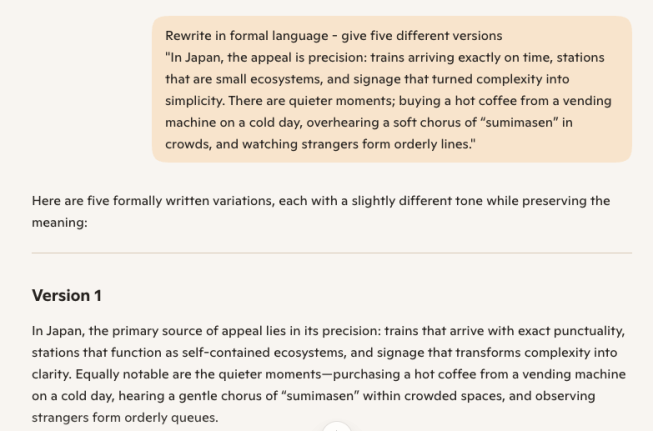
- Ask for multiple versions to consider – maybe 2 to 5. In the above examples (from Copilot) the system automatically gave multiple versions to consider. Some other cases you might need to ask for extra versions.
- Specify a different writing style or the same style.
“Rewrite in formal language – give five different versions”
Write from notes
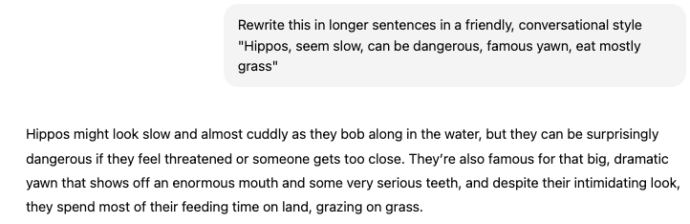
Another type of AI rewriting is taking some notes or phrases and turning them into nice prose. Great if you’re really stuck and just have some words.
Rewrite this in longer sentences in a friendly, conversational style “Hippos, seem slow, can be dangerous, famous yawn, eat mostly grass”
Most AI hype is about the reverse, turning longer text into shorter notes or bullet points. That works but be careful that the AI hasn’t missed important points in the source text. See Copilot loses an AI writing competition
First person or Third Person
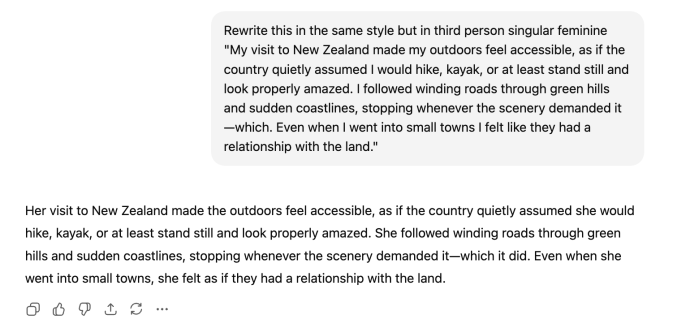
One clever rewriting trick is converting between “grammatical person”. First person writing (I, we) , second person (you) or third person (he, she, they).
Also change between singular/plural masculine/feminine. E.g. “Rewrite this in the same style but in third person singular feminine”
What writing styles?
The skies the limit when it comes to a writing style you can ask for, here’s some to start with:
- Formal
- Casual
- Conversational, talking to a friend
- Making a short, informal speech
- Dry, formal, accurate
- Eager, engaged and caring
- Newspaper
- Textbook
- Reflective
- Observational
- Polished
- Balanced
- Evocative
Copilot in Word
In Word 365 with Copilot you can select text then the Copilot icon at left to see a menu a bit like this (Microsoft often changes it).
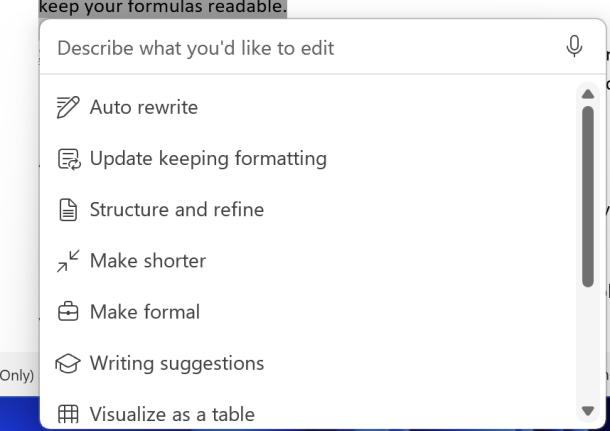
There are some simplistic AI rewrite options there “Auto rewrite”, “Make shorter” and “Make formal” or type in a rewrite request like “Make longer and legalistic”.
But wait … there’s more
Make your own writing prompt to match your style or one of your writing styles, see Create Your Own AI Writing Style Prompts, a Step-by-Step Guide
CoPilot at Office Watch
Copilot gets Make Changes inside Word 365
Use free Copilot to summarize Word documents
Copilot loses an AI writing competition
Microsoft 365 Adds ‘Vibe Working’ Copilot Agent for Word, Excel & Office
Create Your Own AI Writing Style Prompts, a Step-by-Step Guide